Latest entries (500)
- Popular first
- Display 510 2550100entries
-


Imagine v1.5.5 Updated
lintalist on 18 Jul 2024 Change history
- 1MB (uncompressed)
- Released on 13 Jul 2024
- Suggested by infimum
Imagine is a lightweight, fast and easy to use image viewer with basic graphics and animation edit features. Also includes screen capture, thumbnail browser, slideshow and metadata disclosure. Conversion tools include batch format change to dozens of formats and lossless JPEG changes (rotate and flip).
Additional formats support available through plugins.
| Category: | |
| Runs on: | Win95 / Win98 / WinME / WinNT / Win2K / WinXP / Vista / Win7 / Win8 / Win10 |
| Writes settings to: | Application folder |
| Stealth: ? | Yes |
| Unicode support: | Yes |
| License: | Freeware |
| How to extract: |
|
| Similar/alternative apps: | IrfanView |
| What's new? | See: https://www.nyam.pe.kr/dev/imagine/whatsnew/ |
| Latest comments |
filobus
on 2023-09-25 12:32
See all
22›
On site download link doesn't work (anyway, as it is on github, I found that link: https://github.com/nyam1003/imagine) |

BinText v3.00
billon on 3 Apr 2019 Change history
- 37KB (uncompressed)
- Released on 12 Dec 2000
- Suggested by __philippe
BinText is a file text scanner / extractor that helps find character strings buried in binary files. The program can extract text from any kind of file and display plain ASCII text, Unicode (double byte ANSI) text, as well as Resource strings. Additional useful information for each item is included in the "Advanced" mode. Uniquely, the program will show both the file offset and the memory offset of each string found.
Although primarily targeted for programmers, it can be used by anyone interested in ferreting out character strings buried within binary files.
Note: Although updated versions of the program exist, the 3.00 version is listed for reasons described in forums.
| Category: | |
| Runs on: | Win2K / WinXP / Vista / Win7 / Win8 / Win10 |
| Writes settings to: | None |
| Stealth: ? | Yes |
| Unicode support: | Yes |
| License: | Freeware |
| How to extract: | Download the ZIP package and extract to a folder of your choice. Launch bintext.exe. |
| Latest comments |
__philippe
on 2013-07-15 08:17
Here is an old (2006) but interesting narrative about using Bintext for viewing Unicode strings in executables.
__philippe
on 2013-07-26 18:24
Add comment
2›
BinText at your finger_tip: (WinXP tested) |

AutoHotkey v2.0.18 Updated
lintalist on 6 Jul 2024 Change history
- 7MB (uncompressed)
- Released on 6 Jul 2024
- Suggested by Jon Pajela
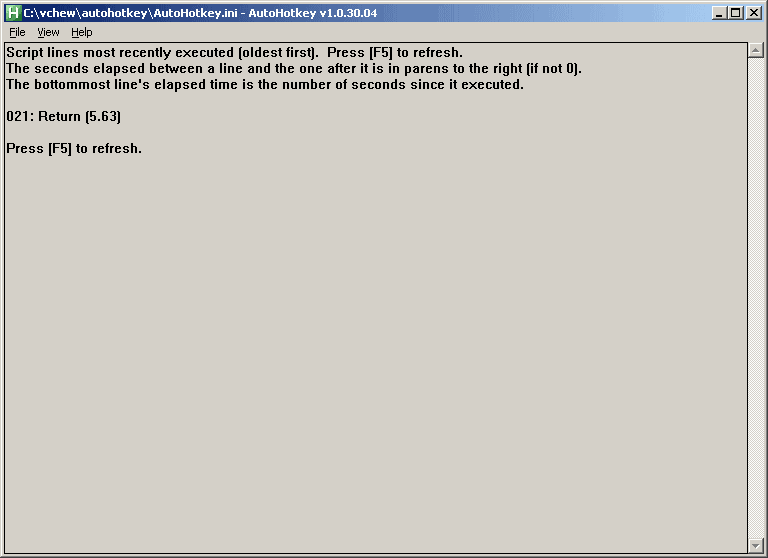
AutoHotkey is a powerful automation and scripting tool with an option to export to a self-contained executable. Possible uses include assigning the hotkey "Ctrl-Alt-F" to launch Firefox, making abbreviations expand to their full definition as you type them, or saving time by setting the computer to auto-click a confirmation screen.
The program can create entire applications and has been used to create many hosted here on PortableFreeware including 7plus, WallPaper Randomizer, Gridy and many more.
Note: Though it's bit outdated (from 2021), Pulover's Macro Creator can be used as a macro recorder and includes an "Export to AHK" function.
| Category: | |
| Runs on: | WinME / WinNT / Win2K / WinXP / Vista / Win7 / Win8 / Win10 / Win11 |
| Writes settings to: | Application folder |
| Stealth: ? | No. By default, it places an ahk script file in user documents. However, if you place a ahk file with the same name alongside the executable (eg. autohotkey.exe => autohotkey.ahk), it becomes stealth. |
| Unicode support: | Yes |
| License: | GNU GPLv2 |
| How to extract: |
|
| Similar/alternative apps: | AutoIt |
| What's new? |
See: https://www.autohotkey.com/docs/v2/ChangeLog.htm. For major changes between v2.x and v1.x, see https://www.autohotkey.com/docs/v2/v2-changes.htm. |
| Latest comments |
Ennovy
on 2023-02-12 08:41
See all
40›
v2 will be actively developed and v1 will be considered deprecated: https://www.autohotkey.com/boards/viewtopic.php?f=24&t=112989 |

FastStone Capture v5.3
billon on 22 Aug 2020 Change history
- 1MB (uncompressed)
- Released on 12 Feb 2007
- Suggested by Fluffy
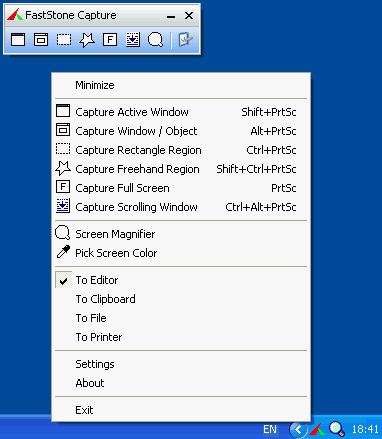
FastStone Capture is a powerful, flexible and intuitive screen-capture utility. It allows you to capture anything on the screen including windows, objects, full screen, rectangle regions, freehand-selected regions and scrolling windows/web pages. It has innovative features such as a floating Capture Panel, hotkeys, resizing, cropping, text annotation, printing, e-mailing, screen magnifier and many more.
Reported to function in Windows 7 and in Linux under WINE.
Note: FastStone Capture went payware starting from v5.4 so I have made the last freeware version available (v5.3) for direct download as the license agreement does not prohibit redistribution.
| Category: | |
| Runs on: | Win98 / WinME / WinNT / Win2K / WinXP / Vista / Win7 / Win8 / Win10 / Wine |
| Writes settings to: | Application folder |
| Stealth: ? | Yes |
| Unicode support: | Yes |
| Path portability: | Requires manual entry of drive-less absolute path (eg. \docs\personal\work.doc without the drive letter) |
| License: | Free for personal use |
| How to extract: | Download the ZIP package and extract to a folder of your choice. Launch FSCapture.exe. |
| Similar/alternative apps: | Greenshot, PicPick, ShareX |
| What's new? |
|
| Latest comments |
webfork
on 2016-06-02 02:58
@jimdorey: I'm a little confused why we had a listing that this works with Win10 -- it really doesn't. When this version of the program stopped being developed, Win7 wasn't even out yet. Anyway, I recommend trying another software package for that OS. I've updated the entry.
joby_toss
on 2016-06-02 11:49
@jimdorey: v5.3 works fine on my win 10 x64 using a 1080p screen resolution. Maybe you're using a high DPI screen/4k monitor, and only the last version (8.4, payware, but worth every penny) works fine in that case.
__philippe
on 2016-10-14 15:57
See all
104›
Don't care for FSC freeware near inaudible screenshot audio cue ? |

Process Explorer v17.06 Updated
Ennovy on 29 May 2024 Change history
- 4MB (uncompressed)
- Released on 28 May 2024
- Suggested by Andrew Lee
Process Explorer is an advanced task manager. It is an indispensable tool for both beginners and power users. I use it all the time to kill tasks that refuse to be killed, or find what which processes are still holding on to a particular file or DLL so it refuses to be deleted.
Alternatively, Process Explorer Portable is also available, which is stealth.
| Category: | |
| Runs on: | Win7 / Win8 / Win10 / Win11 |
| Writes settings to: | Windows registry |
| Stealth: ? | No |
| Unicode support: | Yes |
| License: | Freeware |
| How to extract: |
|
| Similar/alternative apps: | Process Hacker |
| What's new? | See: https://docs.microsoft.com/en-us/sysinternals/#whats-new-rss-icon |
| Latest comments |
Mench59
on 2024-02-13 11:10
Hello, could someone tell me what the differences are with Process Hacker?
dot
on 2024-06-20 18:54
See all
59›
Belongs to Microsoft now. Keeps connecting to Google and Amazon at every start up. Dumped for good. |

Core Temp v1.18.1
Andrew Lee on 25 Sep 2023 Change history
- 914KB (uncompressed)
- Released on 24 Sep 2023
- Suggested by JohnW
Core Temp is a small footprint yet powerful program to monitor processor temperature and other vital system information. The program can track temperatures on individual processor cores, useful for advanced diagnostics or checking that cooling tools are functioning properly.
| Category: | |
| Runs on: | WinXP / Vista / Win7 / Win8 / Win10 |
| Writes settings to: | Application folder |
| Stealth: ? | Yes |
| Unicode support: | Yes |
| License: | Freeware |
| How to extract: | Download the "standalone version" ZIP package (32 or 64-bit) and extract to a folder of your choice. Launch Core Temp.exe. |
| What's new? |
|
| Latest comments |
webfork
on 2013-06-04 20:23
Baas: no prob, thanks for direct-linking the 32 and 64-bit versions. Adding a notice about the adware version.
TP109
on 2014-09-05 05:39
See all
6›
In spite of the adware issues, I think this is the easiest-to-use and to setup CPU temperature application. It's on all my PCs and I've never had a problem with it. Just set it and forget it. The digital temperature display in the system tray is very visible and useful when resource-heavy apps are running. I'm surprised this isn't rated higher. |

Everything v1.4.1.1024
Ennovy on 26 May 2023 Change history
- 2MB (uncompressed)
- Released on 26 May 2023
- Suggested by Drutt
Everything is a powerful search tool that locates files and folders by file name instantly, and includes an FTP and Web server interface. It also can search files by their contents. Unlike Windows search, Everything initially displays all files and folders on your computer. You simply type in part of the desired file name to limit what files and folders are displayed instantly. The more you type, the more specific the list becomes.
Note that the instant-search capability only works on NTFS/ReFS-formatted drives and only uses file and folder names in a file index. The program can separately catalog non-NTFS/ReFS and network servers for searching on a schedule.
| Category: | |
| Runs on: | Win2K / WinXP / Vista / Win7 / Win8 / Win10 / Win11 |
| Writes settings to: | Application folder |
| Stealth: ? | Yes |
| Unicode support: | Yes |
| License: | Freeware |
| How to extract: | Download the "Portable" ZIP package depending on your OS and extract to a folder of your choice. Launch Everything.exe. |
| Similar/alternative apps: | HDDB, Ultra File Search Lite, UltraSearch |
| What's new? |
See: https://www.voidtools.com/Changes.txt https://www.voidtools.com/support/everything/whats_new/. |
| Latest comments |
Nh
on 2017-04-29 18:41
In case it does not remembers sort order, you have to edit 2 lines in Everything.ini:
__philippe
on 2019-01-26 04:54
Everything v1.4.1.932
Bruce
on 2020-07-30 21:07
See all
35›
This is a great program. I've found very helpful tracking down misplaced or seemingly lost files. |

Autoruns v14.11
Special on 9 Feb 2024 Change history
- 2MB (uncompressed)
- Released on 6 Feb 2024
- Suggested by Andrew Lee
Autoruns shows programs that run during system bootup or login, as well as entries in the order Windows processes them. These programs include ones in your startup folder, Run, RunOnce and other Registry keys. You can configure Autoruns to show other locations, including Explorer shell extensions, toolbars, browser helper objects, Winlogon notifications, auto-start services and much more. Autoruns goes way beyond the MSConfig utility.
A 64-bit version is available (within the folder).
Alternatively, Autoruns Portable is stealth and will only show the EULA once.
| Category: | |
| Runs on: | Vista / Win7 / Win8 / Win10 |
| Writes settings to: | Windows registry |
| Stealth: ? | No |
| Unicode support: | Yes |
| License: | Freeware |
| How to extract: |
|
| Similar/alternative apps: | Startup Control Panel |
| What's new? | See: https://docs.microsoft.com/sysinternals/#whats-new-rss |
| Latest comments |
MoisheP
on 2018-12-10 21:35
Though v. 13.93 is available here, at Portable Freeware, the MS site only has v. 13.91 . Is this version again being recalled by MS?
Ander22
on 2021-08-22 21:48
See all
41›
schemer > Stick with the older (pre-Microsoft) versions if you have them. The file-sizes on these newer ones are substancially larger... |

IrfanView v4.67
gbrao on 5 Apr 2024 Change history
- 6MB (uncompressed)
- Released on 5 Apr 2024
- Suggested by Andrew Lee
IrfanView is a viewer for a wide variety of image, audio and video formats. The program includes batch processing, creation of panoramic images, edition of multi-page TIFF files, lossless JPEG rotate/crop and effects such as sharpen and blur. Other tools such as screen capture, scanner, slideshow, plugin support and ability to capture icons from EXE or DLL.
Alternatively, IrfanView Portable is also available and updates drive letters and handles registry keys.
| Category: | |
| Runs on: | WinNT / Win2K / WinXP / Vista / Win7 / Win8 / Win10 / Win11 / Wine |
| Writes settings to: | Application folder |
| Stealth: ? | Yes |
| Unicode support: | Yes |
| License: | Free for personal use (the installer is adware) |
| How to extract: |
|
| Similar/alternative apps: | XnView, Imagine, FastStone Image Viewer |
| What's new? | See: https://www.irfanview.com/main_history.htm |
| Latest comments |
Cornflower
on 2023-12-10 08:43
Also note that virtually every new release updates some plugins, and version 4.65 is no exception. Most users may want to go to https://www.irfanview.com/plugins.htm and download the 32- or 64-bit package, and dump them into the Irfanview Plugins subdirectory.
Cornflower
on 2024-04-05 13:40
I notice in 4.67 that the OCR plugin is updated. It suggests using the Tesseract OCR, which I suspect is not portable. When I test it I will be looking to see if it can be made portable, and if it works with 32-bit Irfanview (there are a number of limitations with the 64-bit Irfanview so I am staying there).
M1P0
on 2024-07-23 21:20
See all
40›
Starting from ver. 4.67.2, the new OCR plugin can read QR Codes and Barcodes by itself, without any Tesseract. |

Angry IP Scanner v2.21
__philippe on 25 Jan 2021 Change history
- 108KB (uncompressed)
- Released on 8 Apr 2004
- Suggested by Andrew Lee
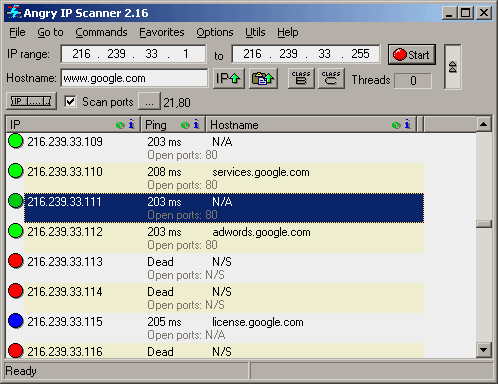
Angry IP Scanner is a fast IP scanner that can ping a range of IP addresses to check if they are alive, then optionally resolve hostnames, scan ports, etc. The program is useful for network administrators to monitor and manage their networks.
Note: Current versions of this program require Java. Until this is tested as portable, we are linking to the previous non-Java version.
| Category: | |
| Runs on: | Win98 / WinME / WinNT / Win2K / WinXP / Vista / Win7 / Win8 / Win10 |
| Writes settings to: | Windows registry. But given the nature of the application, I think it can be accepted as portable. An option is provided to delete registry entries upon user's request. |
| License: | GNU GPLv2 |
| How to extract: | Download IPscan221.EXE to a folder of your choice and launch. |
| Similar/alternative apps: | Angry IP Scanner |
| Latest comments |
__philippe
on 2014-03-14 15:18
@Craunch
__philippe
on 2016-01-30 17:10
See all
13›
As illustrated in the forum http://www.portablefreeware.com/forums/viewtopic.php?p=78597 |