Categories /
System - Display (21)
- Newer first
- Display 510 2550100entries
-


IsMyLcdOK v5.57 Updated
Andrew Lee on 3 May 2024 Change history
- 84KB (uncompressed)
- Released on 28 Apr 2024
- Suggested by I am Baas
IsMyLcdOK checks for dead/paralysed/stuck pixels on LCD monitors.
| Category: | |
| Runs on: | Win98 / WinME / WinNT / Win2K / WinXP / Vista / Win7 / Win8 / Win10 |
| Writes settings to: | Application folder |
| Stealth: ? | Yes |
| Unicode support: | Yes |
| License: | Freeware |
| How to extract: |
|
| What's new? | See: https://softwareok.com/?seite=Microsoft/IsMyLcdOK/History |
| Latest comments |
rodger123
on 2012-12-15 01:59
Add comment
1›
Works as adverised,at least it does not claim to fix dead pixels,I like it!(found 1 dead pixel)BooHoo |

ControlMyMonitor v1.38 Updated
Andrew Lee on 8 Apr 2024 Change history
- 140KB (uncompressed)
- Released on 5 Apr 2024
- Suggested by billon
ControlMyMonitor allows you view and modify the settings of your monitor (also known as 'VCP Features'), like brightness, contrast, sharpness, red/green/blue color balance and more. It can export all settings of your monitor into a configuration file and then later load the same configuration back into your monitor.
Requires hardware that supports DDC/CI. Note that some laptops monitors will not function while attached external monitors will.
| Category: | |
| Runs on: | Vista / Win7 / Win8 / Win10 |
| Writes settings to: | Application folder |
| Dependencies: | Hardware that supports DDC/CI. |
| Unicode support: | Yes |
| License: | Freeware |
| How to extract: | Download the ZIP package and extract to a folder of your choice. Launch ControlMyMonitor.exe. |
| Similar/alternative apps: | MultiMonitorTool |
| What's new? |
|

PointerStick v6.37 Updated
Ennovy on 19 Mar 2024 Change history
- 829KB (uncompressed)
- Released on 18 Mar 2024
- Suggested by Checker
PointerStick modifies the mouse arrow to appear as a virtual pointer stick. This is helpful for presentations to highlight content and the size, shape and other details of the pointer can be customized.
| Category: | |
| Runs on: | Win2K / WinXP / Vista / Win7 / Win8 / Win10 |
| Writes settings to: | Application folder |
| Stealth: ? | Yes |
| Unicode support: | Yes |
| License: | Freeware |
| How to extract: |
|
| What's new? | See: https://softwareok.com/?seite=Freeware/PointerStick/History |
| Latest comments |
Daneel
on 2012-07-03 18:26
But my arrow doesn't disappear with the stick.
rogerthedodger
on 2012-10-27 02:51
Yes agreed would be more useable if the original arrow was to disappear whilst the stick was on show. I do however like software by this guy, and couldnt live without "always mouse wheel" which is what microsoft should have originally had.
MIKLO
on 2016-08-23 14:35
See all
9›
Since I don't see as good as I once did (old eyes)I'm always interested in a way to make a pointer BIGGER. Thanks. |

MultiMonitorTool v2.10
Andrew Lee on 17 Mar 2023 Change history
- 278KB (uncompressed)
- Released on 13 Mar 2023
- Suggested by Checker
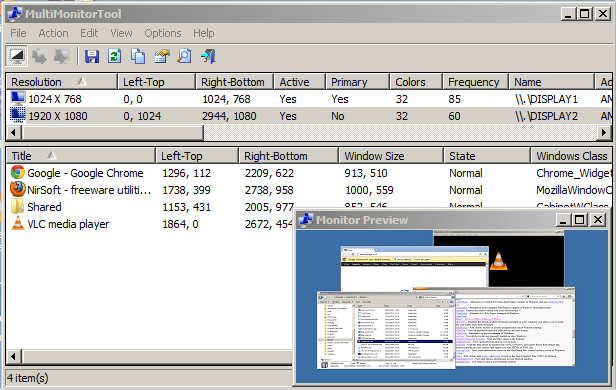
MultiMonitorTool allows a variety of monitor setting tweaks including disable/enable monitors, set primary monitor, save/load all monitors configs and move windows from one monitor to another. The program also provides a preview window, which allows you to view a preview of all attached monitors.
Command-line features are available.
| Category: | |
| Runs on: | WinXP / Vista / Win7 / Win8 / Win10 |
| Writes settings to: | Application folder |
| Stealth: ? | Yes |
| Unicode support: | Yes |
| License: | Freeware |
| How to extract: | Download the ZIP package and extract to a folder of your choice. Launch MultiMonitorTool.exe. |
| What's new? |
|
| Latest comments |
fpelletier
on 2012-07-18 15:32
As I use the rotate monitor multiple times a day, it would be great to control monitor rotation too.
fpelletier
on 2012-07-18 15:37
Add comment
2›
Without playing with it, it seems to me that if I take the time to do the math, that the Left-Top and Right-Bottom field values will control rotation, however, it is currently a bit cumbersome. If there were a toolbar button for clockwise and another for counter-clockwise, that would be great. Oh, BTW, great tool! |

LightBulb v.2.3.3
Andrew Lee on 25 Oct 2021 Change history
- 9MB (uncompressed)
- Released on 15 Jun 2021
- Suggested by freakazoid
LightBulb is a eye-strain prevention tool that gradually modifies screen colors over the course of your day. The program is very configurable with lots of controls for defining daytime and nightime, and will exclude applications where color specifics are important e.g. GIMP or PhotoDemon.
| Category: | |
| Runs on: | Win7 / Win8 / Win10 |
| Writes settings to: | Application folder |
| Dependencies: | .NET Core v3.1 |
| Unicode support: | Yes |
| License: | GNU GPLv3 |
| How to extract: | Download the ZIP file and extract to a folder of your choice. Launch Lightbulb.exe. |
| Similar/alternative apps: | SunsetScreen |
| What's new? |
See: https://github.com/Tyrrrz/LightBulb/blob/master/Changelog.md |

ClickMonitorDDC v7.2
billon on 7 Nov 2020 Change history
- 639KB (uncompressed)
- Released on 30 Jun 2020
- Suggested by Midas
ClickMonitorDDC enables easy controls to adjust monitor brightness, contrast and colors, as well as audio volume. The program supports color profiles, rotation, monitor inputs, and dim, reset, and power off/on monitor. The program can also differentiate between monitor speaker volume and system volume, rotate display and more.
Note that some functions require an up-to-date graphics driver. Supports command-line functionality.
| Category: | |
| Runs on: | Win7 / Win8 / Win10 |
| Writes settings to: | Application folder |
| Unicode support: | Yes |
| License: | Freeware |
| How to extract: |
|
| Similar/alternative apps: | ControlMyMonitor |
| What's new? |
See: https://web.archive.org/web/20201016064411/https://clickmonitorddc.bplaced.net/ |
| Latest comments |
webfork
on 2019-08-30 22:04
Absolutely a must-have if you are in a place with a changing light setting or you need to be moving your laptop frequently. The access to brightness and volume in the notification area is definitely something I can't lose again. Also, the automatic start at a lower light level has saved me loads of battery since I installed it. Some of the advanced tools and functions aren't super clear, but the basic tools are easy and effective.
Cornflower
on 2020-11-07 16:21
Add comment
2›
I just got a 404 error on the page, but the following work: |

MonitorInfoView v1.22
billon on 1 Jun 2020 Change history
- 65KB (uncompressed)
- Released on 1 Jun 2020
- Suggested by technicolordreamcoat
MonitorInfoView is a small utility that displays essential information about your monitor, including week/year of manufacture, manufacturer, model, supported display modes etc. This information is extracted from the EDID ("Extended Display Identification Data") records stored on your computer. You can also view the monitor information of multiple computers on your network if you login to these computers with administrator rights.
| Category: | |
| Runs on: | Win2K / WinXP / Vista / Win7 / Win8 / Win10 |
| Writes settings to: | Application folder |
| Stealth: ? | Yes |
| Unicode support: | Yes |
| License: | Freeware |
| How to extract: | Download the ZIP package and extract to a folder of your choice. Launch MonitorInfoView.exe. |
| What's new? |
|
| Latest comments |
rodger123
on 2012-09-24 03:25
Add comment
1›
Works as advertised-good to use if you forget your monitor serial number,previous versions would not tell correct supported resolutions,this works fine. |

SunsetScreen v1.28
Andrew Lee on 9 Dec 2018 Change history
- 773KB (uncompressed)
- Released on 27 Feb 2018
- Suggested by I am Baas
NOTE: The latest version of this program become trialware and includes components that use system resources for 3rd party services. Linked to the last freeware version.
SunsetScreen is an app designed to reduce the amount of blue glow and glare displayed on your monitor to reduce eye fatigue. Specifically, the app allows you to set the colour and brightness levels for day and night, as well as the sunrise time.
| Category: | |
| Runs on: | WinXP / Vista / Win7 / Win8 / Win10 |
| Writes settings to: | Application folder |
| Dependencies: | .NET 3.5 Framework |
| Stealth: ? | Yes |
| Path portability: | Automatic relative path (eg. ..\..\personal\work.doc) |
| License: | Freeware |
| How to extract: |
Download the ZIP package and extract to a folder of your choice. Launch SunsetScreen.exe. Optionally, to make the program launch to the taskbar, close the program after the initial launch, open the file SunsetScreenPrefs.txt and go to the hideWindowOnManualStart= entry. Change False to True. |
| What's new? |
|
| Latest comments |
stisev
on 2019-08-31 13:34
See all
8›
urgent: sunsetscreen now includes some bitcoin miner to process resources while idle. Do NOT upgrade your version from onwards of 1.28 if you want to avoid this junk. |

Defpix v1.4.10.17
billon on 16 Nov 2016 Change history
- 2MB (uncompressed)
- Released on 16 Nov 2016
- Suggested by Wolfghost
Defpix is a defective (dead) pixels tester to help check for defective pixels, which sometimes occur on LCD screens. The program simply shows these colors - red, green, blue, white and black - over the whole surface of the screen.
Supports multiple monitor systems.
| Category: | |
| Runs on: | Win2K / WinXP / Vista / Win7 / Win8 / Win10 |
| Writes settings to: | None |
| Stealth: ? | Yes |
| License: | Freeware |
| How to extract: | Download defpix.exe to a folder of your choice and launch. |
| Latest comments |
MacroDet
on 2018-08-31 03:49
Add comment
1›
Symantec has deleted it by heuristic search. |

Bgcall v2.6.7.0
webfork on 25 Jun 2017 Change history
- 574KB (uncompressed)
- Released on 3 Jun 2015
- Suggested by I am Baas
Bgcall is a wallpaper changer. Includes multiple monitor support (individual wallpaper setting), calendar display (merge into wallpaper), manual wallpaper setting, and more.
Note: Although this program supports Windows 7, it does not function in the "Starter Edition".
| Category: | |
| Runs on: | WinXP / Vista / Win7 |
| Writes settings to: | Application folder |
| Stealth: ? | Yes |
| License: | Freeware |
| How to extract: |
Once the program is setup, you can:
|
| Similar/alternative apps: | Wallpaper Master, WalCal |
| Latest comments |
Fixitman
on 2015-01-10 14:57
Add comment
1›
Would this work on Windows 8 to replace all those tiles on the home screen? That would be a good solution! |