Categories /
Productivity - Miscellaneous (31)
- Newer first
- Display 510 2550100entries
-


ControlMyMonitor v1.38 Updated
Andrew Lee on 8 Apr 2024 Change history
- 140KB (uncompressed)
- Released on 5 Apr 2024
- Suggested by billon
ControlMyMonitor allows you view and modify the settings of your monitor (also known as 'VCP Features'), like brightness, contrast, sharpness, red/green/blue color balance and more. It can export all settings of your monitor into a configuration file and then later load the same configuration back into your monitor.
Requires hardware that supports DDC/CI. Note that some laptops monitors will not function while attached external monitors will.
| Category: | |
| Runs on: | Vista / Win7 / Win8 / Win10 |
| Writes settings to: | Application folder |
| Dependencies: | Hardware that supports DDC/CI. |
| Unicode support: | Yes |
| License: | Freeware |
| How to extract: | Download the ZIP package and extract to a folder of your choice. Launch ControlMyMonitor.exe. |
| Similar/alternative apps: | MultiMonitorTool |
| What's new? |
|

ColorConsole v6.91 Updated
Andrew Lee on 8 Apr 2024 Change history
- 383KB (uncompressed)
- Released on 5 Apr 2024
- Suggested by guinness
ColorConsole is an enhanced console with changeable font, style and color. Features include sizable window, multi-tabs, copy/paste/cut function, a fast folder switch, and export to RTF and HTML.
| Category: | |
| Runs on: | WinNT / Win2K / WinXP / Vista / Win7 / Win8 / Win10 |
| Writes settings to: | Application folder |
| License: | Freeware |
| How to extract: | Download the "Portable" ZIP package and extract to a folder of your choice. Launch ColorcConsole_Portable.exe or ColorConsole_x64_p.exe (for 64-bit OS). |
| What's new? | See: https://softwareok.com/?seite=Freeware/ColorConsole/History |
| Latest comments |
Peter202
on 2014-07-04 13:05
What is the template to add commands to the menu list? Whatever i try it doesn't work.
Midas
on 2014-07-04 17:45
See all
7›
JPsoft 4DOS/4NT (currently renamed to Take Command) allows you to set up persistent "alias", just check the documentation... |

QuickTextPaste v8.78 Updated
Andrew Lee on 5 Apr 2024 Change history
- 751KB (uncompressed)
- Released on 2 Apr 2024
- Suggested by Checker
QuickTextPaste is a very customizable tool to insert (paste) pre-defined text in any applications via keyboard shortcut. It can also run commands and programs via keyboard shortcuts to save time and avoid errors.
| Category: | |
| Runs on: | Win2K / WinXP / Vista / Win7 / Win8 / Win10 / Win11 |
| Writes settings to: | Application folder |
| Stealth: ? | Yes |
| Unicode support: | Yes |
| License: | Freeware |
| How to extract: |
|
| Similar/alternative apps: | TyperTask |
| What's new? | See: https://softwareok.com/?seite=Microsoft/QuickTextPaste/History |
| Latest comments |
hamasaki
on 2019-09-19 19:29
It`s not stealth. Creates 'AppData\Roaming\QuickTextPaste\QuickTextPaste.ini' file.
hamasaki
on 2019-09-19 19:30
See all
8›
Oops, sorry. Just saw the message about creating the ini file. Too early for me. :( |

Scribus Portable v1.6.1
Andrew Lee on 17 Jan 2024 Change history
- 137MB (uncompressed)
- Released on 15 Jan 2024
- Suggested by JohnW
Scribus is a desktop-publishing tool similar to Adobe InDesign and Microsoft Publisher. It supports professional publishing features, such as CMYK color, separations, ICC color management and versatile PDF creation. Includes support for a wide variety of file types via import filters, rendering of markup languages and XML file format. Other features include PDF Import, EPS import/export, Unicode text including right to left scripts such as Arabic and Hebrew. Scribus is cross-platform and open source.
Scribus Portable is PortableApps.com version of the program. Alternatively, X-Scribus is also available.
Win2K user: Version 1.3 series option (unsupported): Portable Scribus - (choose English or multilingual, extract to any folder of your choice and Launch PortableScribus.exe)
| Category: | |
| Runs on: | WinXP / Vista / Win7 / Win8 / Win10 |
| Writes settings to: | Application folder |
| Stealth: ? | Yes |
| Unicode support: | Yes |
| Path portability: | Automatic relative path (eg. ..\..\personal\work.doc) |
| License: | GPL |
| How to extract: |
Optional: to enable a variety of PDF functions, install Ghostscript Portable to the folder adjacent to ScribusPortable (e.g. If you have installed Portable Scribus to X:\PortableApps\ScribusPortable, install Ghostscript to X:\PortableApps\CommonFiles\Ghostscript) |
| Similar/alternative apps: | Inkscape |
| What's new? | See: https://www.scribus.net/category/news/ |
| Latest comments |
zorro
on 2019-01-28 03:40
...sorry, my previous comment only applies to the stable version 1.4.7 - changing "HKCU\Software\QtProject.." to "HKCU\Software\Trolltech.." in "ScribusPortable.ini" does it.
juverax
on 2023-05-23 09:50
Scribus 1.5.8 released See https://www.scribus.net/scribus-1-5-8-released/
juverax
on 2023-05-23 09:57
See all
21›
Download page (Sourceforge): |

SmartSystemMenu v2.25.1
Andrew Lee on 8 Sep 2023 Change history
- 3MB (uncompressed)
- Released on 4 Sep 2023
- Suggested by billon
SmartSystemMenu enables a variety of functionality to all windows on your machine. When you click the top-left corner of any window, you'll see available visual effects such as resizing, transparency, alignment (such as moving to the lower-right corner). Window movement functions include as sending to tray, staying on top, and the ability to drag the window without using the top bar ("drag-by-mouse").
The program also supports system functions such as window information, saving a screenshot, copy text to clipboard, and process priority. An available launcher menu can be customized, and SmartSystemMenu can be disabled for individual programs.
| Category: | |
| Runs on: | WinXP / Vista / Win7 / Win8 / Win10 |
| Writes settings to: | Application folder |
| Dependencies: |
Microsoft .NET Framework 4.0 Administrator rights |
| Stealth: ? | Yes |
| Unicode support: | Yes |
| License: | Freeware/Open Source |
| How to extract: | Download the ZIP package and extract to a folder of your choice. Launch SmartSystemMenu.exe. |
| What's new? |
|

Textify v1.10.4
Ennovy on 1 Sep 2023 Change history
- 763KB (uncompressed)
- Released on 1 Sep 2023
- Suggested by I am Baas
Textify lets users copy text from such normally static dialog boxes, system messages, program tabs and more. Ideal for quickly taking down diagnostic/error messages in system testing, the program lets you grab part or all of the needed text. It also can launch web services such as Google Translate or external programs.
The program also grabs the "alt" text and URL of web images.
| Category: | |
| Runs on: | WinXP / Vista / Win7 / Win8 / Win10 / Win11 |
| Writes settings to: | Application folder |
| Stealth: ? | Yes |
| Unicode support: | Yes |
| License: | GNU GPLv3 |
| How to extract: |
OR
|
| Similar/alternative apps: | SysExporter |
| What's new? | See: https://ramensoftware.com/downloads/textify_setup.exe?changelog. |
| Latest comments |
Midas
on 2022-05-24 05:55
@stevenmonrad: as a suggestion, being a portable program, you could just fire Textify whenever needed and close it afterwards...
rbon
on 2022-05-30 13:23
See all
9›
Textify rel. 1.10.1 released at May 30, 2022. |

GetWindowText v4.91
Andrew Lee on 21 Aug 2023 Change history
- 84KB (uncompressed)
- Released on 20 Aug 2023
- Suggested by lautrepay
GetWindowText lets you grab text from static system messages via drag-and-drop. The program lets you work with most windows containing text including Edit, Static, Groupbox - Controls etc.
| Category: | |
| Runs on: | Win2K / WinXP / Vista / Win7 / Win8 / Win10 |
| Writes settings to: | Application folder |
| Stealth: ? | Yes |
| Unicode support: | Yes |
| License: | Freeware |
| How to extract: | Download the ZIP package and extract to a folder of your choice. Launch GetWindowText.exe or GetWindowText_x64.exe (for 64-bit OS). |
| Similar/alternative apps: | SysExporter, Textify |
| What's new? | See: https://softwareok.com/?seite=Microsoft/GetWindowText/History |
| Latest comments |
TP109
on 2017-11-02 22:47
Add comment
3›
Easy to use and works good - just drag and drop over the window or dialog box. Seems more reliable and lite weight compared to similar apps. |

Pulover's Macro Creator v5.4.1
Ennovy on 24 Sep 2021 Change history
- 16MB (uncompressed)
- Released on 24 Sep 2021
- Suggested by webfork
Pulover's Macro Creator is an automation tool and script generator that provides users with a variety of functions, as well as a built-in activity recorder. You can not only add keystrokes and mouse actions to your scripts, but also manage windows, controls, files, strings, search images/pixels and even create if/else statements to control the flow of your macros. The program helps both with simple, repetitive tasks as well as complex automation efforts.
Tutorial videos are available.
Developed using AutoHotkey.
| Category: | |
| Runs on: | Vista / Win7 / Win8 / Win10 |
| Writes settings to: | Application folder |
| Stealth: ? | Yes |
| Unicode support: | Yes |
| Path portability: | Requires manual entry of relative path (eg. ..\..\personal\work.doc) |
| License: | Freeware/Open Source |
| How to extract: | Download the "Portable" ZIP package and extract to a folder of your choice. Launch MacroCreator.exe. |
| Similar/alternative apps: | AutoHotkey, Mouse Recorder Premium, LSMacro |
| What's new? |
See: https://github.com/Pulover/PuloversMacroCreator/releases |
| Latest comments |
Ennovy
on 2016-08-04 13:16
Add comment
2›
On the homepage the link to the portable version downloads version 5.0.3 |

Caffeine v1.97
Midas on 11 Apr 2021 Change history
- 321KB (uncompressed)
- Released on 10 Apr 2021
- Suggested by Maurice Maltbia
Caffeine prevents an automatic screensaver or going into standby/sleep/hibernate, useful for presentations or playing video. It works by simulating a keypress once every 59 seconds, so your PC thinks you're still working at the keyboard. Double-clicking the program icon "empties" the coffee pot and temporarily disables the program, while doing this a second time re-enables it.
Other command-line arguments for more functions are present on the web site.
| Category: | |
| Runs on: | WinXP / Vista / Win7 / Win8 / Win10 |
| Writes settings to: | None |
| Unicode support: | Yes |
| License: | Freeware |
| How to extract: | Download the ZIP package and extract to a folder of your choice. Launch caffeine32.exe or caffeine64.exe. |
| What's new? |
|
| Latest comments |
smaragdus
on 2016-02-07 11:57
See all
17›
Caffeine 1.61 has been released, changes in the latest version: |

CCTime v1.01
mmx64 on 11 Dec 2019 Change history
- 588B (uncompressed)
- Released on
- Suggested by mmx64
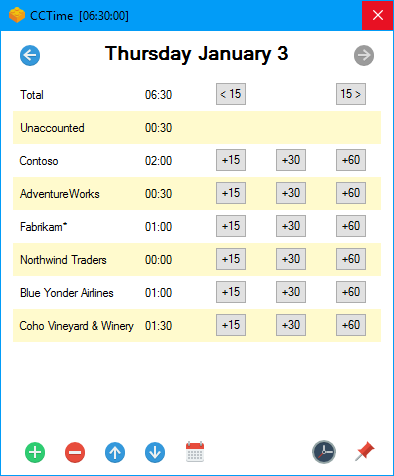
CCTime is a utility to help track how much time you spend on different tasks during your work day. Tracking time is tedious, so focus lies on simplicity and automation. CCTime stays out of your way while still being readily accessible, so you can focus on actual work. CC is short for Click Click, because two clicks is all it takes to register time on a task!
CCTime sits in your system tray and automatically hides when not in use. You can see how much time you've spent in total each day, and how much of that time has not yet been assigned to tasks. For each week you can get a report, summarizing your work that week.
CC Time is free, open source software. Source code is available at GitHub.
| Category: | |
| Runs on: | WinXP / Vista / Win7 / Win8 / Win10 |
| Writes settings to: | Application folder |
| Stealth: ? | Yes |
| Unicode support: | Yes |
| Path portability: | Automatic relative path (eg. ..\..\personal\work.doc) |
| License: | Freeware/Open Source |
| How to extract: | Download the ZIP package and extract to a folder of your choice. Launch CCTime.exe. |