/
Files - Compression/Decompression (7)
- Newer first
- Display 510 2550100entries
-


FileVoyager v24.4.13 Updated
Andrew Lee on 15 Apr 2024 Change history
- 29MB (uncompressed)
- Released on 13 Apr 2024
- Suggested by Midas
FileVoyager is a customisable, feature-rich file manager that supports tabs, themes, color customization and a ribbon or classic interface. The program uses an "orthodox" or two-panel commander-style view of disks, folders (real or virtual), shares, archives and FTP/FTPS. It supports a long list of file operations, archive creation, media file playback, display modes, quick preview, application bar, favorites bar, file comparison, minimize-to-tray and much more.
| Category: | |
| Runs on: | WinXP / Vista / Win7 / Win8 / Win10 |
| Writes settings to: | Application folder |
| Stealth: ? | Yes |
| Unicode support: | Yes |
| License: | Freeware |
| How to extract: |
|
| Similar/alternative apps: | CubicExplorer, FreeCommander XE, Multi Commander, XYplorer Free |
| What's new? | See: https://www.filevoyager.com/doc/changelog/ |
| Latest comments |
smaragdus
on 2016-10-16 16:16
The "No VLC" and "Full" versions differ significantly in size:
Midas
on 2016-10-16 17:54
Add comment
2›
Unless they have very specific needs, most 'portablists' should go with the "No VLC" version -- and get portable VLC if they need it... |

FreeCommander XE 2024 Build 901 Updated
Ennovy on 6 Feb 2024 Change history
- 15MB (uncompressed)
- Released on 5 Feb 2024
- Suggested by David Stutesman
FreeCommander XE is a powerful, dual-pane file manager with hundreds of features including folder size calculation, folder comparison/synchronization, file/duplicate search, filtering, MD5 calc / verfiy, folder compare, sync and a customizable interface. Includes a file viewer to view files in hex, binary, text or image format; an archive handling ability for standard compressed formats including ZIP (read, write), CAB (read, write) and RAR (read); built-in copy/move/delete handlers; and much more. Additional features are available via plugins.
A 64-bit version is available for donors, while a PortableApps version is also available from the author's website.
| Category: | |
| Runs on: | WinXP / Vista / Win7 / Win8 / Win10 |
| Writes settings to: | Application folder |
| Stealth: ? | Yes |
| Unicode support: | Yes |
| Path portability: | Requires manual entry of relative path (eg. ..\..\personal\work.doc) |
| License: | Freeware |
| How to extract: |
Download the "portable" ZIP package and extract to a folder of your choice. Launch FreeCommander.exe. Note: It is not recommended to overwrite the file fcStart.ini when the application is being updated. |
| Similar/alternative apps: | Multi Commander, Q-Dir, CubicExplorer |
| What's new? | See: https://freecommander.com/forum/viewtopic.php?t=775&sid=f1809a9ef15797c7cdf58de4820b5f99&start=345#p42540 |
| Latest comments |
qj3328
on 2019-10-31 00:35
I have been using FreeCommander for many years and it is, simply, outstanding. To not have a real file manager is a misfortune; to be without FreeCommander is to be handicapped. Over time I have introduced many new users to FreeCommander and the results are always the same after several weeks of use - fascination that they ever managed to function with that Windows File Explorer thing. I had moved to FreeCommander when the old Xtree/XtreeGold file manager was no longer functional in Windows, and other file managers were not handling the complex file management work regularly encountered. At first, the two default panes in FreeCommander seemed odd. Though one pane can be disabled or hidden, dual panes grow quickly on the user until one realizes - wait, how can anyone function with a file manager that has just one pane?
PAFuser
on 2022-01-11 13:04
See all
48›
FreeCommanderPortable_2022_Build_860.paf.exe available on author's website. |

RIOT (Radical Image Optimization Tool) v2024.1
Andrew Lee on 26 Jan 2024 Change history
- 12MB (uncompressed)
- Released on 23 Jan 2024
- Suggested by ashghost
RIOT (Radical Image Optimization Tool) presents a before-and-after image compression view that allows you to reduce file size of an image into JPG, PNG, or GIF format. Includes optional metadata removal, batch operations, compression to a target file size, transparency options, and other common editing functions (flip, rotate, zoom, pan). Notable versus similar software in the ability to gradually reduce the available colors one-by-one (7, 8, 9, 10...), not just milestones of 16, 32, 64 etc.
The program is also available as a plugin for XnView, GIMP, or Irfanview (see website).
Functional in Linux using Wine. Many of the official entries here on PortableFreeware have used RIOT for compression. Note that the installer version of this program is considered adware.
| Category: | |
| Runs on: | Vista / Win7 / Win8 / Win10 |
| Writes settings to: | Application folder |
| Stealth: ? | Yes |
| Unicode support: | Yes |
| License: | Freeware |
| How to extract: |
|
| Similar/alternative apps: | FileOptimizer |
| What's new? | See: https://riot-optimizer.com/changelog/ |
| Latest comments |
Ennovy
on 2023-12-25 12:44
See all
12›
The 32-bit version is still at v1.0.1, but the latest 64-bit version is 2023.12.0 |

Multi Commander v13.5.2981 Updated
Ennovy on 30 Jan 2024 Change history
- 15MB (uncompressed)
- Released on 26 Jan 2024
- Suggested by I am Baas
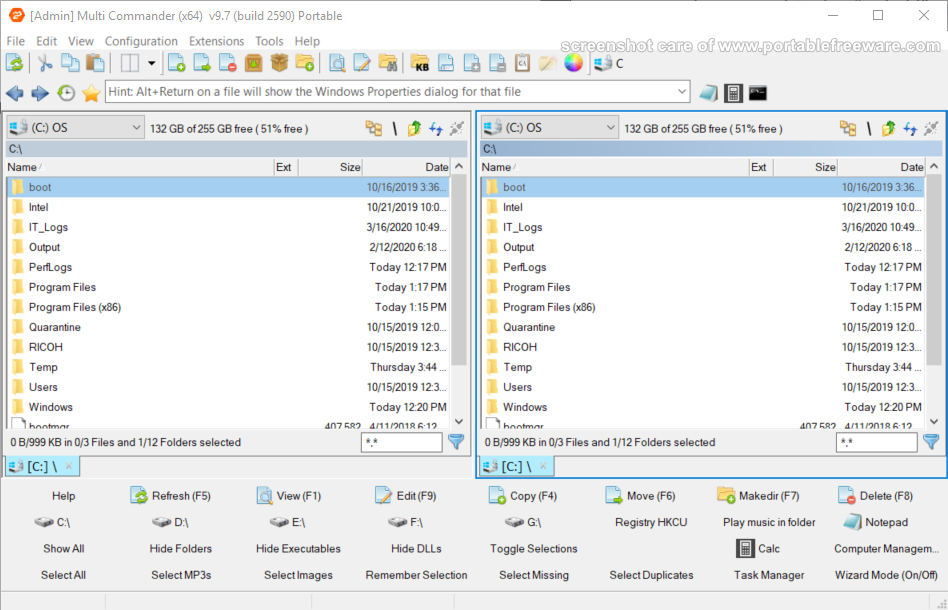
Multi Commander is a customizable, feature-rich and multi-tabbed file manager with a dual-pane layout. The program includes the standard file manager features with the ability to browse a variety of resources including local hard drives, network servers/shares, system registry and FTP (with SSL/TLS Support). Available tools include quick search, file verifier, splitter, audio, picture, clipboard, permissions and many more. The program can browse many archive formats like folders on your system (zip, tar, gz) as well as manage/open other formats (7z, RAR).
Includes intelligent functions that allow you to do advanced tasks with ease such as auto-unpacking, auto-sorting, internal file type associations, a powerful scripting engine for automation and command-line field.
| Category: | |
| Runs on: | Vista / Win7 / Win8 / Win10 / Win11 |
| Writes settings to: | Application folder |
| Stealth: ? | No. Some settings are written to the registry: HKEY_CURRENT_USER\SOFTWARE\MultiCommander |
| Unicode support: | Yes |
| Path portability: | Requires manual entry of relative path (eg. ..\..\personal\work.doc) |
| License: | Freeware |
| How to extract: | Download the "Portable version" ZIP package and extract to a folder of your choice. Launch MultiCommander.exe. |
| Similar/alternative apps: | FreeCommander XE |
| What's new? | See: https://multicommander.com/ChangeLog |
| Latest comments |
apometron
on 2016-12-26 05:28
MultiCommander has a bug in log into other directories. I could not log into directories reliably. =( Check the directories you enter with MC!
Ennovy
on 2020-11-24 08:51
Version 10 no longer supports Windows XP
zorro
on 2024-01-30 08:14
See all
10›
Multi Commander unfortunately isn't stealth > creates MultiCommander-key in HKCU\Software. Could be triggered by some settings. Deleting apparently doesn't affect settings/functionality, but the key reappears on every start. |

muCommander v1.3.0
Ennovy on 9 Jul 2023 Change history
- 18MB (uncompressed)
- Released on 8 Jul 2023
- Suggested by spillej
muCommander is a Java-based skinnable, tabbed file manager with a dual-pane interface. The tool connects to a many online services such as FTP, SFTP, SMB, HTTP, Amazon S3, Bonjour, HDFS (Hadoop), NFS and more. File copying includes transfer verification, rate of speed controls and transfer visualization. It can open and create a variety of archive types as well as view and modify ZIP files without recompression. The program can batch rename, change permissions/date and hash files or folders with a variety of algorithms.
Cross-platform (Mac, Linux, *BSD) and available in 27 languages.
Alternatively, X-muCommander is also available.
| Category: | |
| Runs on: | WinXP / Vista / Win7 / Win8 / Win10 |
| Writes settings to: | Application folder |
| Dependencies: | Java Portable |
| Stealth: ? | No. Saves some temporary information to User\LocalSettings\Temp |
| License: | GNU GPLv3 |
| How to extract: | Download the "portable" package and see forum post for further instructions. |
| Similar/alternative apps: | Multi Commander |
| What's new? | See: https://github.com/mucommander/mucommander/blob/release_1_3_0/package/readme.txt |
| Latest comments |
Danix
on 2011-04-08 21:37
winPenPack has released X-muCommander Portable.
appsuser
on 2019-12-10 09:11
Add comment
2›
This program still supports SMB 1.0, which is no longer supported by Windows 10. Very useful if you have older devices and don't want to make your Windows 10 insecure by re-enabling this protocol. |

DropIt v8.5.1
billon on 11 Feb 2018 Change history
- 6MB (uncompressed)
- Released on 10 Feb 2018
- Suggested by Lupo73
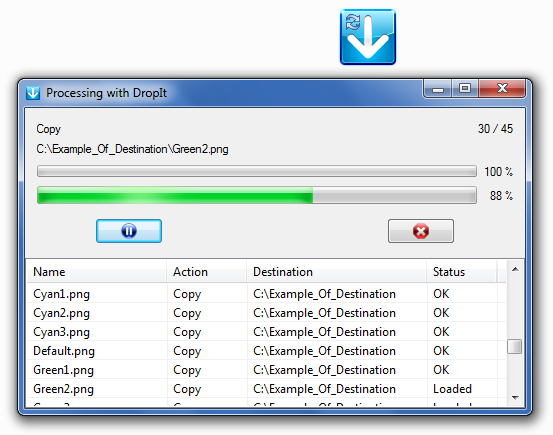
DropIt provides a floating target image on your desktop that you can drag-and-drop files to quickly process them with a predefined action. Actions include: copy, compress, extract, rename, delete, split, join, encrypt, decrypt, open with, print, upload, send by mail, create gallery, create list, create playlist, create shortcut, copy to clipboard, change properties and ignore. A destination can be chosen for each association defined, as well as group associations in any number of profiles.
Users can create rules to filter files based on name, directory, size, date, properties, content or regular expressions. Existing files in destination folders can be defined to overwrite, skip, or rename them. It includes a multi-language interface, folder monitoring, shared folders support, SendTo and Command-Line support, environment variables support, automatic update and much more.
| Category: | |
| Runs on: | Win2K / WinXP / Vista / Win7 / Win8 / Win10 |
| Writes settings to: | Application folder |
| Stealth: ? | Yes |
| Unicode support: | Yes |
| License: | GPL |
| How to extract: | Download the "Portable" ZIP package and extract to a folder of your choice. Launch DropIt.exe. |
| Similar/alternative apps: | Drop Zone |
| What's new? |
See: http://www.dropitproject.com/changelog.txt |
| Latest comments |
treis
on 2011-05-31 14:37
Congrats. Dropit has a mention on lifehacker.
Ennovy
on 2012-06-17 06:38
Raymond wrote a review here: http://www.raymond.cc/blog/manage-files-folders-quickly-easily-dropit/?utm_source=feedburner&utm_medium=feed&utm_campaign=Feed%3A+RaymondccBlog+%28Raymond.CC+Blog%29
hamasaki
on 2013-11-11 08:49
See all
18›
Great little utility. I regularly have a lot of zip files I need to move to different locations. This is a real timesaver. |

DiskInternals ZIP Repair v1.1
billon on 15 Aug 2017 Change history
- 1MB (uncompressed)
- Released on 9 Nov 2007
- Suggested by AlephX
DiskInternals ZIP Repair rebuilds the Zip structure and then extracts the recovered contents of the archive. The application has a wizard-like interface.
| Category: | |
| Runs on: | Win95 / Win98 / WinME / WinNT / Win2K / WinXP / Vista / Win7 / Win8 / Win10 |
| Writes settings to: | Application folder |
| Stealth: ? | No. HKCU\Software\DiskInternals\ZipRepair |
| Unicode support: | Yes |
| License: | Freeware |
| How to extract: | Download the installer and extract ZipRepair.exe and fsm.ini to a folder of your choice. Launch ZipRepair.exe. |
| Latest comments |
Onesimus Prime
on 2008-11-09 19:24
Stealth: no
pplknownothin
on 2013-05-11 17:30
Great piece of software. Tried fixing an archive in WinRAR but it failed. Tried this and it was able to rebuild the Zip file. Thanks for the post!
webfork
on 2013-09-01 18:39
Add comment
3›
You only need this program when something goes wrong and I got a chance to test it when an archived ZIP file went bad. The program worked great and did exactly what I needed. The program extracts the files from the archive that it can, then re-zipps them out to a new one (that isn't broken). Since I then extracted said archive, part of me wishes there was an option to just extract the good files and folders. |
Can't find what you are looking for? This list shows entries with Files - Compression/Decompression as a supplementary function.
You can view more entries with Files - Compression/Decompression as a primary function.
You can view more entries with Files - Compression/Decompression as a primary function.