/
Audio - MP3 Tag Editors (6)
- Newer first
- Display 510 2550100entries
-


foobar2000 v2.1.5 Updated
Ennovy on 2 May 2024 Change history
- 9MB (uncompressed)
- Released on 2 May 2024
- Suggested by Barrette
foobar2000 is an audio player with low memory footprint and native support for most popular audio formats. It includes CD ripping, format conversion, replay gain, audio normalization, equalization and more. Playlist display and keyboard shortcuts are both very customisable. Additional functionality available via a wide variety of plugins.
The program can edit song tags (album and song name, number, year etc.) based on the FreeDB Internet database and even rename the original songs based on these tags. A file format conversion tool is available, but must be enabled with external downloads. Can even fix some MP3s with corrupted file headers.
Windows 2000 users can download the last compatible version: 0.9.4.
Windows XP and Vista users, download last version from 1.5 series.
| Category: | |
| Runs on: | Win7 / Win8 / Win10 / Win11 |
| Writes settings to: | Application folder |
| Stealth: ? | Yes |
| Unicode support: | Yes |
| Path portability: | Requires manual entry of relative path (eg. ..\..\personal\work.doc) |
| License: | Freeware |
| How to extract: |
|
| Similar/alternative apps: | 1by1, Boom, Winyl |
| What's new? | See: https://foobar2000.org/changelog. |
| Latest comments |
PAFuser
on 2023-04-26 15:52
64bit available on download page, see https://foobar.hyv.fi/2.0/?sort=modified&dir=r for 64bit components. 32bit will not work.
freakazoid
on 2023-06-10 00:59
See all
42›
PSA: For older users, use the 32-bit version of v2.0 for now. |

Multi Commander v13.5.2981
Ennovy on 30 Jan 2024 Change history
- 15MB (uncompressed)
- Released on 26 Jan 2024
- Suggested by I am Baas
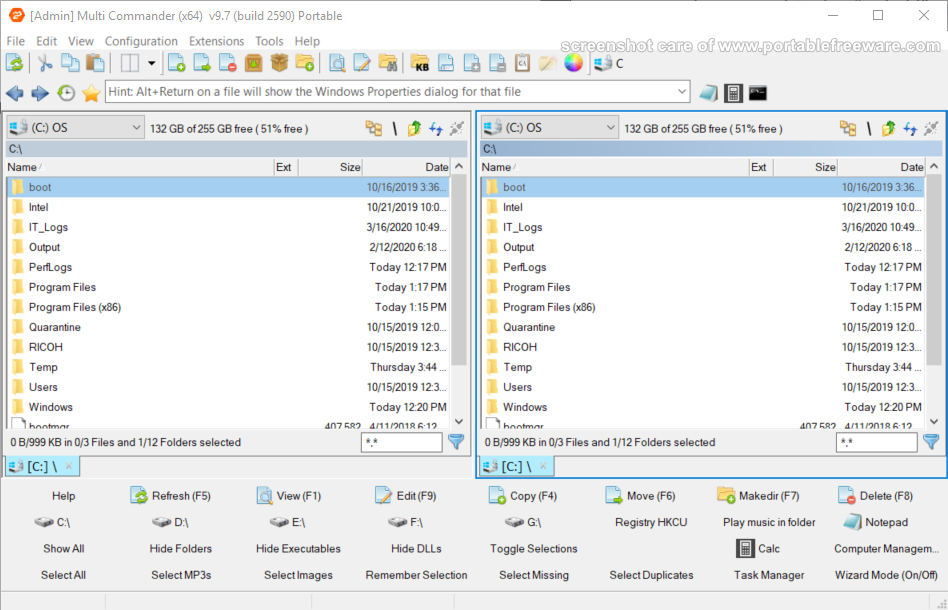
Multi Commander is a customizable, feature-rich and multi-tabbed file manager with a dual-pane layout. The program includes the standard file manager features with the ability to browse a variety of resources including local hard drives, network servers/shares, system registry and FTP (with SSL/TLS Support). Available tools include quick search, file verifier, splitter, audio, picture, clipboard, permissions and many more. The program can browse many archive formats like folders on your system (zip, tar, gz) as well as manage/open other formats (7z, RAR).
Includes intelligent functions that allow you to do advanced tasks with ease such as auto-unpacking, auto-sorting, internal file type associations, a powerful scripting engine for automation and command-line field.
| Category: | |
| Runs on: | Vista / Win7 / Win8 / Win10 / Win11 |
| Writes settings to: | Application folder |
| Stealth: ? | No. Some settings are written to the registry: HKEY_CURRENT_USER\SOFTWARE\MultiCommander |
| Unicode support: | Yes |
| Path portability: | Requires manual entry of relative path (eg. ..\..\personal\work.doc) |
| License: | Freeware |
| How to extract: | Download the "Portable version" ZIP package and extract to a folder of your choice. Launch MultiCommander.exe. |
| Similar/alternative apps: | FreeCommander XE |
| What's new? | See: https://multicommander.com/ChangeLog |
| Latest comments |
apometron
on 2016-12-26 05:28
MultiCommander has a bug in log into other directories. I could not log into directories reliably. =( Check the directories you enter with MC!
Ennovy
on 2020-11-24 08:51
Version 10 no longer supports Windows XP
zorro
on 2024-01-30 08:14
See all
10›
Multi Commander unfortunately isn't stealth > creates MultiCommander-key in HKCU\Software. Could be triggered by some settings. Deleting apparently doesn't affect settings/functionality, but the key reappears on every start. |

MusicBee v3.5.8698
Ennovy on 25 Oct 2023 Change history
- 26MB (uncompressed)
- Released on 25 Oct 2023
- Suggested by taotra
MusicBee is a feature-rich and highly configurable audio toolset, including player, tag and library manager, converter. The overall look and feel can be rearranged, switched to one of two minimal player views, and skinned for a variety of different color schemes.
The program supports a host of different audio functions including Internet radio, podcast search/download/manage, playlists, CD ripping, Last.FM, Soundcloud, device sync and much more. Audio functions include gapless playback, high-end and surround sound audio, volume and EQ controls.
| Category: | |
| Runs on: | Win7 / Win8 / Win10 |
| Writes settings to: | Application folder |
| Dependencies: | Microsoft .NET Framework 4.6.1+ |
| Unicode support: | Yes |
| License: | Free for personal use |
| How to extract: |
|
| Similar/alternative apps: | foobar2000 |
| What's new? | See: https://getmusicbee.com/help/release-note/ |
| Latest comments |
risk
on 2019-12-13 22:36
Add comment
1›
MusicBee has been my music player for well over a decade - ever since the other one stopped whipping the llama’s ass! |

fre:ac v1.1.7
Andrew Lee on 7 Mar 2023 Change history
- 14MB (uncompressed)
- Released on 7 Mar 2023
- Suggested by Andrew Healey
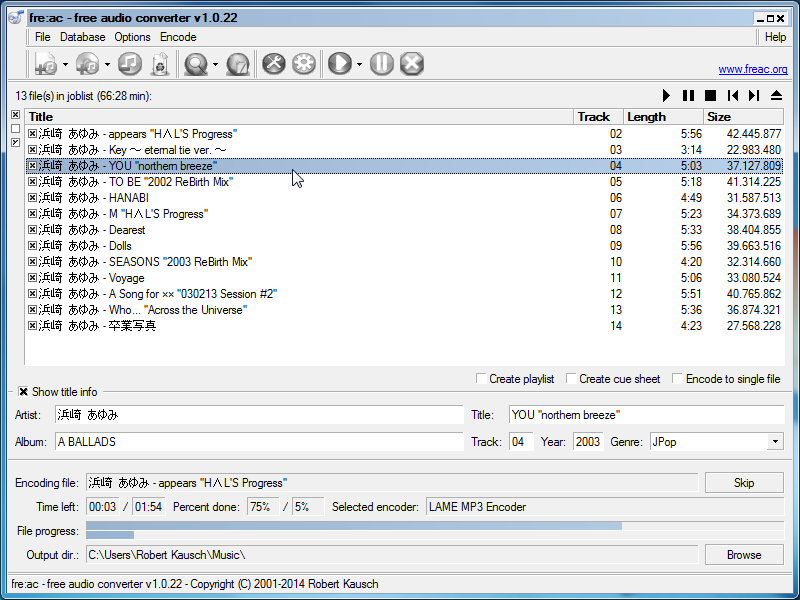
fre:ac (pronounced "freak") is a feature-rich audio tool set featuring audio encoding and conversion, CD ripper, playlist and metadata editor. The program supports most popular audio formats such as MP3, M4A, WMA, OGG and FLAC, as well as support for a long list of additional converters such as Quicktime and Shorten. For CDs, the program supports reliable conversion (CD Paranoia), online databases (CDDB/GNUdb) and CDText, automatically writing song information metadata. The program is optimized for multi-core systems, making conversions as fast as possible.
Cross-platform (Mac, Linux, FreeBSD). Available in many world languages. Alternatively, fre:ac Portable automatically adjusts paths.
| Category: | |
| Runs on: | WinXP / Vista / Win7 / Win8 / Win10 |
| Writes settings to: | Application folder |
| Stealth: ? | Yes |
| Unicode support: | Yes |
| License: | GNU GPLv2 |
| How to extract: | Download the ZIP package and extract to a folder of your choice. Launch 'freac.exe'. Optionally, delete unnecessary language and manual files, and 'translator.exe'. |
| Similar/alternative apps: | CUETools, LameXP |
| What's new? | See: https://github.com/enzo1982/freac/releases. |
| Latest comments |
smaragdus
on 2016-12-05 14:51
See all
64›
I prefer freac snapshots to freac stable because the snapshots support more encoders (including the best one- OptimFROG, Monkey's Audio, WavPack, etc). |

AIMP v5.03.2392
Andrew Lee on 25 Jun 2022 Change history
- 13MB (uncompressed)
- Released on 22 Jun 2022
- Suggested by eldad
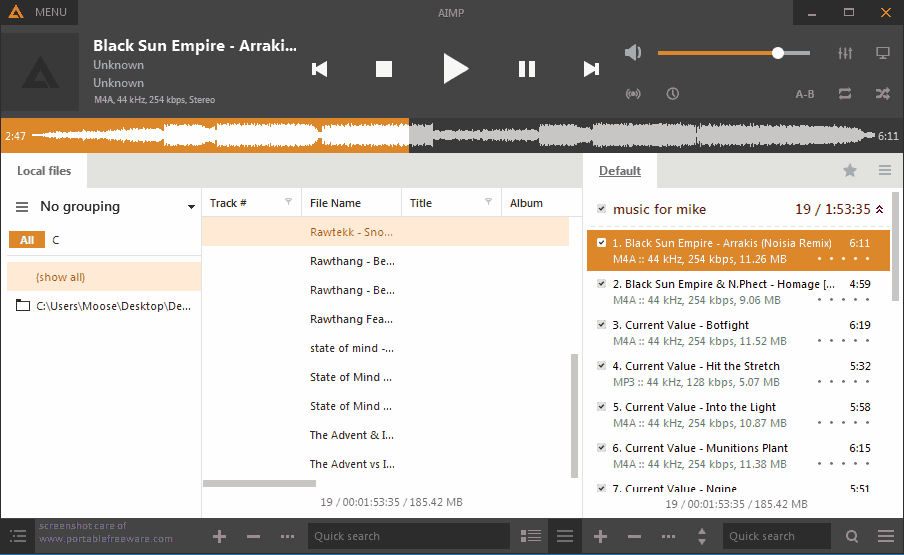
AIMP is a skinnable audio player similar to Winamp that supports most audio formats, as well as Internet radio. Features include a music library, mini-player, colorizing of individual skins, visualizations, smart playlists, global hotkeys, and plug-ins capability. Filters/effects include equalizer, reverb, normalization, voice remover, speed changes and more.
AIMP includes a built-in audio converter, APE image splitter, tag editor, alarm clock, and auto-shutdown.
Alternatively, AIMP Portable is stealth and automatically adjusts paths.
| Category: | |
| Runs on: | Vista / Win7 / Win8 / Win10 |
| Writes settings to: | Application folder |
| Stealth: ? | No. Writes to registry if run with admin rights. See this forum thread. |
| Unicode support: | Yes |
| Path portability: | Automatic relative path (eg. ..\..\personal\work.doc) |
| License: | Freeware |
| How to extract: |
|
| Similar/alternative apps: | Winyl, Xion |
| What's new? | See: https://www.aimp.ru/?do=changelog |
| Latest comments |
MIKLO
on 2016-06-03 11:47
smaragdus REALLY? wow I didn't realize that looks over substance was so important to sum people. Now I'm curious what others think about the "looks" of V4 or if most just don't care like me, please don't misunderstand I understand how you feel its just foreign 2me is all I'm saying. Of course if V3 suits your needs then by all means that's the correct version for you to use, no matter what I or others think. Enjoy.:)
Peter202
on 2016-11-06 10:52
See all
46›
Is it possible to disable the ID3v1 tagging? It's messing up the grouping of my mp3 files when i import them in the library. |

Winyl v3.3.1
billon on 15 Oct 2018 Change history
- 5MB (uncompressed)
- Released on 15 Oct 2018
- Suggested by ArnaudNime
Winyl is a lightweight digital audio player with a minimalist design and skinable interface. The program plays all popular formats and automatically organizes files into categories based on audio tags, making your music easy to find and play. The program offers music organization tools, Internet radio, track rating, smart playlists, rapid search, song lyrics and music tagging.
| Category: | |
| Runs on: | WinXP / Vista / Win7 / Win8 / Win10 |
| Writes settings to: | Application folder |
| Stealth: ? | Yes |
| Unicode support: | Yes |
| License: | GNU GPLv3 |
| How to extract: |
Download the 'portable' ZIP package and extract to a folder of your choice. Launch Winyl.exe. Optionally, delete unnecessary language folders. |
| Similar/alternative apps: | AIMP |
| What's new? |
|
| Latest comments |
PAFuser
on 2018-03-22 17:24
64 bit "test" version available: http://vinylsoft.com/download/winyl_portable_x64_test.zip I have not had any problems with it.
zorro
on 2018-12-14 14:55
Somehow difficult to find new skins for Winyl - I ended up mixing some:
PAFuser
on 2019-08-28 22:37
See all
11›
Nera skin from deviantart.com, modified - large print: https://drive.google.com/open?id=1KtLN9Kw9RxdLtMzcET7j3HeOCz9HtgNf Easier reading info, and some other modifications. |
Can't find what you are looking for? This list shows entries with Audio - MP3 Tag Editors as a supplementary function.
You can view more entries with Audio - MP3 Tag Editors as a primary function.
You can view more entries with Audio - MP3 Tag Editors as a primary function.