Categories /
Audio - Miscellaneous (30)
- Newer first
- Display 510 2550100entries
-


Opal v1.3.1 Updated
Andrew Lee on 15 Apr 2024 Change history
- 82MB (uncompressed)
- Released on 28 Mar 2024
- Suggested by webfork
Opal is a specialized audio player that lets you play one of 20+ built-in relaxing tracks for as long as you want, without interruption. The audio tracks include: rain, wind, thunder, river, fire, various office background noise such as typing, chatter etc. There's also a timer feature that helps stop the audio player after a preset interval.
| Category: | |
| Runs on: | Win7 / Win8 / Win10 / Win11 |
| Writes settings to: | Application folder |
| License: | GPL |
| How to extract: | Download the portable ZIP package and extract to a folder of your choice. Launch Opal.exe. |
| What's new? | See: https://github.com/CodeDead/opal/releases/tag/v1.3.1 |
| Latest comments |
FileHandler
on 2023-03-29 02:52
Add comment
1›
A nice alternative to running audio files or listening to online content. Settings are easy to adjust on the fly. And it offers to save them as presets. |

MKVToolNix v83.0 New
lwc on 12 Apr 2024 Change history
- 153MB (uncompressed)
- Released on 10 Mar 2024
- Suggested by agam
MKVToolnix is a freeware utility that allows you to create, alter, inspect, etc., video files with the MKV format.You can use MKVToolNix to create, split, edit, mux, demux, merge, extract, or inspect Matroska files.
MKVToolnix program will also work with other video formats including AVI, MPEG, MP4, MPEG, MPEG1/2, h264, and more, as well as some video codecs such as VP9, audio including AAC, FLAC, MP2, MP3, AC3, DTS/DTS-HD, Vorbis and most subtitle formats including SRT, PGS/SUP, VobSub, ASS, and SSA.
| Category: | |
| Runs on: | Win10 / Win11 |
| Writes settings to: | Application folder |
| Stealth: ? | No. QtProject registry key |
| License: | Freeware/Open Source |
| How to extract: | Download the Portable 7z package and extract to a folder of your choice. Launch mkvtoolnix-gui.exe. |
| Similar/alternative apps: | Avidemux, MKVcleaver |
| What's new? | See https://mkvtoolnix.download/doc/NEWS.md (detailed) or https://www.bunkus.org/blog/ (summary but might not be limited to just what's new) |

MKVcleaver v0.8.0.0 Updated
lwc on 12 Apr 2024 Change history
- 98MB (uncompressed)
- Released on 16 Sep 2018
- Suggested by I am Baas
MKVcleaver extracts various data from MKV video files. It can be used in a batch mode (loading and extracting data from many files) as well as single file mode. It has a simple interface, but a lot of functionality.
The program is an outdated alternate graphical user interface for MKVToolNix (which is newer and has its own GUI including a 64-bit version).
| Category: | |
| Runs on: | WinXP / Vista / Win7 |
| Writes settings to: | Application folder |
| Stealth: ? | Yes |
| License: | GPL |
| How to extract: | The portable version of MKVCleaver is now a part of the installer. You must run the installer to get the Portable version. Follow the instruction included in the installation wizard. |
| Similar/alternative apps: | MKVToolnix |
| What's new? | See: https://blogs.sapib.ca/apps/v-0-8-0-0-released/ |
| Latest comments |
juverax
on 2024-04-04 09:58
https://blogs.sapib.ca/apps/mkvcleaver/mkvcleaver-downloads/
juverax
on 2024-04-04 10:16
See all
4›
V.0.8.0.0 ( https://blogs.sapib.ca/apps/new-inno-installer/ ) : |

SoundVolumeView v2.46
Andrew Lee on 3 Feb 2024 Change history
- 191KB (uncompressed)
- Released on 1 Feb 2024
- Suggested by Checker
SoundVolumeView displays general information and current volume level for all active sound components on your system, allowing instant mute/unmute. This is useful both for viewing audio management details as well as tracking down (and silencing) a given program sound from your system. Additionally, the program also allows for loading or saving custom sound configurations for a given situation or toolset. A config file contains volume level, mute/unmute state of all sound components and default sound devices.
A command-line interface is also available with extensive support, allowing you to save/load profiles, change the current volume of every sound component and mute/unmute every sound component.
| Category: | |
| Runs on: | Vista / Win7 / Win8 / Win10 |
| Writes settings to: | Application folder |
| Stealth: ? | Yes |
| License: | Freeware |
| How to extract: | Download the ZIP package and extract to a folder of your choice. Launch SoundVolumeView.exe. |
| What's new? |
|
| Latest comments |
Checker
on 2015-01-03 20:28
See all
4›
@ bzl333: System Requirements: This utility works on Windows Vista, Windows 7, Windows 8, and Windows 2008. Both 32-bit and 64-bit systems are supported. |

Volume² v1.1.8.465
Ennovy on 16 Sep 2023 Change history
- 14MB (uncompressed)
- Released on 16 Sep 2023
- Suggested by Userfriendly
Volume² is an utility designed as a replacement for the standard Volume Control. It lets you easily change the sound volume just by rotating the mouse wheel, using keyboard hot keys or moving the mouse pointer to an edge of the screen.
It also includes an audio mixer with advanced volume controls support, a scheduler, an on-screen display, command line support and the ability to store and recall different unlimited presets via one mouse click or system-wide hot keys.
| Category: | |
| Runs on: | WinXP / Vista / Win7 / Win8 / Win10 / Win11 |
| Writes settings to: | Application folder |
| Stealth: ? | Yes |
| Unicode support: | Yes |
| License: | Freeware |
| How to extract: |
|
| Similar/alternative apps: | Volumouse |
| What's new? | See: https://github.com/irzyxa/Volume2/blob/master/History.txt |
| Latest comments |
freakazoid
on 2023-01-03 21:08
Can't believe I didn't know about this app!
freakazoid
on 2023-07-24 20:17
See all
10›
@Ennovy v1.1.8.464 appears to be a beta version. Perhaps we should change the version back to the last release version - v1.1.7.449? |

sPlaylistMaker v1.1.0
lautrepay on 4 May 2023 Change history
- 1MB (uncompressed)
- Released on 8 Mar 2016
- Suggested by Checker
sPlaylistMaker allows you to easily create playlist files via drag-and-drop. The program will recursively scan through dropped folders and create a playlist file in each folder with the name of that folder. Existing playlist files are left untouched, though.
Generates .m3u and .m3u8 playlist files and a command-line interface is available.
| Category: | |
| Runs on: | Win7 |
| Writes settings to: | Application folder |
| Stealth: ? | Yes |
| Unicode support: | Yes |
| License: | Freeware |
| How to extract: | Download the ZIP package and extract to a folder of your choice. Launch sPlaylistMaker.exe. |
| What's new? |
|
| Latest comments |
Checker
on 2014-01-06 18:16
@ misan: If you klick on the little "?"-icon behind "Stealth" ...
Napiophelios
on 2014-05-03 21:14
"Added ability to create video playlists."
DarkShadow
on 2014-05-03 23:03
See all
4›
@ Napiophelios: |

DSpeech v1.74
Andrew Lee on 2 May 2022 Change history
- 5MB (uncompressed)
- Released on 29 Apr 2022
- Suggested by AlephX
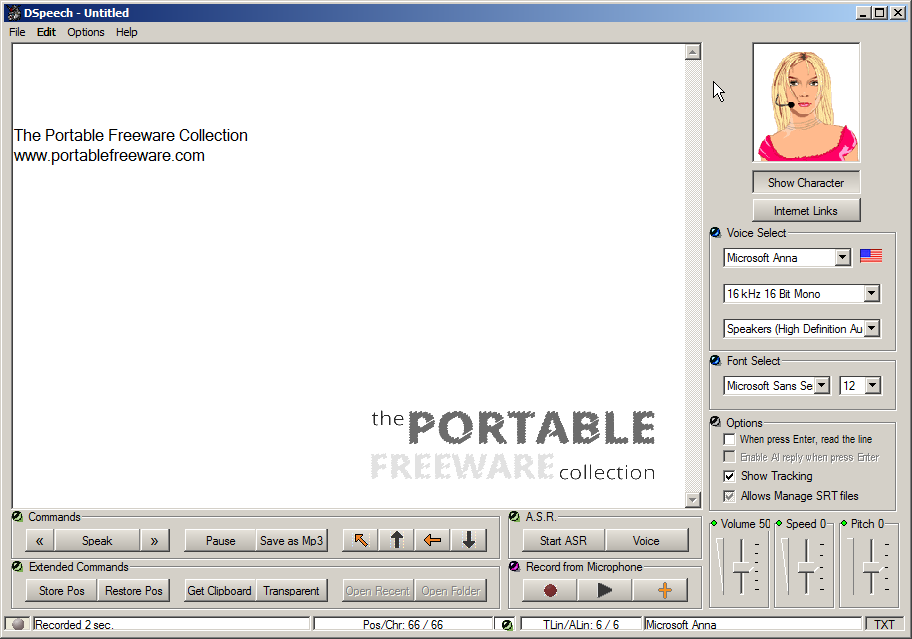
DSpeech is a text-to-speech program with the option of saving the output to a variety of formats, great for reviewing text or creating audio books. The program uses Microsoft's included speech engine SAPI5 but also supports dynamically changing the features of the voices using tags e.g. insert pauses, emphasize specific words, spell them out etc.
The program can do simple audio/voice recordings to save to WAV, and include some basic dictation / voice control tools ("ASR" for Automatic Speech Recognition). Text can be imported from a variety of formats TXT, DOC, DOCX, RTF, HTML, XML and PDF and outputs to MP3, OGG, AAC, WMA, OPUS and AMR.
| Category: | |
| Runs on: | WinNT / Win2K / WinXP / Vista / Win7 / Win8 / Win10 |
| Writes settings to: | Application folder |
| Dependencies: | Microsoft speech engine SAPI5 |
| Unicode support: | Yes |
| License: | Freeware |
| How to extract: |
Download the ZIP package and extract to a folder of your choice. Launch DSpeech.exe. WinNT/2K users: need to install the speech engine separately. You will find links to plugins, speech engines and voice sets on the program website. Optionally, delete unnecessary language and manual files. |
| Similar/alternative apps: | Balabolka |
| What's new? | See: https://www.softpedia.com/progChangelog/DSpeech-Changelog-36935.html |
| Latest comments |
Happy.Camper2
on 2017-06-10 17:28
DSpeech is now version 1.63.3 Released 2017 Mar 27 at Authors site.
webfork
on 2021-11-15 00:12
I've got to say that DSpeech has come a long way over the past few years. The last time I tested it the program felt like it was just a simple throwaway text reader with Microsoft voices front-end program. What I tested today had loads of features, usability, and a great interface. This contrasts a lot of other voice-to-text tools that I've been playing with, including LibreOffice and Firefox add-ons, which are fairly basic.
GorfianRobot
on 2022-11-14 21:54
See all
18›
I'm really impressed with this program. It handles changing voices midstream (so you can create conversations) better than Balabolka (and a lot of programs can't chance voices at all. |

AppAudioConfig v1.16
Andrew Lee on 18 Oct 2021 Change history
- 116KB (uncompressed)
- Released on 18 Oct 2021
- Suggested by billon
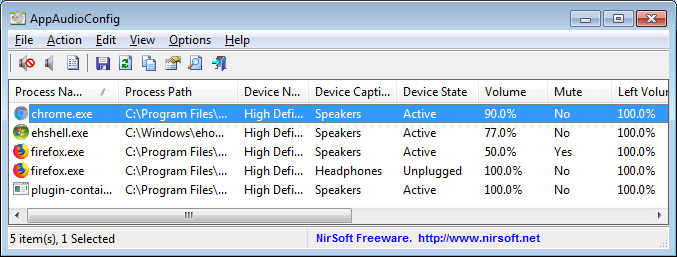
AppAudioConfig displays the current audio settings for every application on your system and allows you to easily change multiple application settings at once. You can change a variety of functions including volume, right/left audio balance and mute/unmute status.
| Category: | |
| Runs on: | Vista / Win7 / Win8 / Win10 |
| Writes settings to: | Application folder. Modifies the Windows registry under HKCU\Software\Microsoft\Internet Explorer\LowRegistry\Audio\PolicyConfig\PropertyStore |
| Stealth: ? | Yes |
| Unicode support: | Yes |
| License: | Freeware |
| How to extract: | Download the ZIP package and extract to a folder of your choice. Launch AppAudioConfig.exe. |
| What's new? |
|

sLyrics v1.0.3
billon on 25 Dec 2018 Change history
- 1MB (uncompressed)
- Released on 24 May 2017
- Suggested by Checker
sLyrics allows the search and download of song lyrics from a broad database of songs. The program also allows search inside lyric text.
The program uses the ChartLyrics API.
| Category: | |
| Runs on: | WinXP / Vista / Win7 / Win8 / Win10 |
| Writes settings to: | Application folder |
| Stealth: ? | Yes |
| Unicode support: | Yes |
| License: | Freeware |
| How to extract: | Download the ZIP package and extract to a folder of your choice. Launch sLyrics.exe. |
| What's new? |
|
| Latest comments |
zorro
on 2018-12-25 17:35
Add comment
1›
New version 1.0.3 as of 24.05.2017 - and the website link should be updated (actual one doesn't work): |

ChordEase v1.0.14.000
billon on 23 Sep 2018 Change history
- 2MB (uncompressed)
- Released on 20 Feb 2017
- Suggested by victimofleisure
ChordEase makes it easier to play music with complicated chords. No matter what the chords are, you can play as if they were all in the key of C. You don't need to play sharps or flats, because ChordEase automatically adds them for you. Although ChordEase is primarily intended for jazz, it could be useful for any type of music that modulates frequently. ChordEase alters your notes in real time in order to make them harmonically correct, while preserving their rhythm and dynamics. By delegating rapid music theory calculations to ChordEase, you gain freedom to concentrate on other aspects of musical performance, such as feel and aesthetics.
The program is a translator that takes MIDI notes as input, and produces MIDI notes as output. The input notes are translated to the current chord scale, so that the output notes fit the chord progression of a song. Supports various mapping functions which determine how the translating is done, can handle multiple translations at once for multiple performers to play through a single instance using any number of MIDI instruments. Parameters can be remotely controlled via MIDI for additional effects and can also record its own output as MIDI data.
| Category: | |
| Runs on: | WinXP / Vista / Win7 / Win8 / Win10 |
| Writes settings to: | Application folder |
| Stealth: ? | Yes |
| Unicode support: | No |
| License: | GNU GPLv2 |
| How to extract: | Download the "Portable" ZIP package and extract to a folder of your choice. Launch ChordEase.exe. |
| What's new? |
See: http://chordease.sourceforge.net/relnotes.html |
| Latest comments |
victimofleisure
on 2014-09-03 13:14
Add comment
3›
Hi Taf, |