Categories /
Files - Backup/Restore (23)
- Newer first
- Display 510 2550100entries
-


ShadowCopyView v1.16
Andrew Lee on 1 Jan 2024 Change history
- 124KB (uncompressed)
- Released on 28 Dec 2023
- Suggested by billon
ShadowCopyView lists the snapshots of your hard drive created by the 'Volume Shadow Copy' service in Windows. Every snapshot contains an older versions of your files and folders from the date that the snapshot was created, you can browse the older version of your files and folders and optionally copy them into a folder on your disk.
| Category: | |
| Runs on: | Vista / Win7 / Win8 / Win10 |
| Writes settings to: | Application folder |
| Stealth: ? | Yes |
| Unicode support: | Yes |
| License: | Freeware |
| How to extract: | Download the ZIP package and extract to a folder of your choice. Launch ShadowCopyView.exe. |
| Similar/alternative apps: | PreviousFilesRecovery |
| What's new? |
|

jaBuT Backup v2023.02.36857
joby_toss on 3 Dec 2023 Change history
- 57MB (uncompressed)
- Released on 20 Feb 2023
- Suggested by smaragdus
jaBuT (just another Backup Tool) Backup is an flexible and powerful backup and synchronization program. It supports different processing modes including copy, move, and compress both with and without file comparison, as well as mirror and sync. The program includes exclusion/inclusion of processed data, a variety of profile options, scheduled execution and a variety of file comparison options.
Supports batch processing, GUI customization, rich tray control, command-line options, and more.
| Category: | |
| Runs on: | WinXP / Vista / Win7 / Win8 / Win10 |
| Writes settings to: | Application folder |
| Stealth: ? | Yes |
| Unicode support: | Yes |
| License: | Cardware |
| How to extract: | Download the "Portable" ZIP package and extract to a folder of your choice. Launch jaBuT.exe. |
| Similar/alternative apps: | Back4Sure, Directory Compare, DirSync Pro, Zback |
| What's new? |
See: https://jabut.de/changelog-en.php |
| Latest comments |
jabuTBackup
on 2019-02-11 07:32
Recent statement
FireRabbit
on 2020-12-08 20:21
See all
21›
When I first found jaBuT I liked it and thought it was working, until I realized that it stops working every time you sleep/wake your computer unless you manually restart it. unfortunately I realized that after I needed to recover files I thought it was baking up. |

Back4Sure v3.7.8
Ennovy on 19 Jan 2023 Change history
- 6MB (uncompressed)
- Released on 5 Jun 2022
- Suggested by guinness
Back4Sure is a feature-rich backup solution for typical backup use. The program can make a backup to hard-disk, USB drive or network and can also be compressed using high or low compression settings to a ZIP or 7-zip file of various compression levels, as well as encrypted for security.
Other features include filters to backup or exclude specific file types, a cleanup mode to remove old archives, and creation of one or multiple zip files (separated by directory structure). Backups are saved by directory structure either inside the archive or inside the directory for easy restoring. Users can also use multiple settings profiles, or "job" files.
| Category: | |
| Runs on: | Win2K / WinXP / Vista / Win7 / Win8 / Win10 |
| Writes settings to: | Application folder |
| Stealth: ? | Yes |
| Unicode support: | Yes |
| License: | Freeware |
| How to extract: | Download the "Portable version" ZIP package and extract to a folder of your choice. Launch Back4Sure.exe. |
| What's new? | See: https://ukrebs-software.de/english/back4sure/changelog.html |
| Latest comments |
ihateyou
on 2013-12-15 18:36
what you should know:
romulous
on 2015-01-11 06:52
See all
11›
It's a crying shame that you can only backup folders with this tool, and not individual files within those folders (yes, I know you can set filters, but unless you know in advance what files you want from each folder, this is not practical to use). |

Toucan v3.1.8.2
webfork on 27 Feb 2022 Change history
- 16MB (uncompressed)
- Released on 16 Feb 2022
- Suggested by Dormouse

Toucan is an advanced synchronization and backup tool with a variety of options including mirroring, incremental (only copy what's changed), encrypted, compression and many more. File sets can be added or excluded using name, size, date, or regular expressions.
Compression formats include ZIP or 7-zip, and all encryption uses standard AES 256. Includes command line tools and advanced scripting for automated / batch jobs.
| Category: | |
| Runs on: | WinXP / Vista / Win7 / Win8 / Win10 / Wine |
| Writes settings to: | Application folder |
| Stealth: ? | Yes |
| Path portability: | Automatic compensation for dynamic drive letter in removable storage devices |
| License: | GNU GPLv2 |
| How to extract: |
Download the self-extracting EXE and extract to a folder of your choice. Launch Toucan.exe. Optionally, delete unnecessary language files. |
| What's new? | See: https://github.com/PortableApps/Toucan/blob/master/help/source/changelog.txt |
| Latest comments |
Meks
on 2009-02-23 05:05
Same with me, doesn't work from the stick.
billie
on 2009-03-14 07:57
nothing comes close to rsync. Go check it out then you'll agree.
Mixture
on 2012-09-18 21:48
See all
6›
I have used version 2.2.1 for years and have had no problems at all. |

USBFlashCopy v1.16
billon on 26 Sep 2020 Change history
- 302KB (uncompressed)
- Released on 25 Sep 2020
- Suggested by guinness
USBFlashCopy backs up/synchronizes from external storage on the fly. The program runs in the background and copies all or select files from inserted media to a destination of your choice. Includes available copy throttle speed, minimum free space check to avoid filling up your drive, file filters, and can even be set to only copy from selected drives (by serial number).
New drives plugged in are prompted for a new copy profile and transfers include a progress bar. Ideal for people who do much of their work on remote computers and need to automate the process of backing up their files.
Functional in 64-bit. Note that fully transparent operations (no user notification; runs entirely in background) are only available in the registered version.
| Category: | |
| Runs on: | WinXP / Vista / Win7 / Win8 / Win10 |
| Writes settings to: | Application folder |
| Unicode support: | Yes |
| License: | Free for personal use |
| How to extract: | Download "(No installer)" usbflashcopy.exe to a folder of your choice and launch. |
| What's new? |
See: https://usbflashcopy.com/download/download.html |
| Latest comments |
Midas
on 2012-06-08 08:38
For a more in-depth review, read *webfork* excellent post in the forum: http://www.portablefreeware.com/forums/viewtopic.php?p=51049#p51049
hamasaki
on 2020-09-26 00:59
Add comment
3›
I can never get this to work. I have to two USB drives plugged in all the time, drives q and z, but the software says no removeable media found. |

PreviousFilesRecovery v1.10
billon on 23 Sep 2020 Change history
- 118KB (uncompressed)
- Released on 16 Sep 2020
- Suggested by billon
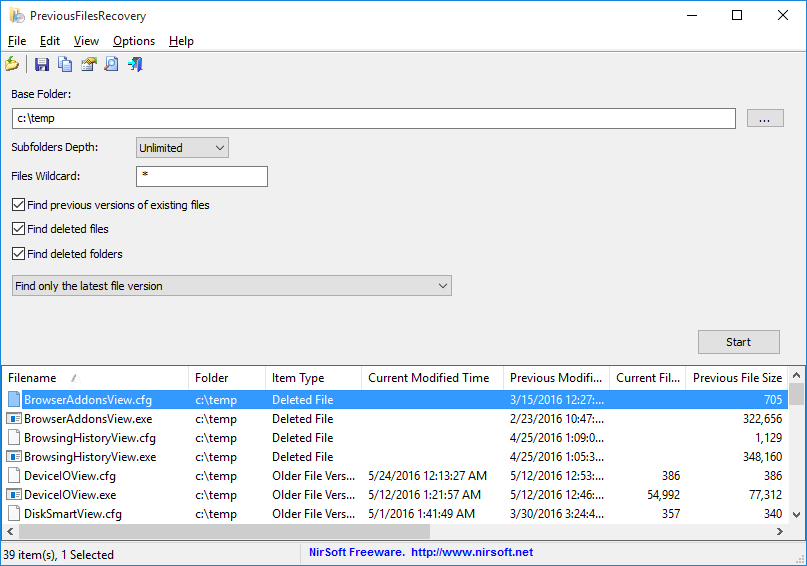
PreviousFilesRecovery allows you to scan the shadow copies of your local hard drive and find deleted files as well as older versions of existing files. If the file you need is found in the shadow copies of Windows, you can easily recover it by copying it into existing folder on your drive.
| Category: | |
| Runs on: | Vista / Win7 / Win8 / Win10 |
| Writes settings to: | Application folder |
| Unicode support: | Yes |
| License: | Freeware |
| How to extract: | Download the ZIP package and extract to a folder of your choice. Launch PreviousFilesRecovery.exe. |
| Similar/alternative apps: | ShadowCopyView |
| What's new? |
Added:
|

MozBackup v1.5.2 Beta 1
billon on 15 Apr 2020 Change history
- 2MB (uncompressed)
- Released on 6 May 2012
- Suggested by sandokan_zwijn
MozBackup allows you to backup and restore profiles of a variety of Mozilla-based products including Firefox, Thunderbird, SeaMonkey, Mozilla Suite, Netscape, Sunbird, Songbird, Flock Spicebird, Wyzo etc. This includes bookmarks, mail, contacts, history, extensions, cache etc. Program works with installed versions of these programs and can help shuttle profiles between programs on multiple machines.
The program will also back up Firefox Portable and backed up files are saved to .PCV files, compatible with standard ZIP tools.
NOTE: Program is not being developed anymore and may be incompatible with latest browsers.
| Category: | |
| Runs on: | Win98 / WinME / WinNT / Win2K / WinXP / Vista / Win7 / Win8 / Win10 |
| Writes settings to: |
None You can customize some defaults by editing backup.ini in the application folder with a text editor. |
| Stealth: ? | Yes |
| License: | MPL v. 2.0 |
| How to extract: | Download the ZIP package and extract to a folder of your choice. Launch MozBackup.exe. |
| What's new? |
See: http://mozbackup.jasnapaka.com/changelog.txt |
| Latest comments |
rbon
on 2020-04-14 11:08
MozBackup 1.5.2 Beta 1
RightToolsForJob
on 2021-05-31 19:31
Mozbackup no longer backups the address book in Thunderbird, the option is grayed out.
RightToolsForJob
on 2021-05-31 21:25
See all
9›
More from my last post, |

Zback v2.90.0.a
Andrew Lee on 3 Apr 2022 Change history
- 2MB (uncompressed)
- Released on 2 Apr 2020
- Suggested by grannyGeek
Zback is a backup and synchronization tool with a small footprint. Copy modes include update files, refresh existing files, or mirror source to target and can be run manually, from batch/script, or from the command line. Users can filter files based on extension, size, date, subdirectories and preview their backup/sync before running.
| Category: | |
| Runs on: | Win2K / WinXP / Vista / Win7 / Win8 / Win10 / Wine |
| Writes settings to: | Application folder |
| Dependencies: | Administrator rights |
| Stealth: ? | Yes |
| Unicode support: | Yes |
| License: | Free for personal use |
| How to extract: | Download the "portable version" ZIP package and extract to a folder of your choice. Launch zback.exe. |
| What's new? |
|
| Latest comments |
Maeve13
on 2022-04-03 18:24
Download link is dead; Archive.org has the site, but unable to download the zip folder. Lo4d and MajorGeeks both appear to have a copy, such as it is...
juverax
on 2022-04-03 20:17
Zback v.2.90.00a can be downloaded from https://www.softpedia.com/get/PORTABLE-SOFTWARE/System/Backup-and-Recovery/Zback-Portable.shtml
kiwichick888
on 2023-02-13 01:12
See all
26›
Maeve13 the download link on the website works for me. |

Folder Sync v1.0.0 build 222 Adware
billon on 25 Jul 2019 Change history
- 4MB (uncompressed)
- Released on 25 Jul 2019
- Suggested by I am Baas
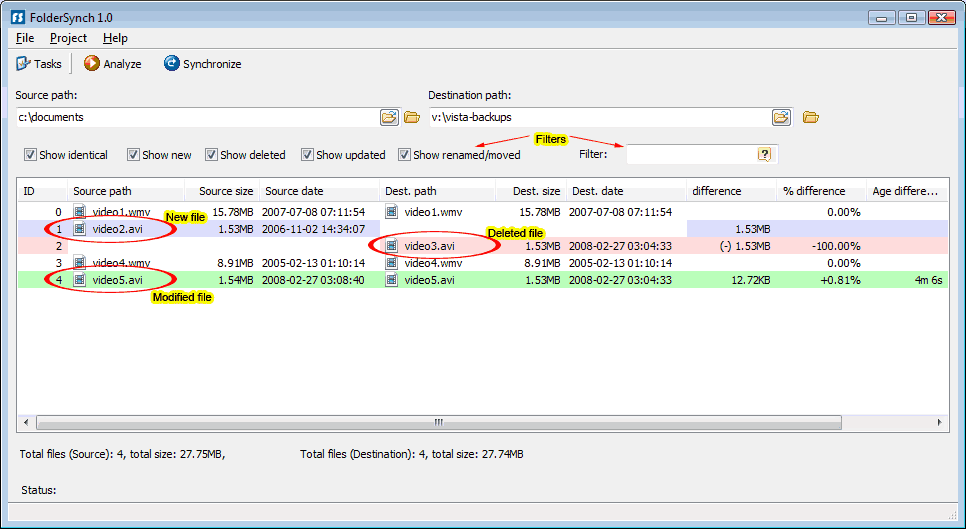
Folder Sync is a backup program that can performs comparisons between two directories and then reports new, updated, renamed, moved and deleted files. The program can performs synchronization, as well as full or differential (only items that have changed) from the source to the destination path.
| Category: | |
| Runs on: | Vista / Win7 / Win8 / Win10 |
| Writes settings to: | Application folder |
| Dependencies: | Microsoft .NET Framework 4 |
| Stealth: ? | No |
| License: | Freeware |
| How to extract: |
|
| What's new? |
See: https://www.saleensoftware.com/FolderSync |
| Latest comments |
mukhi
on 2016-04-10 05:16
See all
13›
Folder Syncv1.0.0 build 208 is crashing in Win7Pro32. I use Folder Syncv1.0.0 build 110, and have Folder Syncv1.0.0 build 205, too; neither of these two crashes. |

Exiland Backup Free v5.0
billon on 28 May 2020 Change history
- 7MB (uncompressed)
- Released on 21 May 2020
- Suggested by exiland
Exiland Backup Free is a flexible file backup and folders sync software. It lets you easily copy your important files and duplicate your backups to various locations: local or network drives, FTP servers, or other removable media (such as flash drives or external HDD).
Commercial versions of the program are available with additional features.
| Category: | |
| Runs on: | WinXP / Vista / Win7 / Win8 / Win10 |
| Writes settings to: | Application folder |
| Stealth: ? | Yes |
| Unicode support: | Yes |
| License: | Free for personal use |
| How to extract: | Download the "Portable" ZIP package and extract to a folder of your choice. Launch ExilandBackup.exe. |
| Similar/alternative apps: | Back4Sure, DirSync Pro, DSynchronize, jaBuT, Zback |
| What's new? |
See: https://exiland-backup.com/backup-history-free.html |
| Latest comments |
hamasaki
on 2019-08-07 23:01
Not sure how this is stealth, it created a 'temp' folder in the root of my drive and added a startup entry.
PAFuser
on 2024-02-18 14:35
5.0 does not appear to be available on web site, found it on MajorGeeks.com. Only demo on site.
Ennovy
on 2024-02-18 15:46
Add comment
3›
Internet Archive page: https://web.archive.org/web/20190516075918/https://exiland-backup.com/backup-download.html |