Categories /
Internet - Web Authoring (6)
- Newer first
- Display 510 2550100entries
-


BlueGriffon v3.1
billon on 26 Oct 2019 Change history
- 97MB (uncompressed)
- Released on 10 Oct 2019
- Suggested by webfork
BlueGriffon is a feature-rich tabbed WYSIWYG content editor for the Web with formatting, spell-check and keyboard shortcuts. Powered by the rendering engine behind Firefox, it's a modern and robust solution to edit HTML in conformance to the latest standards, including HTML 4, XHTML 1 and HTML 5 documents. Includes the popular vector graphics editor SVG Edit and HTML files can be viewed in a rendered or a source-only mode that supports themes.
Note: Some features are for-pay including editing style sheets (thanks IanFromBarrie) and Full Screen view, but the program also supports many free add-ons similar to Firefox.
Cross-platform and intended to replace NVU, a tool written by the same author.
| Category: | |
| Runs on: | Win7 / Win8 / Win10 |
| Writes settings to: | Application folder |
| Stealth: ? | No. %APPDATA%\Mozilla |
| Unicode support: | Yes |
| Path portability: | No |
| License: | Freemium (installer version is adware). Source code is MPL/GPL/LGPL. |
| How to extract: | Download the ZIP package and extract to a folder of your choice. Launch bluegriffon.exe. |
| Similar/alternative apps: | KompoZer Portable, NVU Portable |
| What's new? |
See: https://github.com/therealglazou/bluegriffon/releases |
| Latest comments |
osirisgothra
on 2013-11-05 10:51
and a quick FYI about the comment on not having to pay for CSS editing, the "free one' in the program seems to be somewhat of a bad joke. It is a beat-around-the bush feature that lets you do something you wouldnt expect it to, and other features are just plain missing.. they may be there buried somewhere, but to a user who just installed it and is testing it out, it isn't very convincing, I did manage to find some of the features after an hour, and you shouldn't have to go into code to correct something that the editor did wrong. The spell checker seems like instead of correcting words it replaces the word and leaves the misspelled word right next to it. Like I said, maybe there is some option buried but to the new user of the product, it just doesn't do it. I ended up just writing my own simple WYSIWYG webpage editor in a few days and have the functionality i need... sheesh
webfork
on 2013-11-05 22:13
osirisgothra: Every WYSIWYG editor I've worked with requires that I go back at some point and fix something in the code that the macro editor side broke. In my experience so far, BlueGriffon does some things better, some things worse. As to the CSS and rigidity, I agree, but the truth is that this is the direction Adobe went with Dreamweaver and I think BlueGriffin is trying to be an OSS alternative to that program rather than a normal WYSIWYG.
jack45435
on 2016-05-09 23:07
See all
18›
extracting the installer works with Universal Extractor (last version: 1.6.1), when updating bin/innounp.exe to latest version. |

KompoZer Portable v0.8 Beta 3
webfork on 25 Jan 2016 Change history
- 10MB (uncompressed)
- Released on 16 Mar 2013
- Suggested by Simon.T
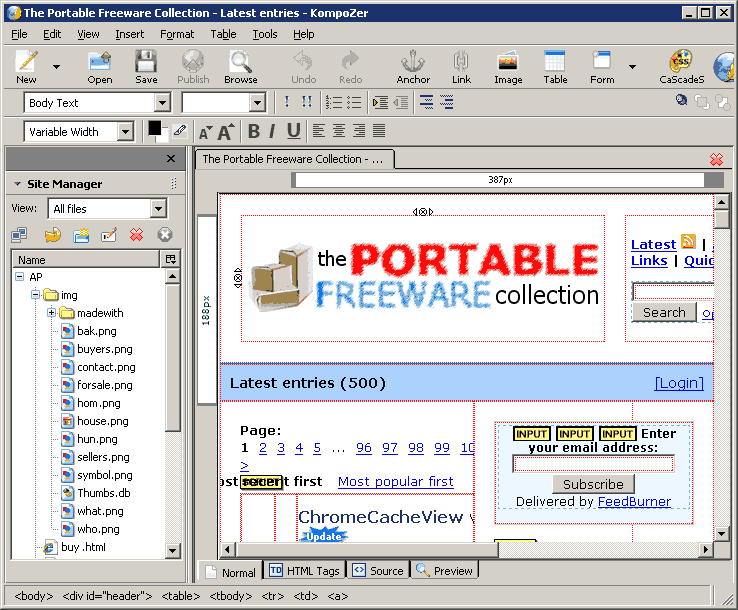
KompoZer is a web authoring system (like FrontPage or DreamWeaver) that features WYSIWYG editing of web pages in a tabbed interface. Although requiring no knowledge of HTML, views can switch between normal, code, and "tag" views. Includes basic CSS, PHP, and Javascript tools, and support for forms, complex tables, layers, and templates.
Includes a Site Manager that works with local and FTP sites to give easy access to files in an easy tree-style format.
KompoZer and its name are based on Mozilla Composer (now part of SeaMonkey) and the now-defunct Nvu project. KompoZer Portable is a PortableApps version of the program. Alternatively, X-KompoZer is also available.
| Category: | |
| Runs on: | Win95 / Win98 / WinME / WinNT / Win2K / WinXP / Vista / Win7 |
| Writes settings to: | Application folder |
| Stealth: ? | Yes |
| Unicode support: | Partial. You can enter Unicode characters into the documents you create, but you can't save them with Unicode filenames. |
| License: | Freeware/Open Source (MPL/GPL/LGPL tri-license) |
| How to extract: | Download the self-extracting EXE and extract to a folder of your choice. Launch KompoZerPortable.exe. |
| Similar/alternative apps: | BlueGriffon, NVU Portable |
| What's new? |
|
| Latest comments |
AndTheWolf
on 2015-02-02 22:41
See all
6›
Download still points to KompoZerPortable_0.7.10_Rev_3_English.paf.exe. Website is up to date though. |

Email Link Encoder v4.0
lwc on 28 Mar 2021 Change history
- 580KB (uncompressed)
- Released on 26 Aug 2006
- Suggested by technicolordreamcoat
Email Link Coder assists you in encoding the email links on your web pages so they cannot be easily extracted by spambots. The email links can be produced as encoded HTML, Javascript or images.
| Category: | |
| Runs on: | Win95 / Win98 / WinME / WinNT / Win2K / WinXP |
| Writes settings to: | None |
| Stealth: ? | Yes |
| License: | Freeware |
| How to extract: | Download the ZIP package and extract to a folder of your choice. Launch EMailCoder.exe. |
| Latest comments |
CyberDoc
on 2006-08-25 14:29
The identical problem that Andrew Lee is having is exhibited on my WinXP SP2 PC... Otherwise javascript and image features work well...
Andrew Lee
on 2006-08-27 04:41
I emailed the author, and here's his reply: "I'm not sure what happened there. I've re-uploaded it to my website and it seems to be fine now." I have downloaded it again and it seems to be working fine too.
CyberDoc
on 2006-08-28 21:51
See all
4›
I just downloaded it again... overwrote the 1st EXE and it is working beautifully... NICE... Thanks go to Andrew Lee for following up with the author... and to the author for a quick response... |

Scriptly v0.8.95.6
Midas on 13 Feb 2021 Change history
- 27MB (uncompressed)
- Released on 25 Nov 2010
- Suggested by computerfreaker
Scriptly is an extensive code editor for writing HTML and programming with PHP. In addition to the comprehensive search and replace facility, the program features syntax highlighting for several script languages and file types. Code snippets and complex tables can be added quickly and easily.
| Category: | |
| Runs on: | Win98 / WinME / Win2K / WinXP / Vista / Win7 / Win8 / Win10 |
| Writes settings to: | Application folder |
| Stealth: ? | Yes |
| License: | Freeware |
| How to extract: | Download the ZIP package and extract to a folder of your choice. Launch webocton_scriptly.EXE. |
| Latest comments |
carbonize
on 2011-12-31 08:02
I gave it a try and whilst it is powerful in some aspects some of it is a bit weird such as the faded text HTML generator.
vmars316
on 2015-12-23 00:47
Add comment
2›
Its text size is too small for me to use , and it won't allow changing/enlarging text size . |

Zoundry Raven v1.0.375
webfork on 28 Jan 2017 Change history
- 42MB (uncompressed)
- Released on 21 Jul 2008
- Suggested by ashghost
Zoundry Raven is a tabbed WYSIWYG blog editor. It's as easy to use as a word processor, and includes simple tools to add links, tags, photos, music and video files, and more. The indexer allows you to browse all of your previous posts across all of your blogs by tags, links, or images.
Website offline, linking to archive.org
| Category: | |
| Runs on: | Win2K / WinXP / Vista / Win7 |
| Writes settings to: | Application directory |
| Stealth: ? | No. Creates an empty folder in "%appdata%. |
| License: | GPL v2 |
| How to extract: | Download and run the installer and select "Install Raven as a Portable Application (Raven2Go). |
| Latest comments |
hamasaki
on 2013-04-29 06:47
Add comment
1›
Throws so many exceptions I`ve lost count. Could be great, but is very poor. |

NVU Portable v1.0 Rev 5
webfork on 12 Jan 2016 Change history
- 10MB (uncompressed)
- Released on
- Suggested by Eu Gene Lim
Nvu is a web authoring system (like FrontPage or DreamWeaver) that features WYSIWYG editing of web pages, integrated file management via FTP and tabbed editing that makes working on multiple pages a snap. It includes support for forms, tables, and templates.
Note: KompoZer Portable is considered an unofficial bug fix based on the same code. The Nvu Project has ended and PortableApps lists KompoZer on the former home page.
| Category: | |
| Runs on: | Win95 / Win98 / WinME / WinNT / Win2K / WinXP |
| Writes settings to: | Application folder |
| Stealth: ? | Yes |
| Unicode support: | Partial. You can enter Unicode characters into the documents you create, but you can't save them with Unicode filenames. |
| License: | Freeware/Open Source |
| How to extract: | Download the self-extracting EXE and extract to a folder of your choice. Launch NVUPortable.exe. |
| Similar/alternative apps: | BlueGriffon, KompoZer Portable |
| Latest comments |
Webfork
on 2007-06-05 16:08
An excellent basic HTML editor for new and intermediate Web page authors. Although the program has a few bugs here and there, it is easily one of the best free (non-text only) Web page editors available. Its cross-platform nature (windows, linux, mac) means you'll be able to edit your files no matter where you are.
vcb
on 2007-09-09 02:08
his is a great program. While set up to easly open and edit html files, I found I can also open and edit asp pages as well. I really like how it color codes the html on the source view page
Angelo Archie Amoruso
on 2008-01-10 03:54
See all
6›
The application is now named as "KompoZer" |