Categories /
Security - Secure Deletion (16)
- Newer first
- Display 510 2550100entries
-


Blank And Secure v7.71 Updated
Andrew Lee on 6 Apr 2024 Change history
- 135KB (uncompressed)
- Released on 5 Apr 2024
- Suggested by guinness
Blank And Secure is a basic tool for permanently deleting files from your hard drive by overwriting them. The program includes drag-and-drop capability, multiple overwrites for greater security and a free space wipe feature to help prevent recovery of files already deleted.
| Category: | |
| Runs on: | Win98 / WinME / WinNT / Win2K / WinXP / Vista / Win7 / Win8 / Win10 / Win11 |
| Writes settings to: | Application folder |
| Stealth: ? | Yes |
| Unicode support: | Yes |
| License: | Freeware |
| How to extract: |
|
| Similar/alternative apps: | WipeFile |
| What's new? | See: https://softwareok.com/?seite=Microsoft/BlankAndSecure/History |
| Latest comments |
Beeber
on 2015-06-05 18:43
I use shredder.exe. It is less than 150kb and fast. As I work, I can move files to be deleted into a 'new folder', planted anywhere. When I am done, shredder.exe takes the 'new folder', and seconds later, it is gone. Loading individual files works fine, too.
LonerD
on 2018-12-10 08:45
See all
14›
Unicode support- partially. Author doesn't want implement fully support. Some months ago I reported about bug - program can't work with Unicode file names from command line. No answer, no fix... |

BleachBit v4.6.0
rbon on 6 Nov 2023 Change history
- 16MB (uncompressed)
- Released on 5 Nov 2023
- Suggested by guinness
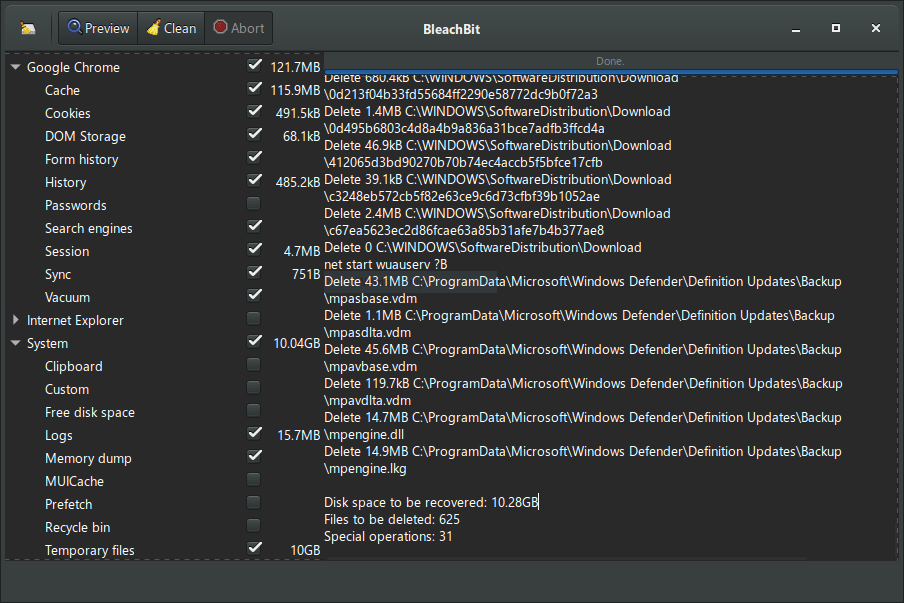
BleachBit quickly frees disk space, removes hidden junk and safeguards your privacy. You can erase cache, Internet history, cookies (including the much-maligned "evercookie"), DOM storage, unused localizations and temporary files of 70 applications including Firefox, Internet Explorer, Flash, Google Chrome, Opera, Safari, Adobe Reader, APT and more. Additional applications can be added with the community authored winapp2.ini cleaner list in the Preferences - General tab (requires restart).
Includes wipe function to protect privacy, support for many languages, and available for Linux and Mac OS X.
| Category: | |
| Runs on: | Vista / Win7 / Win8 / Win10 / Win11 |
| Writes settings to: | Application folder |
| Dependencies: | Administrator rights |
| License: | GNU GPLv3 |
| How to extract: | Download the "portable" ZIP package and extract to a folder of your choice. Launch bleachbit.exe. |
| Similar/alternative apps: | CCleaner |
| What's new? |
See: https://www.bleachbit.org/news |
| Latest comments |
zorro
on 2020-03-15 15:13
BleachBit seems to leave traces in the last version (3.2) - after first run I found the folder ".dbus-keyrings" in the root of C:\USERS\user\
DzejPy
on 2023-12-05 05:55
See all
20›
Bleachbit portable downloaded using the link (from the home page) does not contain the msvcr100.dll file - without it the program cannot be run. |

WipeFile v3.6
billon on 13 Dec 2020 Change history
- 484KB (uncompressed)
- Released on 12 Dec 2020
- Suggested by AlephX
WipeFile is a secure file and folder deletion utility, overwriting data to prevent later recovery. Although most users will only require a standard 1-pass wipe, the program supports 14 different wipe methods, including high-security military standards. Higher security settings involve overwriting the data multiple times, which is dramatically slower.
For full drive wiping, the developer makes available an also portable WipeDisk program.
| Category: | |
| Runs on: | WinXP / Vista / Win7 / Win8 / Win10 |
| Writes settings to: | Application Folder |
| Dependencies: | Microsoft .NET Framework 4 |
| Stealth: ? | Yes |
| Unicode support: | Yes |
| License: | Freeware |
| How to extract: |
Download the 7z package and extract (using a program like PeaExtractor) to a folder of your choice. Launch WipeFile.exe. Optionally, delete unnecessary language files. |
| Similar/alternative apps: | Blank and Secure, WipeDisk |
| What's new? | See German changelog here. |
| Latest comments |
Midas
on 2020-06-30 07:42
See all
15›
@PAFuser: DotNET apps tend to reflect the underlying OS bitness, unless instructed otherwise. |

OW Shredder v6.45
billon on 12 Feb 2019 Change history
- 2MB (uncompressed)
- Released on 1 Jun 2018
- Suggested by I am Baas
OW Shredder erases files irretrievable by overwriting the affected file data blocks on the disk space, which prevents the reconstruction of the deleted documents. The program can wipe individual files, free disk storage, as well as entire disks or volumes.
The program includes basic disk usage analyzer, file unlocker, autostart manager and more.
Various erasing methods are available, with more iterations (wipes) taking longer to execute and potentially more secure.
| Category: | |
| Runs on: | WinXP / Vista / Win7 / Win8 / Win10 |
| Writes settings to: | Application folder |
| Dependencies: |
Microsoft .NET Framework 2.0+ Administrator rights |
| Stealth: ? | Yes |
| Unicode support: | Yes |
| License: | Freeware |
| How to extract: | Download the ZIP package and extract to a folder of your choice. Launch OW Shredder.exe. |
| Similar/alternative apps: | Blank and Secure |
| What's new? |
|
| Latest comments |
MIKLO
on 2016-12-19 15:32
Add comment
1›
I really like the look of this software, now for testing. Thanks for your hard work and allowing us to use it for free. |

Quick Erase v0.6.4.649
webfork on 23 Feb 2017 Change history
- 2MB (uncompressed)
- Released on 25 Sep 2015
- Suggested by smaragdus
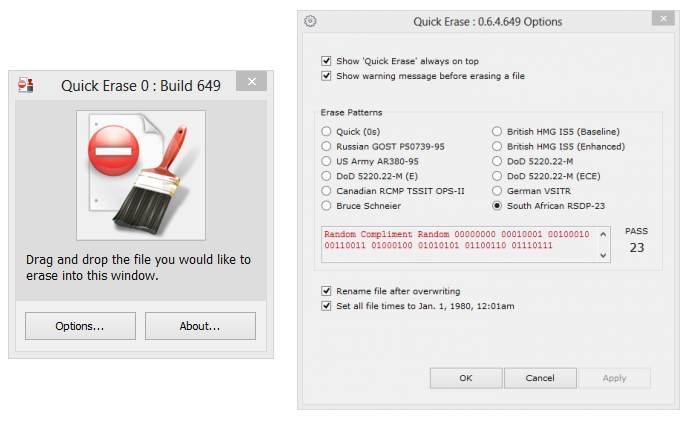
Quick Erase is a simple drag-and-drop file shredder, helping to prevent file recovery by renaming, overwriting, and resetting file date. The program offers 12 different deletion methods that vary from fast 1 pass approaches (zero-out or British HMG IS5), up to very slow 23-pass mechanisms (Rizonesoft's own South African RSDP-23).
Notes
- Only the most security-conscious users will require anything but 1-pass shredding
- Program discontinued (linking to Softpedia and Archive.org)
| Category: | |
| Runs on: | WinXP / Vista / Win7 / Win8 / Win10 |
| Writes settings to: | Application folder |
| Stealth: ? | Yes |
| Unicode support: | Yes |
| License: | GPL |
| How to extract: | Download the ZIP package and extract to a folder of your choice. Launch QuickErase.exe. |
| Similar/alternative apps: | CyberShredder |
| What's new? |
|

WipeDisk v1.3
webfork on 14 Sep 2017 Change history
- 842KB (uncompressed)
- Released on 14 Apr 2014
- Suggested by Gaijin
WipeDisk is a tool for secure wiping of hard disks (both logical and physical), USB memory sticks and floppy disks to prevent file recovery. By default, the program will wipe a disk and all it's content, but the program includes a "Free Space" wipe, which includes deleted but recoverable files.
Although the "Low 1x" setting should be sufficient for most security needs, it supports 14 wiping methods for very high security, including US Navy, Airforce, DoD and NATO standards. Higher settings are slower.
The developer also makes a program for individual files WipeFile.
Note: No longer listed on the author's website -- linking to Softpedia.
| Category: | |
| Runs on: | Win2K / WinXP / Vista / Win7 / Win8 / Win10 |
| Writes settings to: | Application folder |
| Stealth: ? | Yes |
| License: | Freeware |
| How to extract: |
Optionally, delete unnecessary language files. |
| Similar/alternative apps: | WipeFile |
| What's new? | See German change-log here. |
| Latest comments |
Dave
on 2010-11-16 20:57
Can it be run from a bootable USB Flash Drive
Mixture
on 2017-08-28 16:02
See all
16›
The software is no longer available at its website. I had to go to Download.com to acquire Wipedisk. |

DPWipe v1.1
webfork on 16 May 2016 Change history
- 387KB (uncompressed)
- Released on
- Suggested by AlephX
DPWipe is a tiny drag-and-drop secure wipe program for files and folders. It supports normal delete (not secure), single overwrite, DoD wipe (US Department of Defense 5220.22-compliant wiping), and Gutmann's method (35-pass).
Note: Multiple wipe actions are progressively slower. All but the most security-minded users should only need single overwrite.
| Category: | |
| Runs on: | Win95 / Win98 / WinME / WinNT / Win2K / WinXP / Vista / Win7 |
| Writes settings to: | None |
| Stealth: ? | Yes |
| Unicode support: | No |
| License: | Freeware |
| How to extract: |
|
| What's new? |
|
| Latest comments |
morg
on 2009-02-24 15:16
See all
9›
"did you" even :) |

Mareew Free Eraser v1.1.3
webfork on 11 Jan 2020 Change history
- 5MB (uncompressed)
- Released on 1 Mar 2008
- Suggested by Wolfghost
Mareew Free Eraser wipes the content of the files and metadata, making private data and sensitive information completely unrecoverable.
File systems supported: NTFS 4 and 5, FAT16, FAT32, and VFAT file systems.
| Category: | |
| Runs on: | Win95 / Win98 / WinME / WinNT / Win2K / WinXP / Vista |
| Writes settings to: | None |
| Stealth: ? | Yes |
| Unicode support: | No |
| License: | Freeware. Site claims to be GPL'd but source is not present. |
| How to extract: |
|

Square Privacy Cleaner v1.2.1.0
webfork on 15 Nov 2016 Change history
- 342KB (uncompressed)
- Released on 6 Apr 2011
- Suggested by guinness
Square Privacy Cleaner is a fast, powerful, and easy to use privacy protection tool, able to remove all the unwanted history data on your computer.
NOTE: Program has gone commercial but the last available freeware version is still linked.
| Category: | |
| Runs on: | WinXP / Vista / Win7 |
| Writes settings to: | Application folder |
| Stealth: ? | Yes |
| License: | Freeware |
| How to extract: | Download the portable ZIP package and extract to a folder of your choice. Launch SPCleaner.exe. |
| Similar/alternative apps: | BleachBit |
| What's new? |
|
| Latest comments |
Jimmy Neutron
on 2010-10-31 14:24
If you close this program using the usual Windows red "X" in the top right corner, it will leave SPCleaner.exe running in Task Manager (and an inactive icon in system tray). Instead, you MUST pull down the file menu and choose exit to actually shut this program down. That's pretty rude going against Windows conventions.
joe
on 2011-01-08 12:16
This app deleted everything an a mounted TrueCrypt volume.
Mike.S.G.
on 2011-04-04 13:13
See all
6›
@Gary, Jimmy Neutron & joe |

CleanAfterMe v1.37
Checker on 21 Mar 2014 Change history
- 60KB (uncompressed)
- Released on
- Suggested by spaztastic
CleanAfterMe allows you to easily clean files and registry entries automatically created by Windows during regular computer activity. You can clean the cookies/history/cache/passwords of Internet Explorer, the 'Recent' folder, the last opened files, temporary Windows folders, the event logs, the Recycle Bin etc.
The program includes an optional basic wipe of deleted files for extra security.
| Category: | |
| Runs on: | Win2K / WinXP / Vista |
| Writes settings to: | Application folder |
| Stealth: ? | Yes |
| License: | Freeware |
| How to extract: | Download the ZIP package and extract to a folder of your choice. Launch CleanAfterMe.exe. |
| What's new? |
|
| Latest comments |
NirSoft fan
on 2008-12-14 05:25
From the app's version history:
Indie
on 2008-12-14 06:38
Thanks all.
webfork
on 2010-10-05 18:31
See all
9›
I ran 3 other major cleaner programs here on the site (Bleechbit, CCleaner, and PureRA) and this program still found more to delete. If you're using an public computer, this seems to be THE program to run before you leave. |