Categories /
Internet - HTML Tools (5)
- Newer first
- Display 510 2550100entries
-


Leafier v1.1.1.1
Midas on 21 Nov 2014 Change history
- 615KB (uncompressed)
- Released on
- Suggested by I am Baas
Leafier is a simple HTML editor with tag insertion feature. Unicode, tabbed multi document interface, syntax highlighting, customizable colors, fonts, and more. Comes with a variety of predefined tags to insert.
Languages: Swedish, Japanese, Greek, Chinese Traditional
| Category: | |
| Runs on: | WinXP / Vista / Win7 / Win8 |
| Writes settings to: | Application folder |
| Stealth: ? | Yes |
| Unicode support: | Yes |
| License: | Freeware |
| How to extract: |
|
| Similar/alternative apps: | RJ TextEd, Scriptly |
| What's new? |
Google Translate(d) changelog:
(Japanese original at http://www.vieas.com/en/software/lea_his.html) |
| Latest comments |
webfork
on 2013-03-16 16:44
Sunclad: I have no explanation for your download issues. I was able to download it almost instantly. I can only suggest trying a download from softpedia http://www.softpedia.com/get/Internet/WEB-Design/HTML-Editors/Leafier.shtml
NickR
on 2013-05-17 01:02
Version 1.0.2.0 (2013-05-16)
zorro
on 2016-09-28 14:52
See all
12›
Interesting enough, Leafier (x64) does not support the use of the "AltGr"-Key (german keyboard), what makes the use of brackets (who needs brackets for HTML/CSS?) really annoying (you have to insert them by opening the charmap...). Funny deal-breaker... |

dirhtml v4.871
Midas on 21 Sep 2020 Change history
- 2MB (uncompressed)
- Released on 25 Feb 2013
- Suggested by Rodrigo Freitas
Dirhtml creates index.html files that list files in a folder (and optionally subfolders). With scripts, dirhtml can incorporate customizable HTML code to create unique web pages.
| Category: | |
| Runs on: | WinNT / Win2K / WinXP / Vista / Win7 / Win8 / Win10 / Wine |
| Writes settings to: | Application folder |
| Stealth: ? | Yes |
| Unicode support: | Yes |
| License: | Freeware |
| How to extract: | Download the "portable" ZIP package and extract to a folder of your choice. Launch dirhtml.exe. |
| What's new? |
|
| Latest comments |
Ian from Barrie
on 2010-12-19 17:11
My 2 cents (while I can - Canadian Government is debating scrapping the penny):
aziz
on 2011-02-15 04:05
a perfect software which i have been looking for..
Jasantes
on 2022-03-03 16:36
See all
9›
Hello everyone. This is a very useful tool!!! |

HTMLAsText v1.11
billon on 20 Apr 2019 Change history
- 42KB (uncompressed)
- Released on 15 Aug 2009
- Suggested by Checker
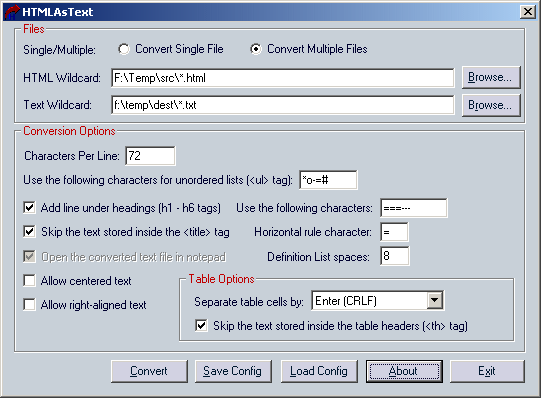
HTMLAsText converts HTML documents to simple text files, by removing all HTML tags and formatting the text according to your preferences.
| Category: | |
| Runs on: | Win95 / Win98 / WinME / WinNT / Win2K / WinXP / Vista / Win7 / Win8 / Win10 |
| Writes settings to: | None |
| Stealth: ? | Yes |
| License: | Freeware |
| How to extract: | Download the ZIP package and extract to a folder of your choice. Launch HtmlAsText.exe. |

HtmlDocEdit v1.02
Checker on 21 Mar 2014 Change history
- 90KB (uncompressed)
- Released on
- Suggested by webfork
HtmlDocEdit is a simple HTML designer/editor based on the Internet Explorer browser, that allows you to easily edit HTML files without any knowledge in HTML. With HtmlDocEdit you can change the font/color of selected text, add images, add links, add ordered and unordered lists, and more...
| Category: | |
| Runs on: | Win2K / WinXP / Vista |
| Writes settings to: | Application folder |
| Stealth: ? | Yes |
| License: | Freeware |
| How to extract: | Download the ZIP package and extract to a folder of your choice. Launch HtmlDocEdit.exe. |

HTML Portable Editor v3.0.0
Checker on 5 Aug 2014 Change history
- 429KB (uncompressed)
- Released on
- Suggested by AlephX
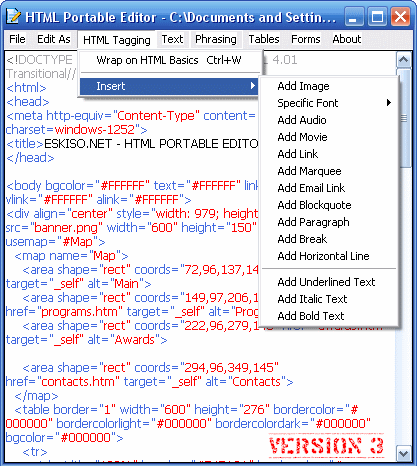
HTML Portable Editor is a simple HTML editor with support for HTML tags and syntax highlighting.
| Category: | |
| Runs on: | WinNT / Win2K / WinXP |
| Writes settings to: | None |
| Stealth: ? | Yes |
| Unicode support: | No |
| License: | Freeware |
| How to extract: | Download the ZIP package and extract to a folder of your choice. Launch HTML Portable Editor.exe. |
| What's new? |
|