Categories /
Internet - Web Servers (9)
- Newer first
- Display 510 2550100entries
-


XAMPP v8.2.12
lwc on 23 Dec 2023 Change history
- 674MB (uncompressed)
- Released on 19 Nov 2023
- Suggested by Hank7
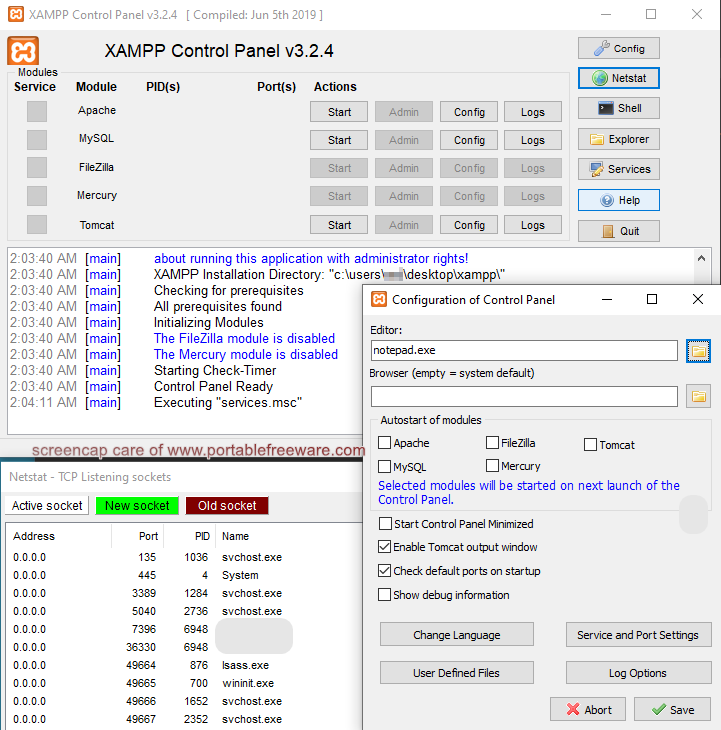
XAMPP is an integrated server package with mail, Web, FTP, and WebDAV. Named for Apache + MariaDB + Filezilla + PHP + Perl (AMPP) plus Mercury and Tomcat, the program includes a open software packages combined to power the various services, including JSP Java, OpenSSL, and more.
Also available for OSX and Linux.
Notes:
- To also add portable Python:
- Download and extract Python's NuGet package
- In XAMPP's control panel, click Config=>Apache (httpd.conf)
- Add AddHandler cgi-script .py into the end of the file (see this blog post for other info)
- Start your PY files with #!..\Python\python.exe (or wherever else you extracted the Python folder)
- To also add portable Composer:
- Download Compser's Manual Installation (i.e. portable) version
- Extract it in any folder you like
- Modify the command in the link above to the relative (or absolute) path to the main PHP file, for example (assuming you'll run composer from htdocs): @echo ..\php\php "%~dp0composer.phar" %*>composer.bat
- In order to be able to download packages, edit php\php.ini and uncomment ;extension=zip (i.e. remove the ;)
- One useful function of this program is the Wiki on a stick tool that works with XAMPP.
- XAMPP has add-on capabilities, currently only a WordPress installation (but previously also a portable MediaWiki).
| Category: | |
| Runs on: | Vista / Win7 / Win8 / Win10 / Win11 |
| Writes settings to: | Application folder |
| Stealth: ? | Yes |
| Unicode support: | Yes |
| License: | GPL |
| How to extract: |
|
| Similar/alternative apps: | Uniform Server, Abyss Webserver X1 |
| What's new? | See: https://www.apachefriends.org/blog.html |
| Latest comments |
freakazoid
on 2012-06-02 20:22
webfork: Because it's their preferred portable build. Not everyone will need the full package. The lite / portable build should be sufficient for people building a website for testing locally and on the go.
olliebean
on 2018-10-19 14:51
Just for clarification, is the full version portable? Because the only version labelled "portable" at the download link appears to be the lite version, without FTP or Mail.
Pax
on 2019-05-17 03:49
See all
25›
Note: The description should replace Oracle's MySQL with the community-based fork: MariaDB. |

Abyss Web Server X1 v2.16.9.1
Andrew Lee on 4 Jul 2023 Change history
- 3MB (uncompressed)
- Released on 26 Jun 2023
- Suggested by Ezzetabi
Abyss Web Server is a lightweight web server that supports secure connections, compression and a variety of web technologies. Includes dynamic content generation through CGI/FastCGI scripts, ISAPI extensions, native ASP.NET, reverse proxying, eXtended Side Includes (XSSI), custom error pages and log rotation. Includes remote management tools.
Security features include SSL/TLS, anti-leeching, password protection, bandwidth throttling, IP address controls, anti-hacking features etc.
Clients available for Mac OS X and Linux.
| Category: | |
| Runs on: | WinXP / Vista / Win7 / Win8 / Win10 |
| Writes settings to: | Application folder |
| Stealth: ? | Yes |
| Unicode support: | Yes |
| License: | Liteware |
| How to extract: |
For x86 systems:
|
| Similar/alternative apps: | Uniform Server, XAMPP |
| What's new? | See: https://aprelium.com/news/ |
| Latest comments |
Kapilind
on 2010-07-13 07:50
Works great I have been using it for 2 years with no significant errors or bugs. Works well with ASP, PHP, MYSQL.
Cattleya
on 2014-07-11 02:56
Hi, anyone here know why I cannot connect to 127.0.0.1:9999 (Abyss configuration page) when using Privoxy, is there a workaround ?
webfork
on 2014-07-12 21:10
See all
9›
Cattleya: have you tried changing the admin port (away from 9999)? Privoxy might be redirecting it for some reason. |

WinNMP v21.10
lwc on 15 Apr 2023 Change history
- 426MB (uncompressed)
- Released on 12 Oct 2021
- Suggested by lwc
WinNMP (formerly WTServer and prior to that WT-NMP) is an open source free WNMP (a variation of WAMP). That is, a Windows package with Nginx, MariaDB/MongoDB and PHP-CGI (and also Redis) server stack for Windows.
| Category: | |
| Runs on: | Win7 / Win8 / Win10 |
| Writes settings to: | Application folder |
| Dependencies: | Microsoft Visual C++ Redistributable |
| Stealth: ? | Yes |
| Unicode support: | Yes |
| Path portability: | Automatic relative path (eg. ..\..\personal\work.doc) |
| License: | GPL |
| How to extract: |
The installer, which was created in Inno Setup, tries to install Microsoft Visual C++ Redistributable without asking and even if you already have it. However, it also executes some needed stuff (e.g. customizing the database). So download the installer and install it to the default folder. Copy all files to a folder of your choice. Uninstall the application. Launch WinNMP.exe. If you don't want it to install MVC, then:
|
| Similar/alternative apps: | XAMPP |
| What's new? | See https://winnmp.wtriple.com/changelog |
| Latest comments |
lwc
on 2016-01-17 21:31
Add comment
1›
There are no official System Requirements, so I just wrote those tested by myself. |

Uniform Server v15.0.1
lwc on 24 Dec 2022 Change history
- 163MB (uncompressed)
- Released on 9 Dec 2022
- Suggested by Andy Finney
The Uniform Server is a complete web development system containing Apache, PHP, MySQL, Perl, phpMyAdmin and more. Additional plugins on the website will extend the system with FTP server and Java servlet support.
Note: One useful function of this program used to be the Wiki on a stick, but it eventually became outdated.
| Category: | |
| Runs on: | Vista / Win7 / Win8 / Win10 |
| Writes settings to: | Application folder |
| Stealth: ? | Yes |
| License: | FreeBSD |
| How to extract: |
|
| Similar/alternative apps: | XAMPP |
| What's new? |
See: https://sourceforge.net/projects/miniserver/files/ |
| Latest comments |
hamasaki
on 2017-04-08 08:22
Is this project still active? There hasn`t been any updates for awhile. Nothing for the last 2 PHP7 branches. Last update was January.
hamasaki
on 2019-08-12 14:14
See all
13›
The last link is a 404 because this site removes the trailing slash. Add the trailing slash to the url. |

FuguHub v8.1
lwc on 30 Sep 2022 Change history
- 6MB (uncompressed)
- Released on 5 Aug 2020
- Suggested by David Gagnon
FuguHub (formerly BarracudaDrive) enables various server tools and file sharing via a web browser. A number of plugins are integrated into the product, including a WebDAV Server, Large File Mailer, Website Builder, Bulletin Board, and Application Server.
Note that access to the server from beyond your local network will require a dynamic DNS service. See the website for more information.
| Category: | |
| Runs on: | WinXP / Vista / Win7 / Win8 / Win10 |
| Writes settings to: | Application folder |
| Unicode support: | Yes |
| License: | Free for personal use |
| How to extract: |
Download the ZIP package and extract to a folder of your choice. Launch FuguHub.exe -console. Open a web browser and enter "localhost" to begin the setup process. |
| Similar/alternative apps: | HFS |
| What's new? | Not available, formerly in https://fuguhub.com/readme.txt |
| Latest comments |
Grunt
on 2008-08-12 14:32
Homepage has moved.
mozkill
on 2010-02-10 14:59
you can accomplish the same thing as this software simply by running a Hamachi VPN (the non-managed version) plus the HFS file server (through the VPN tunnel). Its easier than I make it sound.
Vavo
on 2010-04-21 17:39
See all
4›
Nothing special. The web interface is ugly. Any HFS will do this. Can not change the port of the server. Only the upload function is a plus |

Serva Community v4.6.0
Andrew Lee on 1 Jan 2022 Change history
- 3MB (uncompressed)
- Released on 8 Dec 2021
- Suggested by webfork
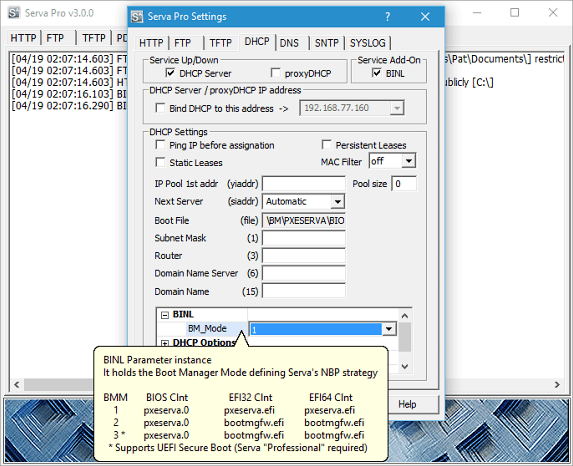
Serva is an easy-to-use server package supporting a variety of protocols including HTTP, FTP, TFTP client/server, DHCP and proxyDHCP (PXE service), BINL, DNS, SNTP and SYSLOG. Focused on the quick deployment of a stable platform running as many server protocol engines as possible, the program doesn't aim compete on with other server tools in terms of speed or security.
Serva also allows you to setup a server which you can use to install Windows over a network without Microsoft's RIS/WDS/WAIK suites.
| Category: | |
| Runs on: | WinXP / Vista / Win7 / Win8 / Win10 |
| Writes settings to: | Application folder |
| Stealth: ? | Yes |
| Unicode support: | Yes |
| License: | Liteware |
| How to extract: | Download the ZIP package and extract to a folder of your choice. Launch Serva32.exe (for 32-bit OS) or Serva64.exe (for 64-bit OS). |
| What's new? |
See: https://www.vercot.com/~serva/download.html#version-history |
| Latest comments |
b1001
on 2013-07-09 14:19
of course !
webfork
on 2013-07-09 23:42
b1001: Please move discussions on policy to forums. Responses to Joby's message are there as well.
Tsuwado
on 2023-05-12 10:27
See all
10›
I registered just to comment this. Should one use tftpd instead? The term is searchable though it seems very generic, in case this URL isn't allowed: https://pjo2.github.io/tftpd64/ |

HFS v2.3m
lwc on 17 Apr 2021 Change history
- 2MB (uncompressed)
- Released on 18 Aug 2018
- Suggested by Darkbee
HFS (HTTP File Server) is a great tool for sharing files on any device with a web browser. Just setup the program, add files and folders via drag and drop, and connect to the web address. The web view is an easy-to-navigate page that provides search, a variety of view options, and even the capability to download files and folders in a single archive (TAR format).
Other features include user controls, uploading, speed limits, transfer logs, "expert" view, and IP bans. Note that to make the program available over the internet, a dynamic DNS-type service may be necessary.
Functional in Linux under WINE.
| Category: | |
| Runs on: | Win95 / Win98 / WinME / WinNT / Win2K / WinXP / Vista / Win7 / Win8 / Win10 / Wine |
| Writes settings to: | Application folder |
| Stealth: ? | Yes |
| License: | GPL |
| How to extract: |
|
| Similar/alternative apps: | Everything (has a web interface) |
| What's new? |
See: http://www.rejetto.com/hfs/?f=wn |
| Latest comments |
Midas
on 2014-07-06 02:25
FYI, in the stunnel forum topic there's some additional tools for easy configuring HFS (http://www.portablefreeware.com/forums/viewtopic.php?t=21551).
smaragdus
on 2015-08-01 00:24
See all
39›
The correct HFS forum thread - http://www.portablefreeware.com/forums/viewtopic.php?f=4&t=32 |

USBWebserver v8.6
lwc on 30 Oct 2022 Change history
- 74MB (uncompressed)
- Released on 17 Oct 2013
- Suggested by sandokan_zwijn
USBWebserver is an easy-to-use server package that integrates Apache, MySQL and PHP, including PHPMyAdmin. Great to show an offline version of your website, anywhere and anytime PHP development, website testing, and more.
NOTE: Website is gone, linking to Archive.org.
| Category: | |
| Runs on: | WinNT / Win2K / WinXP / Vista / Win7 / Win8 / Win10 |
| Writes settings to: | Application folder |
| Stealth: ? | Yes |
| License: | Freeware |
| How to extract: | Download the ZIP package and extract to a folder of your choice. Launch usbwebserver.exe. |
| What's new? |
|
| Latest comments |
bublible
on 2011-12-13 01:29
@dany: I already did and he replay that we need to edit php.ini in SETTINGS directory, not the one in PHP directory - and it worked! So all is normal now... ;-)
dany
on 2011-12-13 01:37
@bublible: Cool.
lrgorby
on 2014-01-04 16:12
See all
39›
@bublible: I think I found a solution for you if you have not gotten it or if others need it. |

Vibe Streamer v3.0.2
lwc on 17 Apr 2021 Change history
- 7MB (uncompressed)
- Released on 26 Nov 2009
- Suggested by Gary
Vibe Streamer is an MP3 streaming server that allows you to listen to your music anywhere in the world using a standard web browser. The server supports users/groups and different access rights, access restriction based on client IP address, sharing of any number of files and folders, etc.
| Category: | |
| Runs on: | Win2K / WinXP / Vista |
| Writes settings to: | Application folder |
| Unicode support: | No |
| License: | Freeware |
| How to extract: |
|
| What's new? |
|
| Latest comments |
MarkyMark
on 2015-04-19 19:24
The instructions no longer seem valid (there is no $_OUTDIR directory for example) and the download link is is now http://www.vibestreamer.com/downloads/
smaragdus
on 2015-04-21 00:28
See all
12›
It's a pity Vibe Streamer has been discontinued. The developer open-sourced it- https://github.com/versionstudio/vibestreamer , but its very unlikely that someone will take over the project. For me Vibe Streamer has two major flaws- it doesn't support Unicode and it can stream only lossy MP3s. |