Categories /
Graphics - Color Tools (15)
- Newer first
- Display 510 2550100entries
-


Just Color Picker v5.9
Andrew Lee on 11 Jul 2023 Change history
- 2MB (uncompressed)
- Released on 10 Jul 2023
- Suggested by lautrepay
Just Color Picker is a tool that captures the colour of any pixel in any screen area and displays its code in a variety of formats: HTML, RGB, HEX, HSB/HSV, HSL, CMYK and Delphi.
| Category: | |
| Runs on: | Win2K / WinXP / Vista / Win7 / Win8 / Win10 |
| Writes settings to: | Application folder |
| Stealth: ? | Yes |
| Unicode support: | Yes |
| License: | Freeware |
| How to extract: |
|
| Similar/alternative apps: | ColorMania, ColorSchemer ColorPix |
| What's new? | See: https://annystudio.com/software/colorpicker/#versionhistory |
| Latest comments |
tomcat
on 2018-01-22 04:43
The instructions say:
Midas
on 2018-01-22 07:27
Add comment
2›
Type '[Windows key]+R', drag and drop 'jcpicker.exe' into the "Run" dialog, edit the the character string you just placed in the "Open" field, adding " /ini" at the end, click the "OK" button and presto... it's called a "Command Line Parameter". |

Instant Eyedropper v2.0.0
Andrew Lee on 9 Feb 2021 Change history
- 1MB (uncompressed)
- Released on 2 Nov 2020
- Suggested by linuxamp
Instant Eyedropper is a simple color picker that sits in the system tray. Just click program icon and drag your pointer to the color you want to grab.
Supported color formats include HTML, HEX, Delphi Hex, Visual Basic Hex, RGB, and HSB.
| Category: | |
| Runs on: | WinXP / Vista / Win7 / Win8 / Win10 |
| Writes settings to: | Application folder |
| Stealth: ? | Yes |
| Unicode support: | Yes |
| License: | Freeware |
| How to extract: | Download the "Portable" ZIP package and extract to a folder of your choice. Launch InstantEyedropper.exe |
| Similar/alternative apps: | Just Color Picker, ColorMania |
| What's new? |
|
| Latest comments | Add comment 1› |

PhiBar v1.00
billon on 17 Jan 2021 Change history
- 48KB (uncompressed)
- Released on 16 Jan 2003
- Suggested by scamme
Phi relationships in a color spectrum produce rich, appealing color combinations. This program has introduced a concept called PhiBar, which applies phi relationships to frequencies, or wavelengths, in the spectrum of visible colors in light.
| Category: | |
| Runs on: | Win95 / Win98 / WinME / WinNT / Win2K / WinXP / Vista / Win7 / Win8 / Win10 |
| Writes settings to: | None |
| Dependencies: | MSVBVM60.DLL MSCOMCTL.OCX |
| License: | Free for personal use |
| How to extract: | Download the ZIP package and extract to a folder of your choice. Launch PhiBar.exe. |
| Latest comments |
juverax
on 2021-01-16 17:18
The download link is broken at TPFC and also at Softpedia.
Andrew Lee
on 2021-01-17 04:40
Found on Wayback Engine:
juverax
on 2021-01-17 10:56
See all
8›
VirusTotal malware detection score of " https://web.archive.org/web/20200511020937/https://www.goldennumber.net/wp-content/uploads/2012/06/PhiBar.zip : |

ColorPicker v1.2
billon on 23 Dec 2020 Change history
- 242KB (uncompressed)
- Released on 1 May 2020
- Suggested by billon
ColorPicker allows color code selections, primarily for web development. Colors can be selected similar to the Windows color selection via an HSL color graphic, and both HSL and RGB values can be adjusted individually. So-called web-safe colors can also be selected via a graphic (e.g. for 3-digit CSS color values) and values can be copied or pasted in different formats. The program allows automatic copy and paste of values that enable data exchange with other programs, including text and HTML editors.
Color code formats include hexadecimal, decimal RGB, CSS hexadecimal, CSS 3 digits hexadecimal, CSS RGB decimal, CSS RGB percent, CSS HSL).
Note: Program discontinued.
| Category: | |
| Runs on: | Vista / Win7 / Win8 / Win10 |
| Writes settings to: | Application folder |
| Dependencies: | Microsoft .NET Framework 4.0 |
| Stealth: ? | Yes |
| Unicode support: | Yes |
| License: | Freeware |
| How to extract: |
|
| Similar/alternative apps: | ColorMania |
| What's new? | See German changelog here. |

ColorMania v12.1
billon on 26 Nov 2020 Change history
- 4MB (uncompressed)
- Released on 25 Nov 2020
- Suggested by I am Baas
ColorMania is an advanced color picker utility, especially created for web-designers, graphic artists and application developers. The program is able to pick colors from anywhere on your screen using a built-in screen magnifier for increased accuracy.
Includes variable zoom settings, a color palate, random and image inversion, hue, saturation, value, and brightness settings. A variety of color notation types (HTML Hex, RGB values, CMYK, Photoshop and more).
| Category: | |
| Runs on: | WinXP / Vista / Win7 / Win8 / Win10 |
| Writes settings to: | Application folder |
| Stealth: ? | Yes |
| Unicode support: | Yes |
| License: | Freeware |
| How to extract: | Download the "Portable Version" ZIP package and extract to a folder of your choice. Launch ColorManiaPortable.exe. |
| What's new? |
See: http://www.blacksunsoftware.com/colormania.html |
| Latest comments |
gbrao
on 2017-02-25 06:59
The dev responds to any e-mail. If any one has any suggestions contact the dev.
PAFuser
on 2020-06-10 08:50
See all
7›
Stay with version 10.1 if you want 64 bit version. Currently 11.0 is only 32 bit. |

Color Warlock v2.3.6 build 4
billon on 28 Jun 2020 Change history
- 470KB (uncompressed)
- Released on 27 Jun 2020
- Suggested by I am Baas
Color Warlock is a color chart program for building palettes and referencing color codes. The program can copy html hex color codes and other color types to use and share them with others. View options include multiple columns, hex color values, and sorting by brightness, name and saturation.
The program includes a Chart Builder to create your own color chart files or you can use available color palettes including a web safe selection, MS Office and even standard Crayola crayons.
| Category: | |
| Runs on: | WinXP / Vista / Win7 / Win8 / Win10 |
| Writes settings to: | Application folder |
| Dependencies: | Microsoft .NET Framework 4.0+ |
| License: | Freeware |
| How to extract: | Download the ZIP package and extract to a folder of your choice. Launch ColorWarlock.exe. |
| Similar/alternative apps: | ColorMania |
| What's new? |
See: https://www.donationcoder.com/forum/index.php?topic=24872 |

ColorPix v1.2
billon on 9 May 2018 Change history
- 605KB (uncompressed)
- Released on
- Suggested by garbanzo
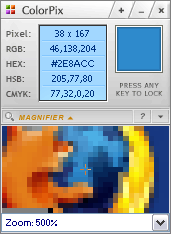
ColorPix is a simple color picker that gives you RGB, HEX, HSB and CMYK values that can be copied with shortcut keys or single left mouse click. It has a collapsible magnifier (max. 28x) and can stay on top of other windows.
NOTE: website is down, linking to archive.org.
| Category: | |
| Runs on: | Win95 / Win98 / WinME / WinNT / Win2K / WinXP / Vista / Win7 / Win8 / Win10 |
| Writes settings to: | Application folder |
| Stealth: ? | Yes |
| Unicode support: | Yes |
| License: | Freeware |
| How to extract: | Download ColorPix.exe to a folder of your choice and launch. |
| Latest comments |
Specular
on 2014-02-25 02:12
Easily my favorite color picking app, mainly for the compact size, any key locking, and one-click copying of values.
smaragdus
on 2018-05-09 15:40
See all
4›
Website down and download link unavailable. |

ColorCop v5.3
shnbwmn on 28 Nov 2016 Change history
- 101KB (uncompressed)
- Released on
- Suggested by risk
ColorCop allows you to magnify any part of your screen and pick a color from it using the eye dropper tool. The magnifier supports 1 to 16x zoom, and the eye dropper tool can pick an average color from a 3x3 or 5x5 area instead of sampling only a single pixel. The picked color can be easily exported to various formats required by HTML, Delphi, PowerBuilder, Visual Basic or Visual C++ etc.
Note: versions newer than v5.3 are no longer natively portable (see "What's new?" button above), because they leave traces in the system; as the license doesn't forbid redistribution, TPFC is making the natively portable v5.3 available for download.
| Category: | |
| Runs on: | Win95 / Win98 / WinME / WinNT / Win2K / WinXP / Vista / Win7 / Win8 |
| Writes settings to: | Application folder |
| License: | Freeware |
| How to extract: | Download the no-install ZIP package and extract to a folder of your choice. Launch ColorCop.exe. |
| What's new? | Complete changelog is at http://colorcop.net/whatsnew. |
| Latest comments |
hamasaki
on 2022-01-18 02:27
Not sure why the author decided to make the settings store in the appData for the newer versions. Older versions are stealth.
Midas
on 2022-01-18 07:26
See all
7›
Maybe a drive to make it more Windows 10 compatible, as later versions seem to have problems with it... (e.g., see https://github.com/ColorCop/ColorCop/releases/). |

Dropper v1.1
Midas on 20 Nov 2013 Change history
- 52KB (uncompressed)
- Released on
- Suggested by I am Baas
Dropper allows you to get the exact color of any pixel on the screen and converts it to commonly used representations.
| Category: | |
| Runs on: | Win95 / Win98 / WinME / WinNT / Win2K / WinXP / Vista / Win7 |
| Writes settings to: | None |
| Stealth: ? | Yes |
| Unicode support: | Yes |
| License: | Freeware |
| How to extract: |
Download the ZIP package and extract to a folder of your choice. Launch Dropper.exe. Note: Unicode (i386ur) and ANSI (i386r) |
| Similar/alternative apps: | ColorSchemer ColorPix ColorCop |
| Latest comments | Add comment 2› |

PasteColor v0.1
Midas on 10 Feb 2021 Change history
- 4MB (uncompressed)
- Released on 25 Feb 2013
- Suggested by tproli
PasteColor is a color picker tool that helps you copy or paste color values with ease. The program has a "picker" system that enables copying colors to the clipboard from color pickers, paste color to color pickers in RGB, HEX formats or using HTML color names, input color validation, and will remember last selected color. Interface includes user-defined colors support, configurable hotkeys, and an available system tray icon with enable/disable feature.
A 64-bit version is available (within the folder).
Written using AutoIt3 (source included in download).
| Category: | |
| Runs on: | WinXP / Vista / Win7 |
| Writes settings to: | Application folder |
| Stealth: ? | Yes |
| License: | Freeware/Open Source |
| How to extract: | Download the ZIP package and extract to a folder of your choice. Launch PasteColor.exe (for 32-bit OS) or PasteColorX64.exe (for 64-bit OS). |
| Latest comments |
FileHandler
on 2018-05-10 14:46
Been using it for years and could not do without it. Fastest way to insert colors into color dialogs
Midas
on 2021-02-10 11:20
See all
4›
PasteColor online sources gone, linked to Archive.org and MajorGeeks.com mirrors. |