Categories /
Productivity - Desktop Accessories (69)
- Newer first
- Display 510 2550100entries
-


AutoHideDesktopIcons v6.12 Updated
Andrew Lee on 14 Apr 2024 Change history
- 168KB (uncompressed)
- Released on 9 Apr 2024
- Suggested by USBman
AutoHideDesktopIcons allows you to hide/unhide all desktop icons after a preset time.
| Category: | |
| Runs on: | Win2K / WinXP / Vista / Win7 / Win8 / Win10 / Win11 |
| Writes settings to: | Application folder |
| Stealth: ? | Yes |
| Unicode support: | Yes |
| License: | Freeware |
| How to extract: | Download the "Portable" ZIP package and extract to a folder of your choice. Launch AutoHideDesktopIcons_p.exe. |
| What's new? | See: https://softwareok.com/?seite=Microsoft/AutoHideDesktopIcons/History |
| Latest comments |
donald
on 2011-09-16 17:56
I will attempt to post on application website but ...
donald
on 2011-09-22 00:45
Please note the immediate response of the developer.
freakazoid
on 2013-12-02 00:03
Add comment
3›
Neat little app. Uses around 1.0 - 1.5MB RAM. GUI is a little ugly like all SoftwareOK apps, but you'll probably want to start this in the system tray and forget it! :) |

TheAeroClock v8.55 Updated
Andrew Lee on 11 Apr 2024 Change history
- 2MB (uncompressed)
- Released on 8 Apr 2024
- Suggested by Checker
TheAeroClock is a simple but at the same time beautiful desktop clock with alpha transparency. Basic functions include transparency, size, setting and selection of the clock texture or appearance are available.
| Category: | |
| Runs on: | Win2K / WinXP / Vista / Win7 / Win8 / Win10 |
| Writes settings to: | Application folder |
| Stealth: ? | Yes |
| Unicode support: | Yes |
| License: | Freeware |
| How to extract: |
|
| What's new? | See: https://softwareok.com/?seite=Freeware/TheAeroClock/History |
| Latest comments |
olliebean
on 2020-07-06 16:00
This is not portable by default; it needs an extra step. From the readme:
stisev
on 2021-02-16 03:07
For any poor souls out there who can't figure this app out.
bitcoin
on 2021-02-16 13:36
See all
12›
"3. If you want to see the program options, launch the app twice (yes you can't make this stuff up - there's no right click options, lol)" |

ZoomIt Portable v8.01 Updated
Andrew Lee on 10 Feb 2024 Change history
- 4MB (uncompressed)
- Released on 8 Feb 2024
- Suggested by roddersg
ZoomIt provides three useful tools for almost any presentation including a screen zoom, annotation tool, and break timer. The zoom option helps focus on a specific point or part of the screen while the annotation tool can help emphasize or edit what's shown (press Ctrl+S to save a screenshot).
The program includes customisable hotkeys, zoom levels, two different kinds of zoom (a "live" zoom as well as a passive read-only view), and a variety of different annotation features.
ZoomIt Portable is a version of Zoomit that saves settings to the local folder.
| Category: | |
| Runs on: | WinXP / Vista / Win7 / Win8 / Win10 / Win11 |
| Writes settings to: | Application folder |
| Unicode support: | Yes |
| License: | Freeware |
| How to extract: | Download the self-extracting EXE to a folder of your choice. Launch ZoomItPortable.exe. |
| What's new? | See: https://docs.microsoft.com/en-us/sysinternals/#whats-new-rss-icon |
| Latest comments |
webfork
on 2014-03-29 17:23
Add comment
2›
Been using this a lot in screen sharing meetings and demonstrations. Works well, but often get a "didn't shut down properly" message and have to restart on Win7x64. Very lucky to have it. |

DesktopSnowOK v6.25 Updated
Andrew Lee on 3 Feb 2024 Change history
- 204KB (uncompressed)
- Released on 1 Feb 2024
- Suggested by Checker
DesktopSnowOK adds a little winter magic feeling (up to 2000 snow flakes) on your Desktop. Can also add flowers, stars or leaves.
| Category: | |
| Runs on: | Win2K / WinXP / Vista / Win7 / Win8 / Win10 |
| Writes settings to: | Application folder |
| Stealth: ? | Yes |
| Unicode support: | Yes |
| License: | Freeware |
| How to extract: | Download the ZIP package and extract to a folder of your choice. Launch DesktopSnowOK.exe or DesktopSnowOK_x64.exe. |
| What's new? | See: https://softwareok.com/?seite=Freeware/DesktopSnowOK/History |
| Latest comments |
rodger123
on 2012-10-15 04:42
Neat little harmless program-wish it had skulls and other creepy stuff falling,maybe they could make a halloween version?
rodger123
on 2012-11-14 05:00
It did nothing spectacular for me,but I had my sister in arizona DL it and she went gaga over it!Must be a girl thing!Nice Job.
fullbug
on 2015-12-28 15:16
See all
4›
Kinda cool, would be better if the snow built up a bit on the bottom of the screen..... |

AutoHideMouseCursor v5.55
Andrew Lee on 7 Jan 2024 Change history
- 100KB (uncompressed)
- Released on 6 Jan 2024
- Suggested by Checker
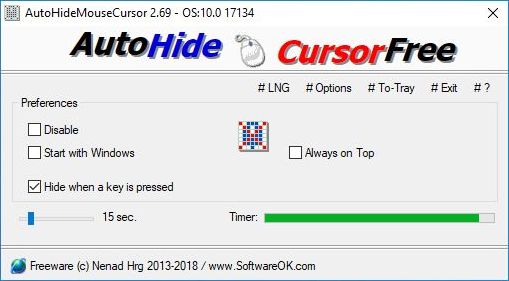
AutoHideMouseCursor automatically hides the mouse cursor with an adjustable timer. The program is useful for reducing distractions for users while reading, during presentations, or for personal preference.
| Category: | |
| Runs on: | Win7 / Win8 / Win10 / Win11 |
| Writes settings to: | Application folder |
| Stealth: ? | Yes |
| Unicode support: | Yes |
| License: | Freeware |
| How to extract: | Download the "Portable" ZIP package and extract to a folder of your choice. Launch AutoHideMouseCursor_p.exe or AutoHideMouseCursor_x64_p.exe (for 64-bit OS). |
| What's new? | See: https://softwareok.com/?seite=Microsoft/AutoHideMouseCursor/History |

7+ Taskbar Tweaker v5.15
Andrew Lee on 10 Nov 2023 Change history
- 1MB (uncompressed)
- Released on 9 Nov 2022
- Suggested by I am Baas
7+ Taskbar Tweaker allows you to configure various aspects of the Windows taskbar including mouse configuration, thumbnail handling, pinned items and button combining.
| Category: | |
| Runs on: | Win7 / Win8 / Win10 |
| Writes settings to: | Application folder |
| Unicode support: | Yes |
| License: | Freeware |
| How to extract: |
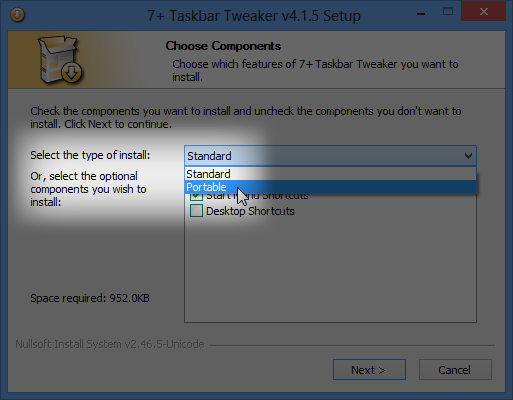
NOTE: We recommend avoiding the included updater as it is reported to install the non-portable version of the program (thanks olliebean). |
| What's new? | See: https://rammichael.com/downloads/7tt_setup.exe?changelog |
| Latest comments |
olliebean
on 2020-08-12 05:20
The stable version (as linked here) doesn't work after the latest Windows update. The beta version (available from the website) works fine, though.
kiwichick888
on 2021-09-06 19:04
Hi, the link downloads the latest version (v5.11.3) and it didn't prompt for portable install. Also, Windows stopped the file running and I had to manually allow it.
Midas
on 2021-09-08 10:05
See all
8›
@kiwichick888: |

Volume² v1.1.8.465
Ennovy on 16 Sep 2023 Change history
- 14MB (uncompressed)
- Released on 16 Sep 2023
- Suggested by Userfriendly
Volume² is an utility designed as a replacement for the standard Volume Control. It lets you easily change the sound volume just by rotating the mouse wheel, using keyboard hot keys or moving the mouse pointer to an edge of the screen.
It also includes an audio mixer with advanced volume controls support, a scheduler, an on-screen display, command line support and the ability to store and recall different unlimited presets via one mouse click or system-wide hot keys.
| Category: | |
| Runs on: | WinXP / Vista / Win7 / Win8 / Win10 / Win11 |
| Writes settings to: | Application folder |
| Stealth: ? | Yes |
| Unicode support: | Yes |
| License: | Freeware |
| How to extract: |
|
| Similar/alternative apps: | Volumouse |
| What's new? | See: https://github.com/irzyxa/Volume2/blob/master/History.txt |
| Latest comments |
freakazoid
on 2023-01-03 21:08
Can't believe I didn't know about this app!
freakazoid
on 2023-07-24 20:17
See all
10›
@Ennovy v1.1.8.464 appears to be a beta version. Perhaps we should change the version back to the last release version - v1.1.7.449? |

Rainmeter v4.5.18
Ennovy on 31 Jul 2023 Change history
- 9MB (uncompressed)
- Released on 31 Jul 2023
- Suggested by Fluffy Bot

Rainmeter is a customizable desktop widget program with the ability to display tools such as memory usage, battery power, RSS feeds and weather forecasts. The program includes many functional skins, able to record your notes and to-do lists, launch your favorite applications and control your media player all in a clean, unobtrusive interface.
Installer includes both the 32-bit and 64-bit versions.
XP/Vista users: download 3.3.3 Release version of Rainmeter.
| Category: | |
| Runs on: | Win7 / Win8 / Win10 / Wine |
| Writes settings to: | Application folder |
| Stealth: ? | Yes |
| Unicode support: | Yes |
| Path portability: | Automatic relative path (eg. ..\..\personal\work.doc) |
| License: | GNU GPLv2 |
| How to extract: |
|
| What's new? | See: https://www.rainmeter.net/changes-4.5/ |
| Latest comments |
Magibon
on 2013-10-18 19:15
thanks for updating guys..
smaragdus
on 2017-01-02 21:27
See all
23›
I am not on a Windows XP system yet I hate when developers drop support for Windows XP. As far as I know the last version of Rainmeter which supports Windows XP is 3.3.2.2743: |

Listary v5.0.0.2843
Andrew Lee on 7 Jul 2023 Change history
- 8MB (uncompressed)
- Released on 14 Oct 2018
- Suggested by Jacob125
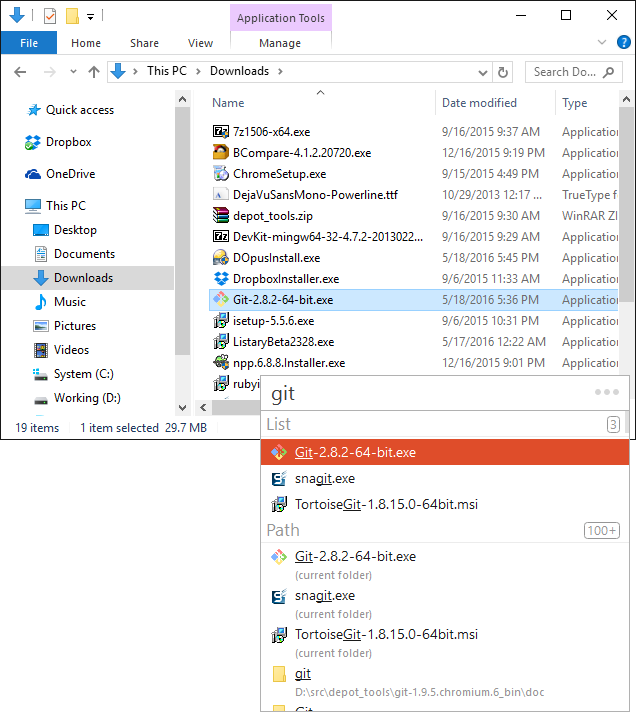
Listary is an enhancement that allows you to quickly search almost any listing in Windows by simply typing your search terms. The program will pop up a small, semi-transparent window in Explorer windows (including open/save dialogs), Task Manager, Registry Editor and even directly on your desktop. The program works with almost any application with a system-generated list.
Although some programs will automatically jump to the first letter you type (a find-as-you-type feature of Windows Explorer), you must type quickly for more than one letter and cannot see your output. Listary brings a long-time feature of Linux to Windows, letting you enter whole words and type slower with automatic changes. Additionally, it allows wildcards and has the ability to edit your input with immediate results.
Advanced features include hotkeys, autocomplete, blacklists, favorites, a customizable window. Note that the program contains many "pro"-only features, but the program is very functional in its basic version.
Note: The latest version is no longer portable. This entry has been updated to reflect the last known portable version of the program.
| Category: | |
| Runs on: | Win8 / Win10 / Win11 |
| Writes settings to: | Application folder |
| Dependencies: | Administrator rights |
| Stealth: ? | Yes |
| Unicode support: | Yes |
| License: | Free for personal use |
| How to extract: | Download the "Portable Version" ZIP package and extract to a folder of your choice. Launch Listary.exe. |
| What's new? |
|
| Latest comments |
Ennovy
on 2023-07-02 04:36
Listary v6 is no longer portable. There is only an installer version wich indicates that settings are stored in the user profile folder. Latest portable version is v5.00.2843 for Windows 10 / 8 / 7 / Vista / XP SP3. Download: http://web.archive.org/web/20200505013426/https://www.listary.com/download/ListaryPortable.zip?version=5.00.2843
Andrew Lee
on 2023-07-07 01:27
@Ennovy: I have updated the entry to reflect this information. Thanks!
Ennovy
on 2024-03-15 01:30
See all
22›
PortableApps.com released version 6.2.0.42: https://portableapps.com/news/2024-03-14--listary-portable-6.2.0.42-released |

Date Reminder v3.38
Andrew Lee on 18 Feb 2023 Change history
- 264KB (uncompressed)
- Released on 1 Feb 2023
- Suggested by Andrew Lee
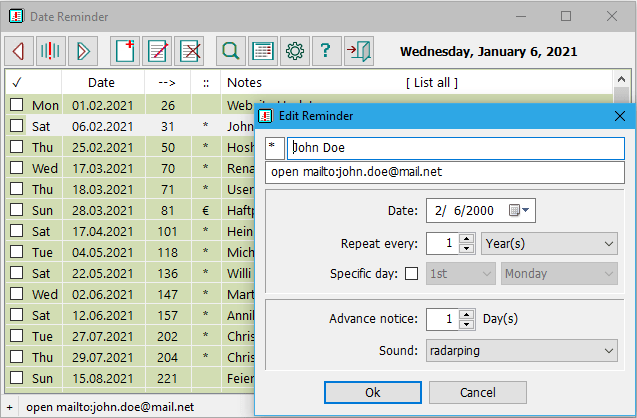
Date Reminder alerts you to both recurring and nonrecurring events, like birthdays, bills to pay, appointments etc. The reminders are listed in chronological order. Reminders can be marked "done", i.e. "dealt with". Past events will remain in the list until they are marked "done". An advance notice marker can be set a number of days before an event.
| Category: | |
| Runs on: | Win2K / WinXP / Vista / Win7 / Win8 / Win10 |
| Writes settings to: | Application folder |
| Stealth: ? | Yes |
| Unicode support: | Yes |
| License: | Freeware |
| How to extract: |
Download the ZIP package and extract to a folder of your choice. Launch Reminder.exe. Optionally, delete unnecessary language files. |
| What's new? |
|
| Latest comments |
MIKLO
on 2017-11-28 12:07
spicydog yeah I have also not been able to find a download link for any version of Datetrac
Cornflower
on 2023-02-18 07:40
Not at version 3.38
Cornflower
on 2023-03-03 05:49
See all
11›
If you downloaded version 3.38, the help files (reminder-en.chm) has just been updated as of 2023-02-23. It had not been when the version was released a month ago. |