Categories /
Graphics - Icon and Cursor Editors (9)
- Newer first
- Display 510 2550100entries
-


Quick Any2Ico v3.5.0.0 Updated
Andrew Lee on 10 Sep 2024 Change history
- 603KB (uncompressed)
- Released on 8 Sep 2024
- Suggested by I am Baas
Quick Any2Ico can take high quality icon or image files from a binary executable or resource file (.exe or .dll). Icons can be exported to a variety of formats with available sizing options. The program can also be used to add or remove image formats from icon files.
Command-line capabilities included (see homepage).
| Category: | |
| Runs on: | WinXP / Vista / Win7 / Win8 / Win10 |
| Writes settings to: | None |
| Stealth: ? | Yes |
| License: | Freeware |
| How to extract: | Download Quick_Any2Ico.exe to a folder of your choice and launch. |
| Similar/alternative apps: | ToYcon, Imagicon |
| What's new? | See: https://www.carifred.com/quick_any2ico/#whats_new |
| Latest comments | See all 4› |

Greenfish Icon Editor Pro v4.2
SYSTEM on 23 Apr 2023 Change history
- 65MB (uncompressed)
- Released on 21 Apr 2023
- Suggested by risk
Greenfish Icon Editor Pro is a tool for creating icons, animated or static cursors and other small images. Can extract icons and cursors from executable files and icon libraries, batch convert image files to icons or other image formats and supports advanced selection handling (marquee, lasso and wand tools, saving/loading selections from files). Offers various gradient styles for filling shapes, and includes many filters such as remove matte, drop shadow, inner/outer glow and bevel etc.
The program opens and saves in ICO, CUR, ANI, PNG, XPM, BMP, JPEG, WebP and TGA formats and creates icons and cursors up to 256x256 @ 32-bit, which can also be PNG-compressed for use in Vista and above.
Include Greenfish Image Converter (for processing TIFF and SVG files), which requires .NET Framework 3.5.
A 64-bit version is available (within the folder). Alternatively, a PortableApps version is also available: Greenfish Icon Editor Pro Portable.
| Category: | |
| Runs on: | Win8 / Win10 / Win11 |
| Writes settings to: | Application folder |
| Stealth: ? | Yes |
| Unicode support: | Yes |
| License: | Freeware |
| How to extract: |
Download the "portable version" ZIP package and extract to a folder of your choice. Launch gfie.exe. Optionally, delete unnecessary language files. |
| What's new? |
|
| Latest comments |
thepiney
on 2013-06-18 21:24
When you click the download link, a page opens with the download, just un-check the "Use our download manager and get recommended downloads" box. You'll get the zip file that you want. My Avast keeps blocking the site/file so I just disabled. After download I checked using VirusTotal and comes up clean.
billon
on 2017-04-06 10:17
If you want load/save WebP under XP, DL v.0.5.0 -
Pendrive
on 2022-10-08 10:28
See all
15›
Greenfish Icon Editor Pro 4.0 |

RealWorld Cursor Editor v2013.1
Checker on 11 Jul 2013 Change history
- 23MB (uncompressed)
- Released on
- Suggested by lautrepay
RealWorld Cursor Editor can create and edit cursors, both static and animated. You can draw your cursors pixel by pixel or make them from images using a simple wizard. Images in cursors can be modified by drawing tools such as Lines, Curves, Rectangles, or Ellipses. A drag-and-drop based interface allows users to easily reorder, duplicate, or append frames to animated cursors.
The program contains several predefined filters covering color corrections, softening, sharpening, motion blur and other effects. Selected filters (for example drop shadow) can be applied on multiple images at once.
Can import cursors from Linux XCursor format.
| Category: | |
| Runs on: | Win2K / WinXP / Vista / Win7 / Win8 |
| Writes settings to: | Application folder |
| Stealth: ? | Yes |
| License: | Freeware |
| How to extract: | Download the ZIP package and extract to a folder of your choice. Launch RWCursorEditor.exe. |
| What's new? |
|

Batch Icon Extractor v 1.0.0.1
Checker on 4 Aug 2014 Change history
- 96KB (uncompressed)
- Released on
- Suggested by Shadeclan
Batch Icon Extractor is a small tool for batch extraction of icons, including Windows Vista compressed icons. Icons from the file or from all files under the given folder are saved to a new folder called "icons" under the same directory as the folder/app. Also supports drag and drop a file or folder to the application icon.
Command-line tools also available.
| Category: | |
| Runs on: | WinNT / Win2K / WinXP / Vista |
| Writes settings to: | None |
| Dependencies: | None. |
| Stealth: ? | Yes |
| License: | Freeware |
| How to extract: | Download the EXE to a folder of your choice. Launch BatchIconExtractor.exe. |

ASysIcon v2.0.1.0
billon on 3 Jul 2017 Change history
- 18KB (uncompressed)
- Released on
- Suggested by Wolfghost
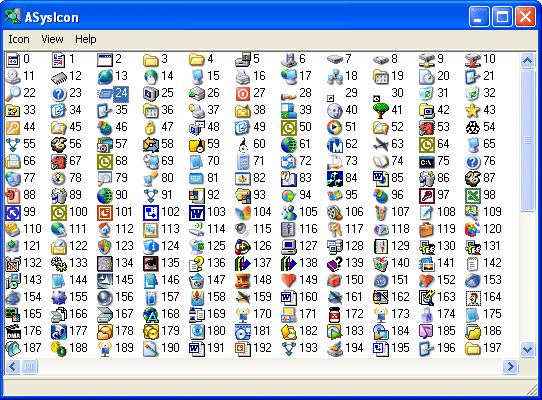
ASysIcon allows for the viewing and saving of the registered system icons. Along with the icon image, ASysIcon also displays the associated icon index within the system imagelist. ASysIcon also allows you to copy icons to the Windows® Clipboard for pasting into other applications. The icon list can also be printed.
| Category: | |
| Runs on: | Win2K / WinXP / Vista / Win7 |
| Writes settings to: | None |
| Dependencies: | .NET Framework 2.0 |
| Stealth: ? | Yes |
| License: | Freeware |
| How to extract: | Download the ZIP package and extract to a folder of your choice. Launch ASysIcon.exe. |

AniFX v1.0
Checker on 15 Mar 2014 Change history
- 3MB (uncompressed)
- Released on
- Suggested by lautrepay
AniFX is an all-in-one solution for cursor creation, extraction and editing. Includes many tools and more than 40 effects. Can utilize images, export cursors to images, or import them from Windows and Mac files. Animated GIF files can be converted to cursors and vice versa.
Supports transparency with XP/Vista/7 cursors and batch processing.
Note: The official website is offline so we are linking to the archive.org mirror. Alternatively, AniFX Portable is also available.
| Category: | |
| Runs on: | Win98 / WinME / Win2K / WinXP / Vista / Win7 |
| Writes settings to: | Application folder |
| Stealth: ? | Yes |
| Unicode support: | No |
| License: | Freeware |
| How to extract: | Download the ZIP package and extract to a folder of your choice. Launch AniFX.exe. |
| Latest comments |
lautrepay
on 2011-12-25 18:10
Add comment
2›
Thanks, Emka. The download link points to http://web.archive.org/web/20110204080136/http://icofx.ro/anifx/files/anifxpe.zip now. I've also added a mention to the PA.c version. |

ToYcon v0.9
billon on 18 Dec 2018 Change history
- 525KB (uncompressed)
- Released on 30 Jan 2010
- Suggested by SlowLearner
ToYcon is a fast, drag-and-drop PNG to ICO convertor. Support for Vista icons with embedded PNG compression available.
| Category: | |
| Runs on: | WinXP / Vista / Win7 / Win8 / Win10 |
| Writes settings to: | Application folder |
| Stealth: ? | Yes |
| License: | Free for personal use |
| How to extract: | Download the ZIP package and extract to a folder of your choice. Launch ToYcon.exe. |
| What's new? |
Retrieved from latest Webarchive snapshot. |
| Latest comments |
juverax
on 2018-12-18 11:25
Links to Download and to website are broken.
Mixture
on 2018-12-18 15:23
juverax
on 2018-12-18 16:08
See all
5›
@ Mixture: Thank you very much |

IcoFX v1.6.4
webfork on 26 Aug 2016 Change history
- 3MB (uncompressed)
- Released on
- Suggested by MISIIM
IcoFX is a complete all-in-one solution for icon creation, extraction and editing. It supports transparency and has tools and more than 40 effects to create icons. It can also import and export various images formats and has batch processing capability.
Works with 64-bit.
Note: This is the last freeware version as latest version has gone payware
| Category: | |
| Runs on: | Win98 / WinME / WinNT / Win2K / WinXP / Vista / Win7 |
| Writes settings to: | Application folder |
| Stealth: ? | Yes |
| Unicode support: | No |
| License: | Freeware |
| How to extract: | Download the "portable edition" ZIP package and extract it to a folder of your choice. Launch IcoFX.exe. |
| Latest comments |
lautrepay
on 2012-11-10 01:04
@rogerthedodger: you can download the PortableApps.com package. Extract or install it, the contents of the APP folder is all you need, delete the rest. After the first launching of IcoFX.exe the configuration files will be created
Rodger
on 2013-01-06 10:04
small fonts (on the app itself) = @ Kermode
Specular
on 2015-01-06 18:35
See all
19›
The busy XP screenshot doesn't do the app justice. Worthwhile app for icon creation and extraction. Main limitation of this version is the lack of 512px+ size support, which OSX and now Windows 10 support. |

@icon sushi v1.21
webfork on 27 Dec 2018 Change history
- 1MB (uncompressed)
- Released on 4 Feb 2007
- Suggested by Andrew Lee
@icon sushi is an image-to-icon converter that supports alpha channel, transparency mask, WinXP 32-bit icons and multi-icon ICO files. It imports ICO, BMP, PNG, PSD, EXE, DLL and ICL files. It exports ICO, BMP, PNG and ICL files.
| Category: | |
| Runs on: | Win95 / Win98 / WinME / WinNT / Win2K / WinXP / Vista |
| Writes settings to: | Application folder |
| Stealth: ? | Yes |
| Unicode support: | No |
| License: | Freeware |
| How to extract: |
|
| What's new? |
Full changelog at http://www.towofu.net/soft/aicon_history_e.txt. |
| Latest comments |
Nergal
on 2009-01-30 15:45
Seems to Work perfect on Vista SP1
Wizzer at Colour4Free
on 2009-09-07 12:06
See all
5›
Tried most of the icon editors listed and found that the application works in XP SP3 and Vista. |