Search results (67)
- Newer first
- Display 510 2550100entries
-


Swift PDF v1.1
Checker on 5 Aug 2014 Change history
- 1MB (uncompressed)
- Released on
- Suggested by AlephX
Swift PDF tranforms and combines images from scans, photos, downloads or any other source into a single PDF document. You can set the page sizes, adjust the margins, and page orientation.
| Category: | |
| Runs on: | Win95 / Win98 / WinME / WinNT / Win2K / WinXP / Vista / Win7 / Win8 |
| Writes settings to: | Application folder |
| License: | Freeware |
| How to extract: | Download the installer and extract to a folder of your choice. Launch SwiftPDF.exe. |
| Latest comments |
Rekrul
on 2011-01-16 06:06
See all
9›
Lousy program. Leaves a white margin around around every image, regardless of the margin and/or paper size settings. Also, it doesn't properly set the page size, so each page looks like a thumbnail image. |

PDF Version Converter v1.0
webfork on 9 Dec 2021 Change history
- 293KB (uncompressed)
- Released on
- Suggested by Andrew Lee
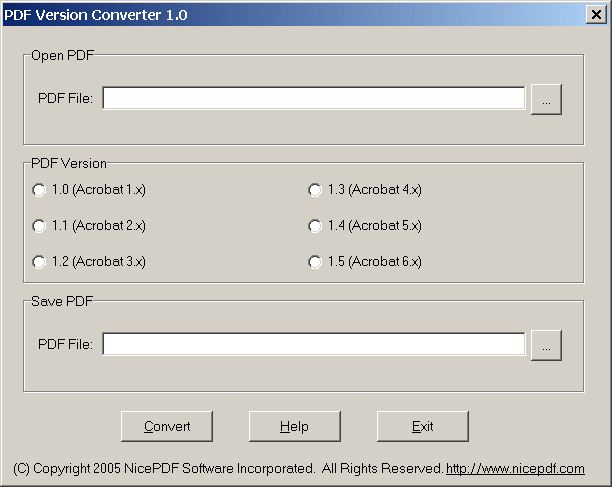
PDF Version Converter converts PDF file between different versions for compatibility reasons. It supports PDF version 1.0 to 1.6.
Note: This software appears to have gone shareware. Download link points to the last freeware version.
| Category: | |
| Runs on: | Win95 / Win98 / WinME / WinNT / Win2K / WinXP |
| Writes settings to: | None |
| Unicode support: | No |
| License: | Freeware |
| How to extract: | Download the stand-alone EXE to a folder of your choice. Launch pdfversion.exe. |
| Latest comments |
freakazoid
on 2011-03-05 19:17
See all
7›
I believe this is v1.0 - http://www.download3000.com/download_10029.html |

Doc Convertor v1.00
webfork on 29 Feb 2020 Change history
- 5MB (uncompressed)
- Released on 23 Apr 2006
- Suggested by AlephX
Doc Converter lets you save your highlighted source code for formats outside of code editors. This lets you share easy-to-read code samples in HTML, PDF, BMP, PNG, JPG, Lotus, SVG, QUATTRO Pro, Excel, and more. The program automatically recognizes and highlights more than 30 formats, including HTML, CSS, PHP, C/C++, C#, ASP, VB6, Pascal, Perl, SQL and many more. It also includes an advanced report engine and allows batch operations.
| Category: | |
| Runs on: | Win2K / WinXP |
| Writes settings to: | Application folder |
| License: | Freeware |
| How to extract: |
|
| Latest comments |
billon
on 2015-01-08 20:43
Add comment
3›
Doc Convertor and RTF Convertor is now part of "Code Export suite" in that page: http://www.highdots.com/products/code-export/ and also can be downloaded separately |

PDF2EXE v1.0.0
webfork on 24 Nov 2015 Change history
- 1MB (uncompressed)
- Released on
- Suggested by Andrew Lee
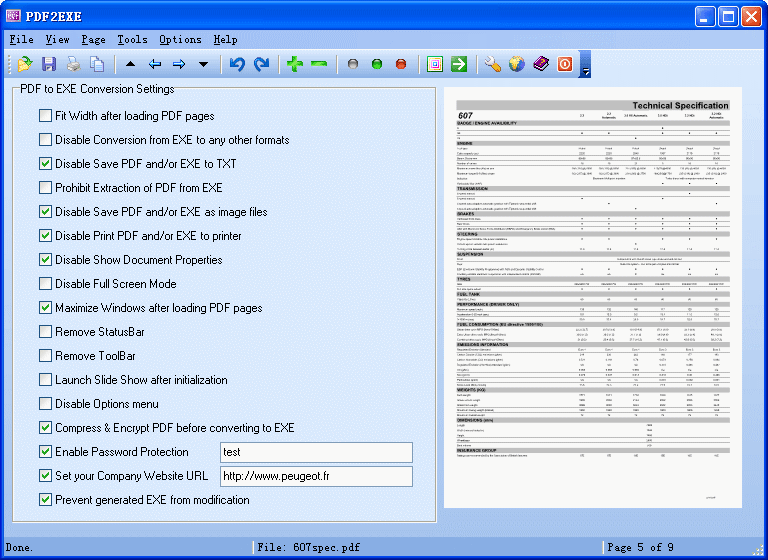
PDF2EXE converts any PDF file to EXE, making PDF readable on any computer without PDF reading software. The conversion from PDF to EXE preserves the look and feel of the original document and includes optional compression. Note that PDF2EXE is based on Cool PDF Reader, which has attracted some comments disparaging the quality of its rendering engine. If you don't like Cool PDF Reader, you will probably want to give this a miss as well.
PDF2EXE also contains security features such as encryption of the shared PDF to help prevent modification, as well as disabling printing and image conversion.
| Category: | |
| Runs on: | Win98 / WinME / WinNT / Win2K / WinXP |
| Writes settings to: | None |
| Unicode support: | No |
| License: | Freeware |
| How to extract: |
|
| Latest comments |
BruceW
on 2006-11-14 06:45
Free PDF readers (Adobe's or otherwise) are so common and easy to obtain that I'm wondering how necessary it is to offer an alternative format, especially one that wouldn't work on Macs or Linux systems. If I knew for sure that my audience were all Windows users, I guess I might consider distributing .EXE files, but if it were up to me I'd prefer that everyone just had some kind of PDF reader.
decomp
on 2009-01-12 04:50
12/01/09: PDF2EXE is shareware (not freeware) as states the website.
Wolfghost
on 2010-05-20 23:17
See all
9›
Here is download link to Portable PDF2EXE 1.0.0.128 |

ABC Amber LIT Converter v2.0.2
webfork on 14 Jul 2017 Change history
- 1MB (uncompressed)
- Released on 14 Jun 2013
- Suggested by Andrew Lee
ABC Amber LIT Converter converts Microsoft Reader's LIT files to a variety of output formats (PDF, HTML, CHM, RTF, HLP, DOC etc.) The software also supports a batch conversion and command line parameters. Note that some of the output formats have dependencies on external applications eg. CHM requires Microsoft HTML Help Workshop etc., but others eg. PDF, HTML do not.
Reportedly functional in Linux using WINE.
Note: The main download is offline, linking to Softpedia.
| Category: | |
| Runs on: | Win95 / Win98 / WinME / WinNT / Win2K / WinXP |
| Writes settings to: | Application folder. |
| Stealth: ? | No. Writes an entry to the registry indicating the full path to the EXE |
| Unicode support: | No |
| License: | Freeware |
| How to extract: |
|
| Latest comments |
juvera
on 2013-09-08 16:42
As of this writing, I could not find the file on the http://www.processtext.com/ website.
I am Baas
on 2013-09-08 17:09
The latest free version is 2.08, Softpedia has 2.05: http://www.softpedia.com/get/Programming/File-Editors/ABC-Amber-LIT-Converter.shtml
billon
on 2013-09-08 22:41
See all
6›
You can convert LIT-books to readable HTML with Universal Extractor (clit.exe), or with GUI for clit.exe - http://www.convertlit.com/clit18.zip (port&stealth) |

AcroPAD v1.3.2
webfork on 8 Jan 2017 Change history
- 282KB (uncompressed)
- Released on 10 Jun 2003
- Suggested by Barrette
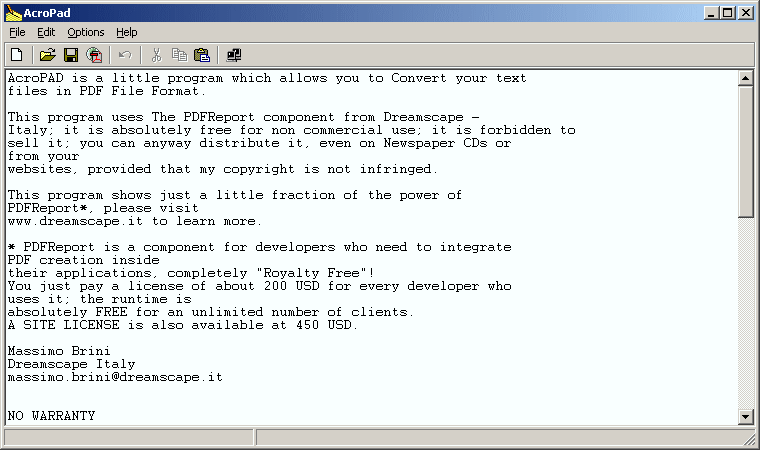
AcroPAD is a simple Notepad-like program with PDF production capability. Handy for quick generation of simple PDF documents.
Note: website offline, linking to archive.org mirror.
| Category: | |
| Runs on: | Win95 / Win98 / WinME / WinNT / Win2K / WinXP |
| Writes settings to: | None |
| License: | Freeware |
| How to extract: | Download the ZIP package and extract to a folder of your choice. Launch AcroPad.exe. |
| Latest comments |
Good_Freeware_Hunter
on 2010-02-08 01:26
Does exactly what it says, simple, and works great. Tested on Vista SP1.
__philippe
on 2017-04-08 15:40
Add comment
2›
AcroPAD |

PDFproducer v1.3
webfork on 1 Oct 2014 Change history
- 94KB (uncompressed)
- Released on
- Suggested by Ram C. Dutta
PDFproducer converts plain text into PDF documents. It does not require Acrobat to be installed on the system, since it does not uses any component of Acrobat to produce PDF files. You have a choice of 3 page sizes, different orientation as well as up to 3 fonts.
Site offline, linking to archive.org
| Category: | |
| Runs on: | Win95 / Win98 / WinME / WinNT / Win2K / WinXP |
| Writes settings to: | None |
| License: | Freeware |
| How to extract: | Download the ZIP package and extract to a folder of your choice. Launch PDFproducer.exe. |
| Latest comments |
PS RAI
on 2007-09-13 04:19
Very very Good !!! Develop somthing to convert Word/Excel etc to PDF without having to go through aquisition and installation of Printer driver
P Smith
on 2009-01-25 12:17
See all
4›
PDFproducer is not fancy and will produce text-only PDFs in only one of three fonts, and the entire document is only one font size, but it's quick and it works very well. |