

XMedia Recode v3.5.9.2
Ennovy on 4 Mar 2024 Change history
- 86MB (uncompressed)
- Released on 3 Mar 2024
- Suggested by Andrew Lee
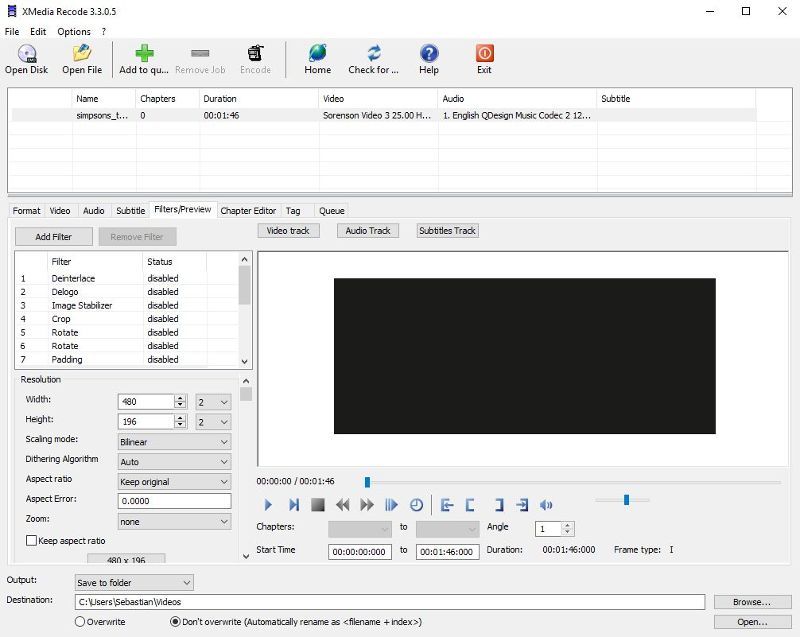
XMedia Recode is an audio/video converter for most popular formats and includes handy profiles for popular mobile/tablet devices such as iPod, iPhone, Samsung, SonyEricsson, Zune, PSP, Blackberry, LG etc. These profiles include file format, screen size and other details chosen specifically for a given player.
Support many formats.
Note: Back when FFMPEG's hall of shame for licensing issues still existed, this program was a member there due to this issue.
| Category: | |
| Runs on: | Win7 / Win8 / Win10 |
| Writes settings to: | Application folder |
| Stealth: ? | Yes |
| Unicode support: | Yes |
| License: | Free for personal use |
| How to extract: |
Default interface is German, to change to English:
|
| Similar/alternative apps: | Video to Video, QWinFF |
| What's new? | See: https://xmedia-recode.de/en/version.php. |
99 comments on XMedia Recode


smaragdus
2016-07-02 14:44
@hamasaki
Thank you for contacting the developer, the file is now available for download.
v3.3.3.0
hamasaki
2016-07-02 06:10
@smaragdus. Yep, not working, looks like the file is missing. I have contacted the author of the software for a fix.
v3.3.3.0
smaragdus
2016-07-01 23:46
When I try to get XMedia Recode 3.3.3.0 (XMediaRecode3330.zip) I get "Not Found" error. Has anyone managed to grab this version?
v3.3.3.0
cyrgh30
2015-08-24 04:58
For many past versions, this works under WinXP and 32-bit, but usually hangs after converting a file under Win8/64bit. I commented this to the developer but got no response.
v3.2.5.5
smaragdus
2015-08-01 14:31
This version (XMedia Recode 3.2.5.0) fails to start on my system (Windows 8 x64).
v3.2.5.0
webfork
2015-01-17 02:04
mukhi: I recommend one of the other programs video2video or TEncoder rather than XMedia.
v3.2.1.2
mukhi
2015-01-13 08:34
Does this really work or it still has problems even for simple transcoding? I was interested after seeing its wide varieties of options for reencoding, but the last version I used the last year was terrible; it produced an output that was a clip (not the entire video), of horrendous quality, and not even in accordance with the specs that I selected. Weird!
v3.2.1.1
Joe
2014-06-17 16:05
I deleted all the files and folders for XMedia Recode (including the one in %AppData\Roaming) and upgraded from 3.1.8.7 to 3.1.8.8. When I ran the program and rechecked there was no folder in Roaming this time. Strange.
v3.1.8.8
Joe
2014-05-23 16:41
@Emka, Thanks for the reply! I'm on Windows 8.1 (with Update 1) applied and I swear the folder is there. I just checked again to make sure I'm not going mad and it's still there.
v3.1.8.7
Joe
2014-05-21 17:18
It is NOT stealth. It creates a folder in %AppData\Roaming with 2 ini files. Please amend this entry on your database.
v3.1.8.7
kleinkinstein
2014-03-22 13:05
XMR is a grotesquely underrated pApp. This thing sprints circles around anything else out there and the UI is perfectly simple and elegantly clean. A++
v3.1.8.0
loin2kolpotoru
2014-02-19 16:42
Download Old versions from here -
http://www.videohelp.com/tools/XMedia-Recode/old-versions#download
v3.1.7.9
Midas
2014-02-19 11:57
[NOTE: copy and paste full links below or else they won't work.]
As recent versions of XMedia Recoder seem to have issues in Windows XP, I was looking for the earlier stables -- webfork recommended v2.3.2.0 (http://www.portablefreeware.com/index.php?id=1443#comment23316) and rodger123 recommended v2.3.0.4 (http://www.portablefreeware.com/index.php?id=1443#comment23637).
Mark-B posted (http://www.portablefreeware.com/index.php?id=1443#comment23317) a link to digital-digest.com, where previous versions could supposedly be downloaded, but the earliest version there is v3.1.3.7 (December 2012), while the latest v2.x.x.x listed is the much earlier v2.3.3.3 (May 2011).
Any further download links appreciated... ?:)
v3.1.7.9
Iru
2012-11-02 16:49
It become laggy and crash lots of time. I cant be sure which version it start but both 3.1.1.8 and latest 3.1.3.0 just didnt work well for me ;|
1. Lag and crash lots of time.
2. Consume most of the CPU up to 80% even when there is no jobs or encoding take place
3. 30sec standard 480p video will take around 50minutes to complete (flv to xvid)
4. WARNING!!! Changing CPU priority from defaults "Below Normal" to "High" and "Real Time" will HANG your PC to DEATH :(
v3.1.3.0
Teh
2012-10-24 08:50
Just tested with XMedia Recode (3.1.3.0) for first time, I got to say it is faster then latest nightly build HandBrake (5026 svn), for the same exact video it took around 15mins to encode with handbrake while with XMedia Recode only takes 7mins.
2 things I would like to say however. Firstly, I would prefer there is option with XMedia Recode for saving our custom settings like handbrake so there is no need to keep tweaking the thing just simply pick the option you tweaked, another is I noticed Constant Quality RF 22.5 for handbrake is around 155mb mkv out of 350mb avi file but it needs to be Constant Quality RF 25 to get 160mb. CQ RF 25 isn't as good as 22.5. As a casual reencoder not a professional, I would say quality difference to me for getting into 150-169mb range handbrake's version looks better.
v3.1.3.0
rodger123
2012-09-17 23:27
every version later than 2304 either crashes or
wil not work on my XP system-gave up trying
new versions months ago but 2304 is awesome.
V3.1.2.5
shodan816
2012-09-04 11:23
This is one fantastic media recoding utility, but it would be absolute tops if only the author would add 'rotate media 90, 180 or 270 degrees' to the option list.
V3.1.2.2
lautrepay
2012-07-02 01:25
V3.1.1.0
Mark-B
2012-07-02 01:11
Another video converter which is supposed to be portable:
"TEncoder is a multithreaded video and audio converter that uses MEncoder, MPlayer and FFMpeg. It can convert almost every video and audio type to each other. Subtitles with same name as video can be hard-coded into video. Up to 8 simultaneous encoders can be run so encoding time decreases. You can select between multiple audio and subtitle tracks. Extracting video or audio content is possible. Edit subtitle and audio delays and part of video that will be encoded. Effects like deinterlacing can be applied to videos."
http://sourceforge.net/projects/tencoder/
V3.1.1.0
Mark-B
2012-06-11 10:21
It still crashes whenever I try to adjust the resolution.
V3.1.1.0
smaragdus
2012-06-11 03:41
The developer quickly fixed the problem. XMedia Recode 3.1.1.0 loads without any crashes.
V3.1.1.0
Mark-B
2012-06-10 23:20
Previous versions can be downloaded here:
http://www.digital-digest.com/software/XMedia_Recode_history.html
V3.1.1.0
webfork
2012-06-10 19:36
Verified crashing on XP SP3. The last stable version I have is somewhat old (2.3.2.0) which I can post on forums if needed. Softpedia is hosting 3.1.0.5 http://www.softpedia.com/get/PORTABLE-SOFTWARE/Multimedia/Video/Portable-XMedia-Recode.shtml
V3.1.0.9
smaragdus
2012-06-10 14:54
Yes, Mark-B is right, XMedia Recode version 3.1.0.9 fails to load. In fact I have never experienced any promlems with previous releases of XMedia Recode.
V3.1.0.9
Mark-B
2012-06-10 14:35
XMedia Recode V3.1.0.9 won't run, but crashes immediately, on my XP system, the previous version crashed when I tried to alter the resolution, the one before that... etc. This author keeps churning out new versions of his FFmpeg front-end with serious bugs. He should test his software before releasing it. I now use Avanti GUI:
http://avanti.arrozcru.org/
V3.1.0.9
webfork
2012-05-27 16:24
abc: Freeware Genius did a bit about that: http://www.freewaregenius.com/2012/01/04/how-to-convert-any-video-file-to-an-animated-gif/
V3.1.0.0
abc
2012-05-24 19:20
Excellent alternative to the buggy and bloated [SUPER and Media Coder] encoders. Anyone know how to convert video (any kind) to a .GIF animation?
V3.1.0.0
Mark-B
2012-04-23 11:35
Fewer updates and better testing, please. I have rarely come across an update of this program which didn't have one or more serious bugs.
V3.0.9.4
webfork
2012-04-07 20:43
The extra step of "Add Job" isn't totally intuitive, but I understand why its there (for batch work). Today I was able to decode a very odd format audio file into WAV format that saved me a lot of time and trouble. Very glad I had this on my machine.
V3.0.9.0
carbonize
2011-10-01 21:08
Serious bug in latest version where if you set it to copy the video it creates an empty file when you go to encode.
V3.0.3.0
Ruby
2011-07-08 16:46
@bajaatan
'Download' was linked to a version dependent filename.
I have corrected/updated to link to the download page.
V3.0.0.5
bajaatan
2011-07-08 11:52
Link is pointing to XMediaRecode3002.zip, not XMediaRecode3005.zip
V3.0.0.5
MarkB
2011-05-22 13:21
It looks like the bugs have been fixed. The program did not crash during conversions with colour corrections. I would strongly advise the author(s) the test new builds more thoroughly. I don't need new releases monthly and prefer less frequent updates with fewer bugs.
V2.3.3.3
Goran
2011-05-15 16:53
@MarkB Mark, you are apsolutely right. Still best encoder is Avidemux.
V2.3.2.9
MarkB
2011-05-15 16:22
Well, it still crashes, but now during conversions after a colour correction has been carried out.
V2.3.2.9
MarkB
2011-05-15 16:15
2.3.2.8 has other bugs which apparently were fixed in 2.3.2.9. Perhaps the guy should try the new versions first before releasing them.
V2.3.2.9
MarkB
2011-05-12 13:52
The bug mentioned by Shodan, Peter and me (program crashes when closed) has been fixed in v.2.3.2.8.
V2.3.2.8
linuxx
2011-05-10 00:52
Started crashing for me a couple versions back, reporting ffmpeg.dll errors. I still use an old version but here's a good one to try also... http://www.softpedia.com/get/PORTABLE-SOFTWARE/Multimedia/Audio/xrecode-II-Portable.shtml
Text mentions a nag screen, but I've never seen it.
V2.3.2.5
MarkB
2011-05-09 22:08
@Shodan and @Peter. I went back to the previous version, which is OK, but may try to find out which component causes the crash. It must be the updated ffmpeg, x264 codec, or both.
V2.3.2.5
Peter
2011-05-09 12:38
Yes, the program crashes bei Closing.
V2.3.2.5
Shodan
2011-05-09 10:58
The latest portable version - V2.3.2.5 - crashes when closed. I am unable to contact the author to report this bug.
V2.3.2.5
MarkB
2011-04-10 14:11
A very good program indeed. But please note that some knowledge about digital media formats is always necessary when you use software like this one. Wikipedia is a reasonable starting point.
XMedia Recode is better as a video converter than as an audio converter imho.
V2.3.1.8
Magibon
2011-04-09 20:57
What a lovely app. !
Thanks to author for making this free :)
Def. recommend/keeper.
V2.3.1.8
Faust
2011-03-22 07:52
2.3.1.3 is working fine on my XP Pro SP3.
V2.3.1.3
TT
2011-03-21 23:05
2.3.1.3 has the same problem as the previous version. (Entry Point Not Found : The procedure entry point DecodePointer could not be located in the dynamic link library KERNEL32.dll).
I have written to the author but have never received a reply.
I guess I'll be looking for a different solution. Too bad, I liked this the best and did a lot to promote it to others...
V2.3.1.3
JT
2011-03-21 20:35
Links on webpage still point to version 2.3.0.9.
V2.3.1.3
TT
2011-02-23 23:09
Another error popup...
Entry Point Not Found : The procedure entry point DecodePointer could not be located in the dynamic link library KERNEL32.dll.
V2.3.0.8
TT
2011-02-23 22:39
Version 2.3.0.8 won't run on older versions of XP. Application Error : The application failed to initialize properly (0xc0000142). Click on OK to terminate the application.
Version 2.3.0.4 works okay.
V2.3.0.8
FukenGruven
2011-02-23 02:34
excellent program for audio conversion.
i have not tried video conversion, i usually encode videos.
V2.3.0.8
K94UR2
2011-01-29 16:40
Using Windows XP pro.
Release: 2.2.9.7 - 2.3.0.4
- Have edited files by shortening them, i.e.: split them into separate files. The From and To time range is not 100% accurate experienced time to be off by 10 to 20 seconds.
Have noticed that some times it works but mostly does not (hit and miss).
- Notice diagonal lines in some file playbacks.
format: AVI, Codec: MPEG-4 Bitrate: 2300
- Have experienced Program to lockup when using the Divx Codec. switched to MPEG-4 Codec and was able to convert files to AVI.
- Does not convert copyrighted DVD's but able to convert copy’s of them?
Any suggestions on tweaking this to work.
JFox562
2011-01-26 00:05
How do you set XMedia Recode to include forced subtitles in the final file. I see how to render subtitles but I only want the forced ones. Thanks
bajaatan
2011-01-15 12:05
Depends on gdiplus.dll
google translation:
"Use a Windows operating system earlier than Windows XP, you must use the file gdiplus.dll, which is available here: Download gdiplus.dll.
Please copy this file into your XMedia Recode installation directory (eg C: \ Program Files \ XMedia Recode \)."
Pax
2011-01-10 15:45
Update to the issue highlighted above (ie, multiple videos in job list not being completely converted).
It turns out that if you select/highlight a single video from your list and click 'add to job list' and do this for each video (select/highlight, addJob), then the Job List will capture the correct information (total video time).
If you highlight all videos loaded and select 'add to job list' so that multiple videos are added to jobList, then the program often captures the total time of a single video and applies that to all the videos.
So if you have a bunch of videos you want to convert with version 2.2.9.7, select them individually, adding to jobList individually.
Pax
2010-12-24 16:08
PS: Used Google Translate to send issue above to author (including this translated page)
Pax
2010-12-24 15:50
WARNING: I'm not certain how the previous versions handled multiple files (job list) but I'm working with version 2.2.9.7 and it fails to convert the complete video on many jobs I've given it. Here's what happens...
When loading a few videos for batch conversion, the program analyzes the selected files and you'll see specs for each video listed (including START and END times = duration). When the list gets highlighted and added to the JOB list, you'll see the duration shortened. It seems to take the duration of one of the videos (let's say 11 minutes) and force that duration on all other videos (even if the other videos are an hour long).
It doesn't happen all the time but often enough in my testing when loading and placing in the job list. Basically whatever appears on the job list (duration, conversion type, etc) is what you're going to get at the end.
The conversions themselves are fine but xMedia Recode doesn't always pass the correct values to the job list (so far we're talking duration only).
Another, smaller issue is the CPU usage which is always at 100% even when CPU Priority is set to the lower levels. So this thing runs "hot" vs other Video Converters I've used.
Despite these short-comings, I really like this application. If you're converting a single video at a time - I would recommend the latest version. If you're doing multiple (batch conversions), keep an eye on duration before deleting any originals.
Brad
2010-11-07 15:09
Color Correction, Deblocking, and Noise filters don't work on version 2.2.8.3.
Neredbojias
2010-10-20 18:42
The latest version, 2.2.7.7, doesn't seem to crop and resize simultaneously.
TT
2010-09-01 16:07
@Frank...
That's exatly what XMediaRecode is .. everything in one package.
Frank
2010-09-01 00:25
I want to use a portable encoder but something with codecs already included. I know Super(C) and MediaCoder have internal codecs thanks to Mencoder is Xmedia recode the same. I have problems with the portable apps versions of Super(c) and MediaCoder.
Would appreciate any info.
TT
2010-08-27 17:42
Let's see... Truly portable, with no registry changes, no logs or histories, etc.? Check. Works well with 1024x600 Netbooks? Check. Compact and UPX-able? Check. Option to automatically output to source folder? Check. Can convert from/to just about anything? Check. .. It doesn't get much better than this. Thanks for the great app!
MC
2010-08-20 00:38
The new version 2.2.5.8 no longer writes in my AppData folder on my Windows Vista. Seems it is corrected now, at least on my Windows Vista.
Lemoir
2010-08-18 18:22
It will only write the settings to an INI file in the program folder if there is already such a file with the line Portable=1. The zip archive has a mall INI file with that line.
Hans
2010-08-18 13:07
The new version 2258 writes the ini-file in the application folder again, you must do nothing.
GBJ
2010-08-18 10:01
Putting 'Portable=1' in the INI file and moving it to the app's folder WORKS! You may then delete the XMedia Recode folder under AppData\Roaming in your User folder, making this great app TRULY portable.
pj
2010-08-17 18:02
I tried to see if the "portable=1" in the ini file in the XmediaRecode directory works or not. Unfortunately, in 2.2.5.3, it still writes the ini file in %APPDATA% on Windows 7.
Hans
2010-08-17 14:49
Thank you, Lemoir, I will proof it.
Lemoir
2010-08-17 13:13
Hans, what are you talking about? Of course I checked it.
You must have an XMediaRecode.INI file with Portable=1 in the Prefences in the XMediaRecode program folder. The program will write preferences and other settings to that file.
Hans
2010-08-17 10:09
Lemoir, you did not check the problem.
Lemoir
2010-08-17 09:52
You must have Portable=1 in the INI file.
MarK2010
2010-08-16 21:21
V. 2.2.5.8 writes XMediaRecode.ini to the Application Data folder. So the program is not portable!
MC
2010-08-14 03:42
TT is correct, the 2.2.5.3 version does write to the AppData folder. I am using Windows Vista. So this is no longer stealth.
TT
2010-08-05 12:31
2.2.5.3 now now works with WinXP-sp1. Problem now is it write settings to C:\Documents and Settings\Owner\Application Data\XMedia Recode, not the app directory. And the GUI 'almost' fits on a 1024x600 netbook. 2.2.4.7 is still works best overall.
TT
2010-07-11 22:34
Error message with WinXP-sp1...
The application failed to initialize properly. (0x000012d). Click on OK to terminate the application.
No problem with earlier version.
RobertAdT
2010-06-29 14:36
When all else fail, this app save my day.
It's the best app there is.
spchtr
2010-06-17 10:17
Theora encoder for V 2.2.3.9 does not appear to work in Vista32. Not sure how to post to the author's web page and let them know.
Onesimus Prime
2010-05-26 21:47
Upon first run, this program now auto-detects the system language, so it should match whatever your computer is set for. You can, of course, force it to always use your language of choice. Oh, and "automatically check for updates" comes enabled by default, FYI...
CincyDave
2010-05-19 16:15
I'll add my support behind this product. I've been using XMediaRecode for several months now to convert numerous flv files recorded from the web to dvd (avi) format. Also, I've edited the files by shortening some of them and enhancing their color saturation. This program has worked flawlessly.
GrzegorzK
2010-05-17 12:02
Great software. Comparable or even better than commercialcial ones/
Shodan
2010-05-13 11:48
I've tried several recoders, both free and shareware, and this is the one I have settled on. Does everything I want and need and it's free. What else can you ask for ?
Alexander Nalunin
2010-04-13 23:36
This one simply ROCKS! Nothing more to say. I just killed commercial product I was using before and requested a money-back. XMedia Recorde is much much better than everything I tried before
Breeeeezzzzze
2010-02-21 19:39
The current version is the best encoder I have found for IPhone. Quickly converts even files that Handbrake choked on. Plus it's portable. Has all the features I need and more. Very happy to have it on all the pcs I use.
Breeeeezzzzze
2010-02-18 13:00
The profiles drop-box only has "custom" for me, using either the portable or full versions.
noaven
2010-02-10 15:55
my friends here you say that this program is Free for non-commercial use but i think is full freeware (just check the official site)
Tala
2010-01-07 11:15
You can't go wrong grabbing this gem. I've tried quite a few but can't go past this. Lack of English help files might hinder some a little but well and truly worth the effort.Thanks to the author.
CodesAway
2009-12-16 06:59
Does anyone know if this program supports command-line options? I would like to integrate it with FreeCommander to perform automatic conversions on a file.
If not, at least it supports passing a file name, which adds the file to the list. From there it's very easy to do the conversion I want.
Andrew.A
2009-12-14 04:19
This is absolutely the best convertor I used this days. It is fast (about 80 FPS on my poor PIV machine), it has simple interface. It can crop/resize/denoise videos. And it is absolutely portable and has a small footprint.
I recommend it!
Fengzj
2009-11-29 00:11
It still leaves configuration settings in Users/.../AppData/Local/ folder in Windows 7.
clitoral hoodlum
2009-07-23 23:51
Absolutely the best converter I have found! Beats the commercial ones, as well!
Tony
2009-01-24 16:11
Full of bugs ....
south28
2008-10-06 17:00
Of all the different video converter programs I've used, this is by far the easiest one to use and manipulate and the resultant video files have been more than satisfactory. It is the only one that managed to convert a couple of stubborn files that other programs kept leaving the video and audio out of sync no matter what I tried.
Many thanks to the programmer!
Post your comment
You have to login in order to post comments.
Recent Searches
Popular Titles
Recent Forum Posts
- Please remove Desktop Media links.
- Mini PCs online database
- Winamp - media player
- Transmission (lightweight bittorrent client)
- 3D Youtube Downloader
- Signal - cross-platform secure messaging (64-bit only)
- Keeping UniExtract up to date
- ExifTool GUI - metadata editor
- The Electron framework and portable software
- NAPS2 (DotNET scanner utility)
- Folder2ISO (Yubsoft)
Recent Comments
- Desktop Mediaby MiDoJo
- IrfanViewby M1P0
- Desktop Mediaby Midas
- 3D Youtube Downloaderby Midas
- Desktop Mediaby MiDoJo
- 3D Youtube Downloaderby loin2kolpotoru
- Rename Masterby rowleys
- Vieasby dot
- LookDiskby Andrew Lee
- WinSCPby hamasaki
- LookDiskby vinc64
- KiTTYby fcomer
- PDFsam Basicby PAFuser
- SmartSystemMenuby Midas
- SmartSystemMenuby gbrao
Recent Updates
- RSS Guardv4.7.2 ➟ v4.7.3
- PrivaZerv4.0.90 ➟ v4.0.91
- FontViewOKv8.43 ➟ v8.51
- NetworkOpenedFilesv1.62 ➟ v1.63
- BrowserAddonsViewv1.29 ➟ v1.30
- LocalSendv1.14.0 ➟ v1.15.1
- NewFileTimev7.23 ➟ v7.29
- HWiNFOv8.04 ➟ v8.06
- Mozilla Firefox, Portable Editionv127.0.2 ➟ v128.0
- RisohEditorv5.8.2 ➟ v5.8.3
- Google Chrome Portablev126.0.6478.183 ➟ v127.0.6533.73
- ocenaudiov3.13.8 ➟ v3.14.0
- Mozilla Thunderbird, Portable Editionv115.12.2 ➟ v115.13.0
- POP Peeperv5.5.1 ➟ v5.5.3
- ConfigureDefenderv3.1.1.1 ➟ v4.0.0.1

XMedia Recode ver. 3.5.3.7 (March 8, 2021): https://xmedia-recode.de/en/index.php
- direct download portable 32 bit: https://www.xmedia-recode.de/download/XMediaRecode3537.zip
- direct download portable 64 bit: https://www.xmedia-recode.de/download/XMediaRecode3537_x64.zip
v3.5.3.4