Search results (1)
|
|
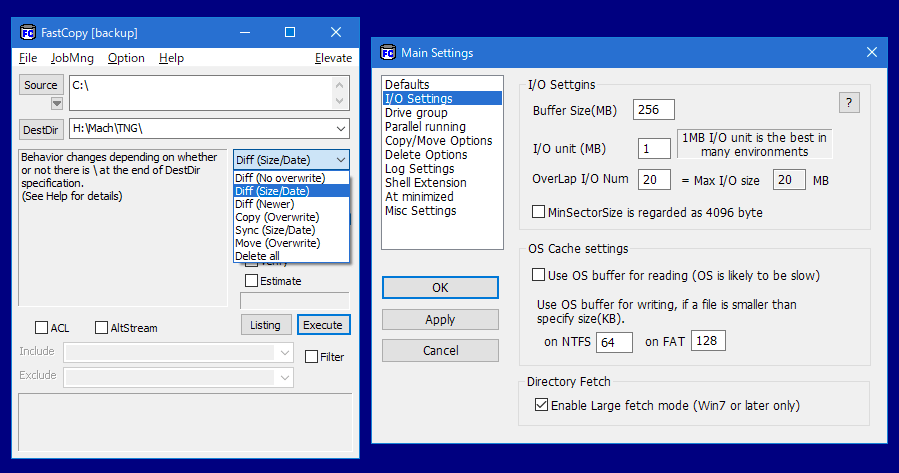
FastCopy
V2.02 |
|
Posted comments:
linuxamp: I know this is a portable software site but I prefer this type of thing to be more closely tied with the OS like supercopier. http://supercopier.sfxteam.org/modules/mydownloads/index.php?sel_lang=english
It would be better if this app worked a bit more transparently and just sped up windows file transfers. [2008-09-04 02:03]
polobunny: Another excellent alternative to SuperCopier, which seemed to give me some trouble before, is TeraCopy.
http://www.codesector.com/teracopy.php
It is free for home users and it integrated well with Windows. Not portable, however, just like SuperCopier. [2008-09-11 22:10]
Fred: Supercopier is very nice for its integration, FastCopy is still worth looking at, I love it. [2008-11-20 14:05]
TavisJohn: I used to use SuperCopier.. However it does not work with Vista, however TeraCopy works with Vista, and WinXP. [2008-11-20 14:12]
Czerwo: It is combined with FreeCommander? [2008-11-20 22:54]
ConusMagus: You can use Supercopier as portable, all you have to do is extract all files with 7zip or uniextract and delete $COMMONFILES dir. Enjoy it! [2009-01-08 03:57]
Transcontinental: I haven't tried 'supercopier', but from what I've experienced, this 'FastCopy' is ... faster than TeraCopy; in fact, it is amazingly fast and stable. [2009-03-18 00:40]
agis: path-sync and dsyncronize can be an option too. [2009-03-19 02:30]
Hugh H.: I've been using this to get some data back from bad DVDR media where the last 300MB generally produces CRC errors a a few months after burning.(pretty much ALL DVDR media!)
First I run FastCopy at full speed, then if a disc throws CRC errors, I slow it down.
Using VNC to drive another computer doing this works fine, but running it directly on my main PC, the mouse is brain dead all the time and frequently goes into a coma requiring that I unplug and re-plug the cable. (USB Wacom tablet) If I run FastCopy at 30% or less, it just makes the mouse "stupid" but doesn't kill it entirely.
I've always thought USB was really fecal technology -- software based and vulnerable, awkward plug, no latch, CPU-bound! I mean, we had a dedicated plug with it's own register that DIDN'T ride on the processor, but nooooo... (a rant for another time)
I've noticed that this utility also fools Task Manager. In the processes listing, I've got nothing running more than 3%, and then only one thing. But in the performance tab, one of my cores is running at over 50%. When I shut down Fastcopy, the "phantom" disappears.
Maybe there's a more comprehensive task manager utility?
Anyway, this utility is, on the whole, really good and very useful. Portability makes it better.
Thanks [2009-03-19 09:17]
zolone: Teracopy's 2.0 beta 3 has a portable version. No shell integration, but you can integrate it to total commander default menu bar (TC UP users has to manually edit the default.bar - anyway I think so) [2009-03-21 03:30]
Andrew Lee: FastCopy is the only freeware copier I found that supports hard links. I had to copy an entire hard disk to another while preserving hard links, and FastCopy worked a treat! [2009-04-09 22:37]
Tom: I just copied 1029 files totaling 209 MB from my laptop hard disk to my external USB hard disk (both 5400 RPM) using three different methods in Win XP Pro SP3. I used a stopwatch to time each method. Here are the results, from fastest to slowest:
1. TeraCopy 2.05: 29'23" (used 8-10 MB of RAM while copying)
2. Normal Windows drag & drop copy: 39'42"
3. FastCopy 1.99r3: 42'59" (used about 2.5 MB of RAM while copying)
Needless to say, I'll be keeping TeraCopy. [2009-07-28 13:11]
a: what?? fastcopy slower than windows file copy? [2009-08-03 14:31]
Anima: @a: I was going to write the same thing. Win 7 copy is MUCH faster than fast copy. I was disappointed. [2010-05-10 06:23]
Mark: @ Tom:
You wrote:
1. TeraCopy 2.05: 29'23"
2. Normal Windows drag & drop copy: 39'42"
3. FastCopy 1.99r3: 42'59"
Are you sure? Is (') meaning minutes and (") meaning seconds? It seems to me that your copying speed is extremely slow (in all 3 methods).
BTW I am also a TeraCopy fan... But a similar operation on my system takes only a fraction of the time you mentioned... I am curious to hear from you, if you have the chance of course.
Thanks and have a great day ;)
Mark [2010-05-10 07:48]
Mark: @ Everybody else
Aren't you surprised about the timings indicated by Tom?
Or am I the only one who discovered the 'Turbo' function in TeraCopy?... Hehe, just kidding ;)
Still it would be nice to read some comments on this important topic... At the end it is all about speed, right?...Otherwise we would all keep using the Windows default copy utility.
Mark [2010-05-10 08:35]
Bill: Tested out slightly slower than WinXP's file copying.
I tested on a laptop with a single HD w/two partitions; C & D. I copied a folder w/599 files totalling 677M from C to D. WinXP copied it in 71 seconds, Fast Copy copied it in 74 seconds.
Fast Copy output:
TotalRead = 677.1 MB
TotalWrite = 677.1 MB
TotalFiles = 599 (44)
TotalTime= 74.58 sec
TransRate= 9.08 MB/s
FileRate = 8.03 files/s [2010-05-12 18:56]
Post your comment:
All HTML tags will be removed from your comment. URLs (http, https, ftp) will be automatically detected and hyperlinked. I reserve the right to delete irrelevant, frivolous or offensive comments. For more general topics (eg. whether apps that write to the registry, leave traces on the host machine, rely on certain versions of IE etc. can be considered portable), please post to the Portable Freeware Discussion forum. If your virus scanner has detected a virus in the application, please email the author directly or post to the forum. Note that false positives (i.e. flagging a virus when there is actually none) are extremely common for virus scanners. When in doubt, try an online scanner like Online Malware Scanner or VirusTotal, which scans files using multiple anti-virus engines. It is very likely to be a false positive if only a few engines raise the red flag.
| Popular searches |
| pdf firefox ccleaner skype iso games torrent opera vlc password |
| Recent forum postings |
| - What is best Anti-virus, spyware, malware? - Portable time tracking app? - TeamViewer v3.5 - AutoHotkey advice - Observations and Questions about RAM usage - pElement |
All rights reserved. Copyright © 2010 Andrew Lee (mailto: andrew at portablefreeware dot com)