Categories /
Alternatively, Shortcuts Search and Replace Portable is also available.
Files - Miscellaneous (40)
- Newer first
- Display 510 2550100entries
-


OpenSaveFilesView v1.16
Andrew Lee on 15 Nov 2022 Change history
- 109KB (uncompressed)
- Released on 14 Nov 2022
- Suggested by Checker
OpenSaveFilesView displays the list of files that you previously opened with the standard Windows open/save dialog-box. The program shows a variety of details including filename, extension, order (the order that the files were opened for every file extension), open time (available only for the last opened file of every file type), file modified/created time, file size and file attributes.
| Category: | |
| Runs on: | Win2K / WinXP / Vista / Win7 / Win8 / Win10 |
| Writes settings to: | Application folder |
| Stealth: ? | Yes |
| License: | Freeware |
| How to extract: | Download the ZIP package and extract to a folder of your choice. Launch OpenSaveFilesView.exe. |
| What's new? |
|
| Latest comments | Add comment 2› |

NTFSLinksView v1.33
Andrew Lee on 8 Nov 2022 Change history
- 66KB (uncompressed)
- Released on 6 Nov 2022
- Suggested by guinness
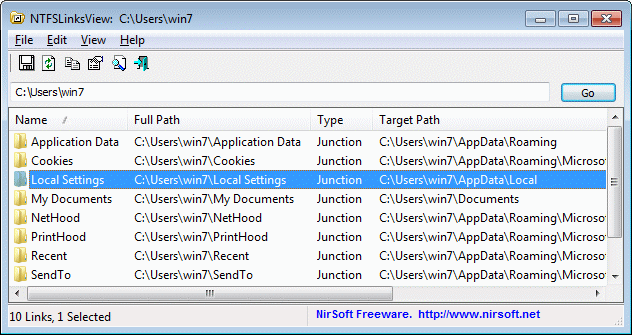
NTFSLinksView shows you a list of all symbolic links and junctions in the specified folder, and their target paths. Microsoft Windows uses symbolic links and junction points of NTFS file system in order to make changes in the folders structure of Windows and keep the compatibility of applications written for older versions (pre-Vista). The program is useful for both diagnosis around linking issues and developers seeking to use symbolic links in their tools.
| Category: | |
| Runs on: | Vista / Win7 / Win8 / Win10 |
| Writes settings to: | Application folder |
| Stealth: ? | Yes |
| Unicode support: | Yes |
| License: | Freeware |
| How to extract: | Download the ZIP package and extract to a folder of your choice. Launch NTFSLinksView.exe. |
| What's new? |
|

Shortcuts Search And Replace v1.9.0
billon on 19 Jan 2021 Change history
- 780KB (uncompressed)
- Released on 18 Jan 2021
- Suggested by guinness
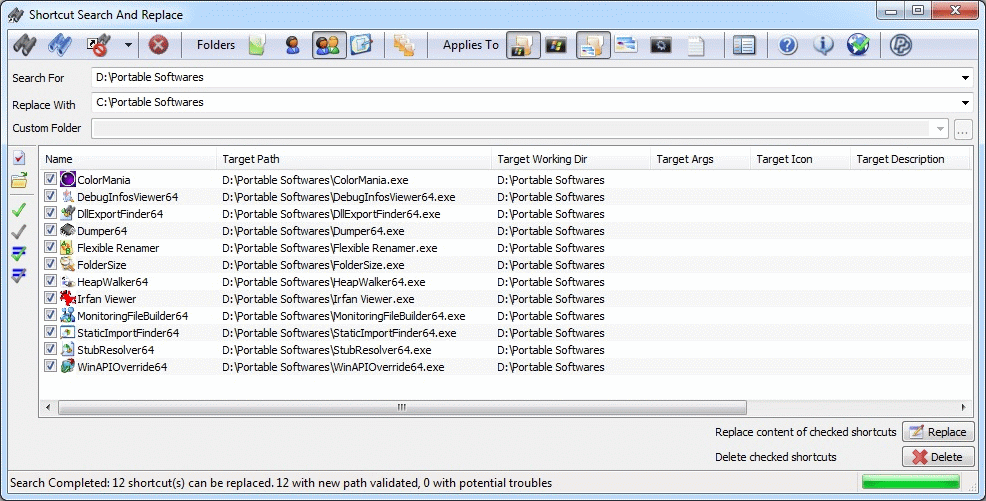
Shortcuts Search And Replace is a tool for system shortcuts that lets you:
- Search for shortcuts target path, working directory, arguments, and icon location content.
- Replace multiple shortcuts' target paths, working directories, arguments, and icon location content (useful if you move portable applications paths or directory).
- Search for dead links to resolve or delete them (multiple resolves/delete in one click).
Alternatively, Shortcuts Search and Replace Portable is also available.
| Category: | |
| Runs on: | Win98 / WinME / WinNT / Win2K / WinXP / Vista / Win7 / Win8 / Win10 |
| Writes settings to: | Application folder |
| Stealth: ? | Yes |
| Unicode support: | Yes |
| License: | GNU GPLv2 |
| How to extract: | Download the ZIP package and extract to a folder of your choice. Launch ShortcutsSearchAndReplace.exe or ShortcutsSearchAndReplace64.exe. |
| What's new? |
|

File Joiner v2.4.4
billon on 7 Jul 2020 Change history
- 440KB (uncompressed)
- Released on 11 Feb 2020
- Suggested by Igor
File Joiner easily combines multiple files into one. Often files are separated into parts using a program like HJSplit (ending with .001, .002, .003, etc.) so they can be sent over email, newsgroup or other hosting service that limits file size.
| Category: | |
| Runs on: | Win2K / WinXP / Vista / Win7 / Win8 / Win10 |
| Writes settings to: | Application folder |
| Stealth: ? | Yes |
| Unicode support: | Yes |
| License: | CC BY-ND 3.0 |
| How to extract: |
Download the RAR package and extract (using 7-Zip or other compatible program) to a folder of your choice. Launch fjoiner.exe. Optionally, delete unnecessary language files. |
| What's new? |
|
| Latest comments |
dis4
on 2010-01-08 07:37
Very easy handy fast useful program. I need it. Thank you.
webfork
on 2010-01-15 02:05
Although it probably won't help with files split using HJSplit, for cutting up and reassemble files, I recommend the outstanding FreeCommander (http://www.portablefreeware.com/index.php?id=291.
steve
on 2010-12-01 08:19
Add comment
3›
though it looks like a nice little tool (52 kB is very slick. good!) you guys are aware thatr 7zip can join .001 .002 .003 ... files together without any hussle? |

ITN Converter v1.94
billon on 10 Mar 2020 Change history
- 2MB (uncompressed)
- Released on 10 Mar 2020
- Suggested by Courtieux
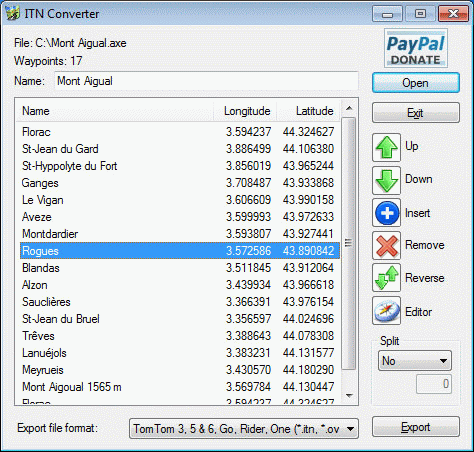
ITN Converter (a.k.a. ITNConv) is both a route converter supporting many formats as well as a simple and efficient route planner.
The converter supports route file formats (roadbook) from many GPS or mapping software such as TomTom, Navigon, Garmin, MapPoint or MapSource. This converter can easily transfer a route created by a GPS or mapping software to another so you can download routes from many web sites and convert it to the file format supported by your hardware.
| Category: | |
| Runs on: | Win7 / Win8 / Win10 |
| Writes settings to: | Application folder |
| Dependencies: | Internet Explorer 10 |
| License: | Freeware |
| How to extract: | Download the "Travel version" ZIP package and extract to a folder of your choice. Launch ITNConv.exe. |
| What's new? |
See: http://benichou-software.com/index.php?option=com_content&view=article&id=27&Itemid=17&lang=en |
| Latest comments |
John
on 2010-10-01 18:44
Norton removed this as a security risk
Hi
on 2010-10-01 21:45
@John It says it right there where you write your comment, above the textbox: "If your *** scanner has detected a virus in the application, please email the author directly or post to the forum. ....."
Happy.Camper2
on 2017-03-11 21:59
Add comment
3›
Hi All, |

MiTeC Icon Explorer v5.2.0
Midas on 11 May 2020 Change history
- 4MB (uncompressed)
- Released on 12 Mar 2019
- Suggested by I am Baas
MiTeC Icon Explorer allows to browse, search, extract and manage standalone icons, icon libraries and executable that contains icons as resources. It searches specified path with directory recursion and examines any file if it contains any icon and then extract it. Icons can be saved as icons, icon libraries, individual icon images or bitmaps.
| Category: | |
| Runs on: | WinXP / Vista / Win7 / Win8 / Win10 |
| Writes settings to: | Registry, if "Persistent layout" preference is checked (it'll be saved to 'HKCU\Software\MiTeC\Icon Explorer'). |
| Stealth: ? | Yes. But only if no layout saved; otherwise see "Writes settings to" above. |
| Unicode support: | Yes |
| License: | Free for personal use |
| How to extract: | Download the ZIP package and extract to a folder of your choice. Launch IconExplorer.exe. |
| Similar/alternative apps: | IconsExtract |
| What's new? |
|
| Latest comments |
Midas
on 2018-02-07 10:59
Care to share your launchers, CornHolio? Please post at the forum thread...
CornHolio the Gringo
on 2018-02-09 18:36
I have now tested MiTeC_Icon_Explorer_5.0.1, and can confirm that
CornHolio the Gringo
on 2018-03-13 06:32
See all
8›
I have to point out that if "persistent layout" in preferences are set, then |

JumpListsView v1.16
billon on 26 Mar 2018 Change history
- 149KB (uncompressed)
- Released on 25 Mar 2018
- Suggested by Checker
JumpListsView displays the information stored by the 'Jump Lists' feature available when you right-click on something in the task bar in Windows 7 - 10. For every record found, data available includes the filename that the user opened, the date/time, the ID of the application, the size/time/attributes of the file on the time that the file was opened etc.
You can also export the Jump Lists records to csv/tab-delimited/xml/html file.
| Category: | |
| Runs on: | Win7 / Win8 / Win10 |
| Writes settings to: | Application folder |
| Stealth: ? | Yes |
| Unicode support: | Yes |
| License: | Freeware |
| How to extract: | Download the ZIP package and extract to a folder of your choice. Launch JumpListsView.exe. |
| What's new? |
|

SigcheckGUI v1.1.3
smaragdus on 21 Feb 2017 Change history
- 1MB (uncompressed)
- Released on 4 Nov 2016
- Suggested by Checker
SigcheckGUI is a system and security analysis tool for understanding files and processes. The program shows a variety of file data including signing source, 32/64-bit status, version, publisher, and more. Security options include VirusTotal analysis and file hashing (MD5, SHA1, and SHA256). The program can even run on all active processes.
The program can export results to spreadsheet (CSV) or copied to the clipboard.
SigcheckGUI is a front-end for Sigcheck from Sysinternals.
| Category: | |
| Runs on: | Vista / Win7 / Win8 / Win10 |
| Writes settings to: | Application folder |
| Stealth: ? | No. HKCU\Software\Sysinternals\SigCheck: "EulaAccepted" |
| License: | Freeware for non-commercial use (obtain commercial license) |
| How to extract: |
Optionally:
|
| Similar/alternative apps: | RapidCRC Unicode |
| What's new? |
Added:
|
| Latest comments |
__philippe
on 2016-09-03 21:33
The underlying SysInternals's SIGCHECK utility (CLI) is updated to V2.54 (as of 29-AUG-2016) with the following change :
Midas
on 2024-01-12 07:31
See all
12›
FYI, Sysinternals SigCheck dependency is currently v2.90 released 2022-07-19. |

Folders Popup v5.2.3
billon on 9 May 2016 Change history
- 3MB (uncompressed)
- Released on 8 May 2016
- Suggested by JnLlnd
Folders Popup lets you move easily between frequently used folders within save dialogs. Click the middle mouse button to access your favorite folders within the menu.
A 64-bit version is included in the download.
| Category: | |
| Runs on: | WinXP / Vista / Win7 / Win8 / Win10 |
| Writes settings to: | Application folder |
| Stealth: ? | Yes |
| Unicode support: | Yes. Unicode support in 64-bit version. |
| License: | Zlib license |
| How to extract: |
Download the ZIP package and extract to a folder of your choice. Depending on your operating system, launch one of the following:
|
| What's new? |
|
| Latest comments |
JnLlnd
on 2016-05-09 21:01
Folders Popup v5.2.3 is a maintenance release. Users looking for new features are invited to check the Folders Popup's next generation app: Quick Access Popup (http://www.portablefreeware.com/index.php?id=2765). Still free and still portable.
Infobot
on 2016-05-24 20:53
Every time I open a folder with Folders Popup then the explorer bar open too. Could you delete that function please? I mean the explorer bar on the left of the screen in a folder, I do not use it since the beginning op windows xp, it takes space.
Infobot
on 2018-01-16 01:58
See all
31›
I use windows xp sp 3 and I use the classic view and classic windows mapping in the folder options. |

Search and Delete v2.6.1.0
Checker on 27 Feb 2016 Change history
- 5MB (uncompressed)
- Released on 20 Feb 2016
- Suggested by tactictoe
Search and Delete is a lightweight tool scanning one or more folders from various sources for files. The program can then rename the file extension, delete the file, or replace it with one you provide. Search results can be saved and loaded later.
Great for system administrators who need to update multiple specific files.
| Category: | |
| Runs on: | Vista / Win7 / Win8 / Win10 |
| Writes settings to: | None. Preferences are saved inside the application folder on user demand: SearchAndDelete.ini. |
| Stealth: ? | Yes |
| Path portability: | Automatic relative path (eg. ..\..\personal\work.doc) |
| License: | Freeware |
| How to extract: | Download the ZIP package and extract to a folder of your choice. Launch SearchAndDelete.exe. |
| Latest comments |
smaragdus
on 2016-02-26 22:01
The program name is stylized as "Search and delete"- "delete" is not capitalized.
I am Baas
on 2016-02-27 09:51
Add comment
2›
@smaragdus |