

BleachBit v4.6.0
rbon on 6 Nov 2023 Change history
- 16MB (uncompressed)
- Released on 5 Nov 2023
- Suggested by guinness
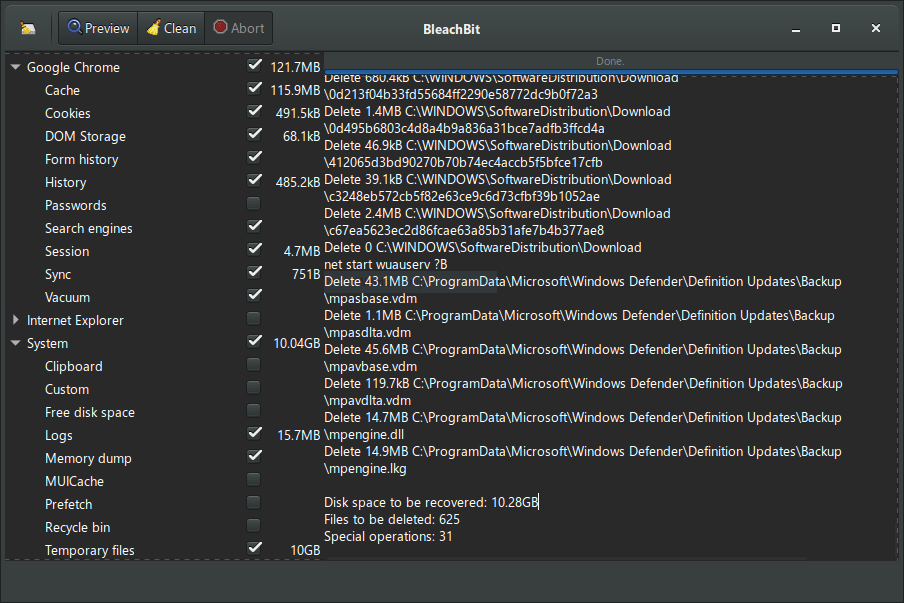
BleachBit quickly frees disk space, removes hidden junk and safeguards your privacy. You can erase cache, Internet history, cookies (including the much-maligned "evercookie"), DOM storage, unused localizations and temporary files of 70 applications including Firefox, Internet Explorer, Flash, Google Chrome, Opera, Safari, Adobe Reader, APT and more. Additional applications can be added with the community authored winapp2.ini cleaner list in the Preferences - General tab (requires restart).
Includes wipe function to protect privacy, support for many languages, and available for Linux and Mac OS X.
| Category: | |
| Runs on: | Vista / Win7 / Win8 / Win10 / Win11 |
| Writes settings to: | Application folder |
| Dependencies: | Administrator rights |
| License: | GNU GPLv3 |
| How to extract: | Download the "portable" ZIP package and extract to a folder of your choice. Launch bleachbit.exe. |
| Similar/alternative apps: | CCleaner |
| What's new? |
See: https://www.bleachbit.org/news |
20 comments on BleachBit


zorro
2020-03-15 15:13
BleachBit seems to leave traces in the last version (3.2) - after first run I found the folder ".dbus-keyrings" in the root of C:\USERS\user\
Would be interesting to put this folder to the user defined cleaners - Bleachbit then would clean up itsself...
v3.2.0
I am Baas
2016-01-01 15:31
v1.10
Midas
2013-10-17 14:51
"BleachBit Is the October [2013] Project of the Month [at SourceForge.net].
BleachBit is a nice tool for freeing disk space on Windows and Linux systems. BleachBit also helps to preserve privacy; in this time of privacy concerns, it might be something you want to check out. It's even caught the attention of computer security Technologist Bruce Schneier in The Guardian (http://www.theguardian.com/world/2013/sep/05/nsa-how-to-remain-secure-surveillance) and in Wired (http://www.wired.com/opinion/2013/10/149481/). Read interview with Andrew Ziem on our blog (http://sourceforge.net/blog/october-2013-potm/)."
v0.9.6
webfork
2012-03-16 01:56
Used this to clean up more than 6 gigs of information off a reasonably old Win 7 x64 machine recently. I don't know that it had a major impact on speed, but certainly like that extra 6 gigs. Love this program.
V0.9.2
Andrew Ziem
2011-01-05 19:29
Faust, Daniel Feenberg is (according to LinkedIn) currently an IT Director at the National Bureau of Economic Research, so Wikipedia's label of "economist" appears to be a mistake. Also reference the 2006 NIST Special Publication.... so which computer scientists claim any data can be recovered after one pass? Also, I thought it was generous to write that each cleaner probably finds things the other doesn't and that CCleaner is older and more mature. CCleaner is not a bad tool and certainly does many things well.
YShayahu53
2011-01-02 14:37
Download is not working:
http://bleachbit.sourceforge.net/download/file?file=BleachBit-0.8.5-portable.zip

Bleachbit portable downloaded using the link (from the home page) does not contain the msvcr100.dll file - without it the program cannot be run.
The author describes a bug "msvcr100.dll was not found", but for the installation, not for the portable version (https://www.bleachbit.org/news/bleachbit-460#known_issues).
Older versions located on SourceForge contain this file - you can copy it from there.
v4.6.0