

AIMP v5.03.2392
Andrew Lee on 25 Jun 2022 Change history
- 13MB (uncompressed)
- Released on 22 Jun 2022
- Suggested by eldad
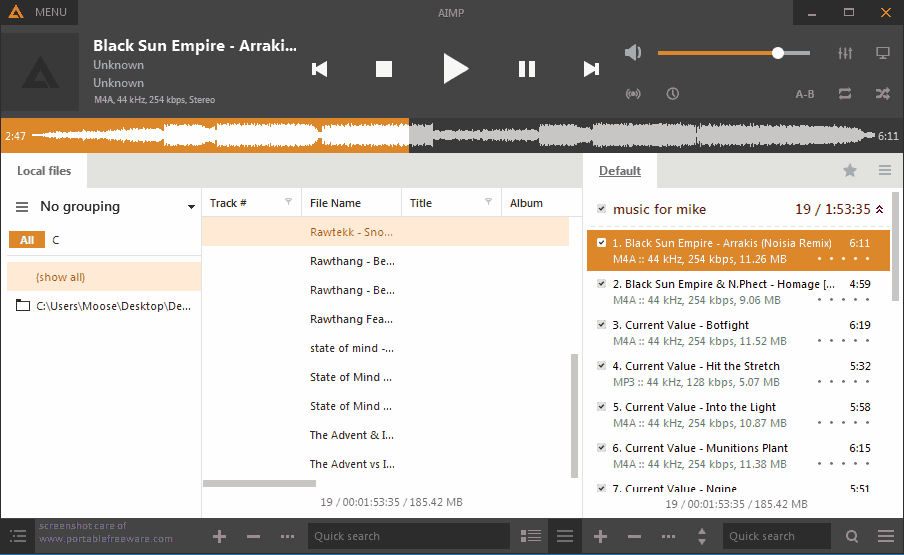
AIMP is a skinnable audio player similar to Winamp that supports most audio formats, as well as Internet radio. Features include a music library, mini-player, colorizing of individual skins, visualizations, smart playlists, global hotkeys, and plug-ins capability. Filters/effects include equalizer, reverb, normalization, voice remover, speed changes and more.
AIMP includes a built-in audio converter, APE image splitter, tag editor, alarm clock, and auto-shutdown.
Alternatively, AIMP Portable is stealth and automatically adjusts paths.
| Category: | |
| Runs on: | Vista / Win7 / Win8 / Win10 |
| Writes settings to: | Application folder |
| Stealth: ? | No. Writes to registry if run with admin rights. See this forum thread. |
| Unicode support: | Yes |
| Path portability: | Automatic relative path (eg. ..\..\personal\work.doc) |
| License: | Freeware |
| How to extract: |
|
| Similar/alternative apps: | Winyl, Xion |
| What's new? | See: https://www.aimp.ru/?do=changelog |
46 comments on AIMP


MIKLO
2016-06-03 11:47
smaragdus REALLY? wow I didn't realize that looks over substance was so important to sum people. Now I'm curious what others think about the "looks" of V4 or if most just don't care like me, please don't misunderstand I understand how you feel its just foreign 2me is all I'm saying. Of course if V3 suits your needs then by all means that's the correct version for you to use, no matter what I or others think. Enjoy.:)
MIKLO
v4.02 Build 1721
smaragdus
2016-02-25 02:01
@Enternal
Ugliness always make me shiver and nauseate of disgust. By the way I am not using AIMP version 3 default skin Pandemic but Siveria. I have added several Winamp add-ons which work with AIMP 3 (for example for playing LA files) but I am not sure that they will be compatible with version 4 (most likely they will be). I have no reason whatsoever to update to version 4 since AIMP 3 can play all the formats I need. More- there is a moral problem- for me updating to version 4 means succumbing to the ubiquitous modern evil of flat ugliness while choosing not to update means that I refuse to accept the developer's detestable taste. If I saw AIMP version 4 for the first time I would have never bothered to test it.
v4.00 Build 1697
joby_toss
2016-02-24 14:52
Just FYI, I've updated my AIMP PA.c version and everything was OK (old skin wasn't changed).
v4.00 Build 1697
Enternal
2016-02-24 01:52
@smaragdu
The new version is simply just a new version that has a new default skin and a major number increment. So you could just update your AIMP3 in place and simply select the old skin (Pandemic). It works perfectly.
For fresh installs, I simply copied over "Pandemic AIO Simple.acs3" from AIMP3 skins folder into AIMP4 skins folder and it works perfectly fine.
There is no need to "stand" or "vomit" over a new default skin when you can easily change it back while keeping AIMP internals up-to-date.
BTW, there are even variations of the old skin here:
http://www.aimp.ru/index.php?do=catalog&id=0&page=0&sort=0&V=0&F1=0&F2=0&F3=0&F4=0&keywords=Pandemic
v4.00 Build 1697
smaragdus
2016-02-23 14:11
@freakazoid
Good news, thanks. However I don't feel like upgrading because version 3 offers all I need while version 4 looks terrible,I can't stand the "modern" flat style.
v4.00 Build 1697
smaragdus
2016-02-22 23:27
I am using AIMP version 3. The screen-shot of version 4 makes me vomit. Can anyone tell whether the old GUI can be restored?
v4.00 Build 1697

Is it possible to disable the ID3v1 tagging? It's messing up the grouping of my mp3 files when i import them in the library.
v4.11 Build 1841