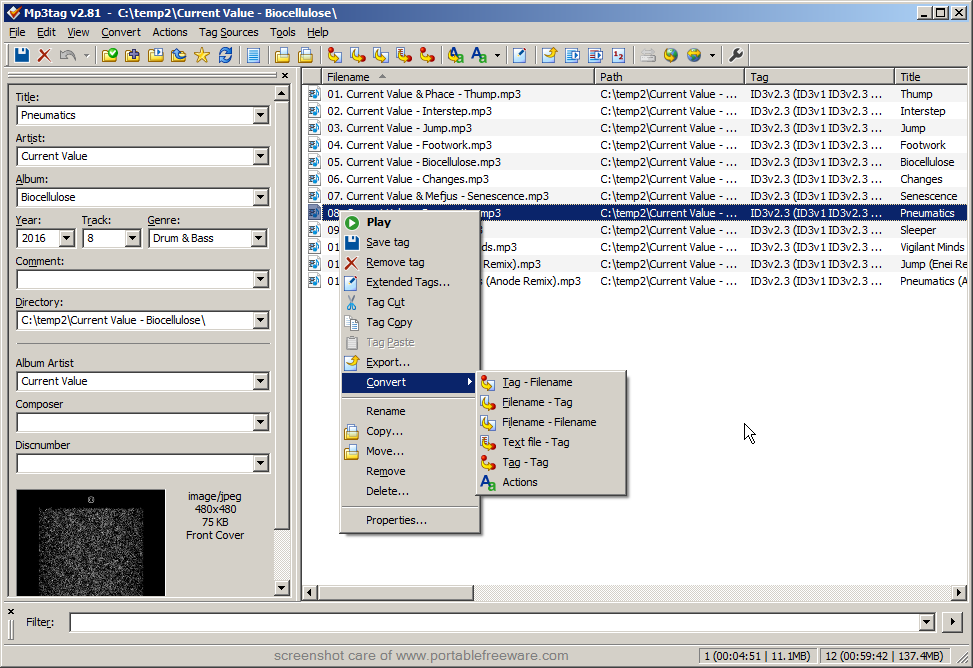
Mp3tag is an editor for metadata of common audio formats (eg. ID3, Vorbis Comments, APE, MP4, TAK Loseless). It can rename files based on the tag information, replace characters or words from tags and filenames, import/export tag information, create playlists and more. The program supports online freedb database lookups for selected files, allowing you to automatically gather proper tag information for select files or CDs.
| Category: | |
| System Requirements: | WinXP / Vista / Win7 / Win8 |
| Writes settings to: | Application folder |
| Dependencies: | GDIPLUS.DLL |
| Stealth: ? | Yes |
| Unicode support: | Yes |
| License: | Freeware |
| How to extract: |
|
| What's new? |
|
The same happened to me. Been using this app for long time and didn't knew it was portable. Now it's even better
i copied this from my program/ directory to my family computer a few months ago, i didn't know it was portable either, i just assumed. hehe, anyways nice to know, because it's cool!
Don't be too surprised, guys, it looks like portability was added with this version :)
Great program, but not TRULY portable. Even after following the suggested 'installation' method, numerous registry values are written under the following key: HKEY_CURRENT_USER\Software\Florian Heidenreich when you run the program for the first time. The values appear to deal with window metrics (size, position, etc.). Even if you delete the key, it re-appears next time you run the program. Not a big deal...but not true STEALTH mode either.
Punjabo, I can confirm that only docking toolbar/panel information are written to the registry. For my position on docking toolbar/panel, please see http://www.portablefreeware.com/forums/viewtopic.php?t=1232, so I am of the opinion that this doesn't affect portability. However, I will update the 'Write settings to" field to reflect this information.
Sorry Andrew, but I just have to disagree with your take on dockable toolbars, pointed by the link above.
While they might result in al the mentioned application misbehaviour, I find that when properly used by the developer they are a god send that allows the user to set the application interface exactly the way s/he wants by moving the toolbars around, resizing them, even hiding.
About the latest version of MP3Tag: I have been using this for a long time as a portable app, just by copying the install folder then uninstalling... I am glad this version makes it easy for user to make it truly portable. However, this version setup exe provides only German help files; I can't read German and I couldn't find the English help -- if it even exists...
So I removed the help folder; but the program started complaining that it needed to be reinstalled, because it couldn't find help files.
After some research, I found that it checks for the file 'helpmap.idx' in the help folder -- if you leave that file in place, you can remove the rest.
Still, an excelent portable app!
Midas, I have found the same problem. As we aren't using the installer the default language isn't being installed as English so the help files will default to German. There are three ways to get around this:
1. Continue to use the old method of installing and copying the install folder (or just the help folder to your portable installation).
2. Go to http://www.mp3tag.de/en/help/ and view the English help files online.
3. Go to http://www.mp3tag.de/en/help/ and save the page as index.html and overwrite the German one in the help folder of the portable version. Unfortunately, this means the English version of Help will open when you select Contents from the Mp32tag Help menu, but if you select any other Help subjects from within the program the German pages will still open (obviously, because the German versions are still in the help folder). Of course you could save every English help page on the website by clicking every link but it seems easier to do a proper install and copy the help files.
Just a thought. May be Andrew might like to make the English help folder available as separate download from here then we wouldn't need to go through the install/uninstall process.
Version 2.42 just released (2008-10-25).
I've been searching for a long time for a freeware alternative for Tag n' Rename without result... But now there's this... WOW! Great renaming features. Ease of use. Displayed info. Real killer app! Thanks!
It didn't show [NSIS].nsi file in extracted, I've searched all my PC, but found nothing on *.nsi weird a, hope it will work anyway. Good Luck everybody!
Version 2.43 just released (2009-03-28).
Mp3Tag can be made portable using the amazing app called JauntePE. The registry is redirected to a folder in my pendrive and all configuration is always with me. I will use my "jaunterized" version until the mp3tag devolpers team release a portable official launcher
I was going to skip this as FLACs were not on the list, but it turns out that it does do them. Here is the list of supported formats:
aac,ape,flac,m4a,m4b,mp3,mp4,mpc,ofr,ofs,ogg,spx,tak,tta,wma,wv
Something is wrong here. Commodo's Defender finds all kinds of dubious changes to programs like Secunia's PSI and PC Tools Spyware Doctor during MP2tag installation. This had better have a good explanation !
Note that this program's author has posted instructions for deploying MP3tag to a portable device here: http://forums.mp3tag.de/lofiversion/index.php/t976.html
GREAT!!!!
it does its job, believe me!
i hate tags, and MP3Tag happen to erase all of them in matter of seconds.. Killer App!
I am confused with this author, so many fix, fix here and fix there, some of them are old bugs, just see version history (i.e, v2.44b Beta). Other side, this app is excellent, yeah sorry if I wrong.
This program sort of saved my life! I lost like half of my music (about 1 GB worth of music) but I'm not so worried cause all I have to do is go back and see which songs I have to download for a certain artist using the freedb tool and that way I can keep track of my songs and manage my music well.
Can somebody please tell me how can I extract the .exe file without installing it
Nik - go look at the line which says "Download the installer and extract to a folder". The word extract should be blue, that's a clickable link. Follow it and it will tell you how to extract using a program called Universal Extractor
The prog writes settings to programdata/mp3tag with this:
How to extract: Download the installer and extract to a folder of your choice. Delete $PLUGINSDIR and [NSIS].nsi. Create a blank file in the same folder called mp3tag.cfg. Launch Mp3tag.exe.
Stealth [?]: Yes
i got an error when extracting the setup file
worked doing it as the above link suggests, in the forum, but is it stealth?
I could not extract it with UniversalExtractor:
"It appears to be a(n) Nullsoft installer, which is supported, but extraction failed."
Same here, MarK.
Same here, @MarK & @Harry. :(
Mark: instructions updated -- thanks.
Yes, that works. Thanks.
I prefer Tagscanner, which has the same features but a better looking interface
http://www.portablefreeware.com/index.php?id=1427
Really like it. If the name of the music service you got the file from has plastered their name all over the song title, album name, etc. this is a great way to get it off. Select all the files, make changes, and then save. Sweet.
The link in the web page is for the old version: mp3tagv247bsetup.exe
im a huge fan of this app., are there programs that offer more features? yes.. but this does the job and quick.
I love that it's free, portable, and stealth.
I have had dealings with the creator, and he was absolutely opened to suggestions. Unlike other creators who take offense.
This is a quality app., and def. a keeper!
V2.48
When the instructions say to delete $PLUGINSDIR does that include all the files contained in it or do I move the files contained in that directory to the parent directory?
V2.48
@Tim: Delete the whole directory.
V2.48
how to create a blank file?
V2.48
n00bguy: just use a text editor (like notepad) and save a file with nothing in it.
V2.48
Absolutely awesome app! Very flexible, very powerful and just the tag editor I've been looking for.
V2.48
I've used this program in the past and it's OK, but lately I use AudioShell (works within Windows Properties) and Foobar2000's built-in tag editor. Foobar recently added image support in the recent betas, so the next full version will be OK for this type of thing. The recent beta is actually pretty stable in most ways.
V2.49
i just realized i haven't been adding "GDIPLUS.dll" and have had no problems?
anyone know why it's listed as a requirement?
V2.49
Mostly your system already have :-)
V2.49
Great freeware. Works fine and it's a very decent alternative to MP3 Tag & Rename.
V2.49
doesn't extract with 7zip anymore
V2.49
@rokth
Extracted just fine with 7-Zip 9.20
V2.49
Thanks for checking Baas -- added a note to the entry.
V2.49
I think u should mention apps that connect to the internet when opened. In this case, this apps connects twice ;
'Mp3tag - the universal Tag editor' from your computer wants to connect to zathras.fheidenreich.org [94.75.231.47], port 80
(allow/deny)?
V2.49
A brilliant piece of software. Also, it extracts OK with 7-zip Portable v4.65
V2.52
Great software, I changed from tagscanner a while back to this one and I wont be going back. The interface is much nicer too.
V2.52
Hmm, when extracting the last version, strangely I see in 7zip there are some files twice in same folder (EN, DE) so when you try to extract the program, it ask for overwriting. I recommend install it and then copy, Sandboxie is very good for this.
v2.53
Go to Tools > Options > Updates and untick "Check for updates on startup" to keep the program from calling home.
v2.54
I've tagged my whole collection of mp3 with mp3tag without even knowing it was portable.
Easy to use and powerful !
I like this software !