

XAMPP v8.2.12
lwc on 23 Dec 2023 Change history
- 674MB (uncompressed)
- Released on 19 Nov 2023
- Suggested by Hank7
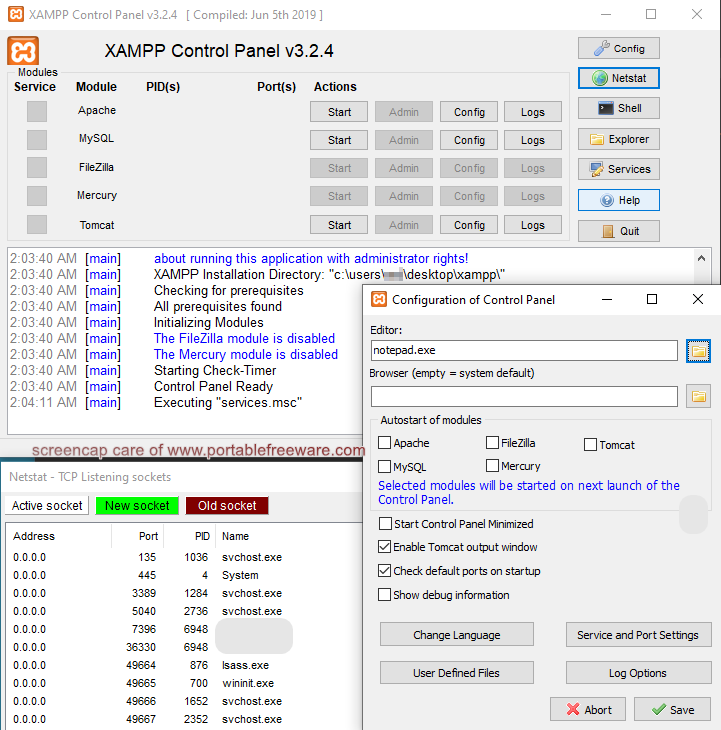
XAMPP is an integrated server package with mail, Web, FTP, and WebDAV. Named for Apache + MariaDB + Filezilla + PHP + Perl (AMPP) plus Mercury and Tomcat, the program includes a open software packages combined to power the various services, including JSP Java, OpenSSL, and more.
Also available for OSX and Linux.
Notes:
- To also add portable Python:
- Download and extract Python's NuGet package
- In XAMPP's control panel, click Config=>Apache (httpd.conf)
- Add AddHandler cgi-script .py into the end of the file (see this blog post for other info)
- Start your PY files with #!..\Python\python.exe (or wherever else you extracted the Python folder)
- To also add portable Composer:
- Download Compser's Manual Installation (i.e. portable) version
- Extract it in any folder you like
- Modify the command in the link above to the relative (or absolute) path to the main PHP file, for example (assuming you'll run composer from htdocs): @echo ..\php\php "%~dp0composer.phar" %*>composer.bat
- In order to be able to download packages, edit php\php.ini and uncomment ;extension=zip (i.e. remove the ;)
- One useful function of this program is the Wiki on a stick tool that works with XAMPP.
- XAMPP has add-on capabilities, currently only a WordPress installation (but previously also a portable MediaWiki).
| Category: | |
| Runs on: | Vista / Win7 / Win8 / Win10 / Win11 |
| Writes settings to: | Application folder |
| Stealth: ? | Yes |
| Unicode support: | Yes |
| License: | GPL |
| How to extract: |
|
| Similar/alternative apps: | Uniform Server, Abyss Webserver X1 |
| What's new? | See: https://www.apachefriends.org/blog.html |
25 comments on XAMPP


olliebean
2018-10-19 14:51
Just for clarification, is the full version portable? Because the only version labelled "portable" at the download link appears to be the lite version, without FTP or Mail.
v7.2.11
freakazoid
2012-06-02 20:22
webfork: Because it's their preferred portable build. Not everyone will need the full package. The lite / portable build should be sufficient for people building a website for testing locally and on the go.
V1.7.7
webfork
2012-06-02 02:04
freakazoid: is there an advantage to using the portable version? I couldn't find anything on the site explaining it and the default program is natively portable.
V1.7.7
freakazoid
2012-06-01 02:08
I would consider switching this entry so we list XAMP Portable instead of the full version:
http://www.apachefriends.org/en/xampp-windows.html#646
V1.7.7
mike
2011-06-03 16:08
thx for the portable
V1.7.4
Simon.T
2011-04-28 08:42
Privoxy version 3.0.12 has a bug when trying to access to http://www.apachefriends.org/en/xampp.html or to http://www.apachefriends.org/en/xampp-windows.html (CPU goes up to 100%)
V1.7.4
alex
2010-09-28 18:08
Hello
I am setting up my own server for Windows.
I tried to install Xamp-win32-1.6.6.a without success.
Problems:
Problem I:
I uninstalled XAMPP 1.6.6.ay mail can not get rid of Mercury or is that version newred MSQL.
I uninstalled because I have suggested that an earlier version of XAMPP will work better.
Does anyone know how I can get rid of those files without damaging my system?
Problem II:
When I was in the process of installation (even when you install an earlier version) I have the following messages:
"Ports 80 or 443 already in use to install Apache 2.2 service failed" i have found the solution from http://frasesparaorkut.us/ but its language not in Engilish
"The port 3306 is already used up my SQL service does not"
I've been told I have to change the mail settings to use for Mercury 85 and not port 80 (since Mercury and Apache use both port 80)
Can anyone tell me how I can do? Where I can tell the program to stop using a port and use another?
I hope someone can help me with these two problems
Thanks,
Marlake
Radiohead
2010-09-15 08:06
XAMPP is a very useful AMP tool! I started to use it several months ago for http://mp3prostore.net and am totally satisfied with it. Nothing to complain about. Everything runs like clockwork. Use it and you will not be disappointed.
nono
2010-07-22 13:28
the advantage being it can come pre-setup with a load of appsbatterie and doesnt need admin rights.

Note: The description should replace Oracle's MySQL with the community-based fork: MariaDB.
v7.3.5-1