Bulk Rename Utility

[Login]

Bulk Rename Utility V2.7.1.1   
Suggested by kwhipp - Added on 19 Mar 2007
1MB (uncompressed) - Popularity score (2153)
Website - Screenshot - Download - Comments (16) - Post comment - Permalink

 
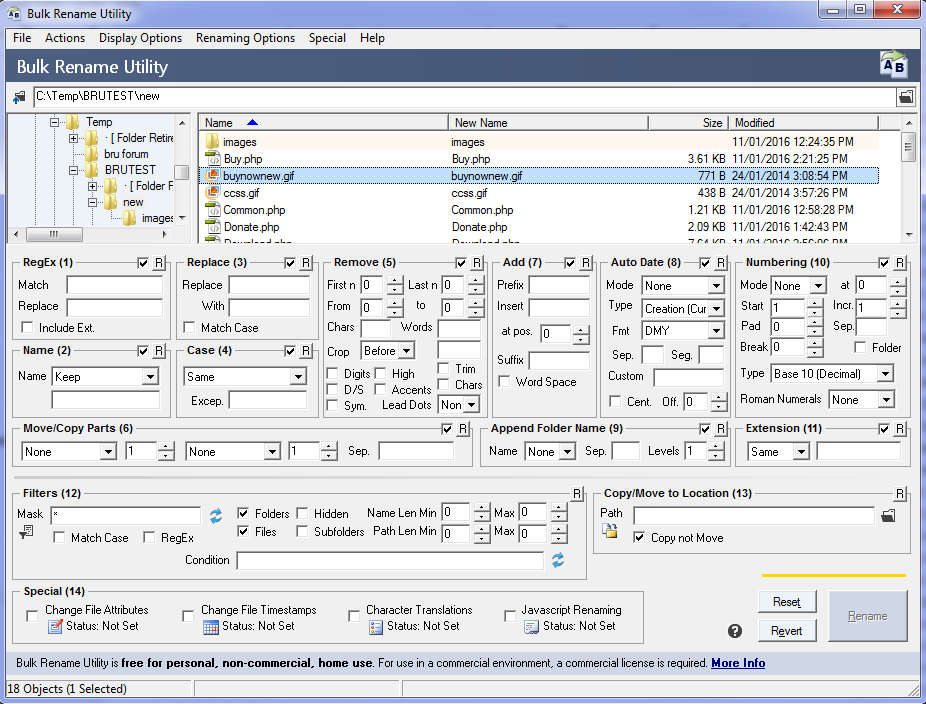
Synopsis: Bulk Rename Utility allows you to batch rename files and folders based on very flexible, configurable criteria. You can add date-stamps, replace numbers, insert strings, convert cases, add auto-numbers, process folders and subfolders etc.
Writes settings to: Application folder. Some window/column placement settings are written to the registry.
Dependencies:
How to extract: Download the "Application files only (no installer)" ZIP package and extract to a temp folder. Copy BRU\32-bit\*, BRU\All\* and BRU\NoInstall Readme.txt to a folder of your choice. Launch Bulk Rename Utility.exe.
Stealth [?]: No
Unicode support: Yes. There are two EXEs included. The EXE found under BRU\Win98ME is ANSI version, while the version found under BRU\32-bit is Unicode version.
License: Freeware
System Requirements: Win98 / WinME / WinNT / Win2K / WinXP / Vista

Posted comments:

[Anonymous] IamNOTWithStupidawesome utility, i'm using an older version so i'm sure it got more awesomer, but that i can't guarentee, just try it out for yourself.. [2006-11-20 19:36]

[Anonymous] stacomaAwesome program indeed! Highly recommended, but new users should make sure to not get scared away when they see all the options available...collect a bunch of COPIES of files to practice with for a little while and you'll do fine. [2006-11-20 21:11]

[Anonymous] rAfThat's what I was looking for when trying to rename hundreds of script filenames needed for my work. It has all of the options I need and more I'll need. [2007-03-20 05:53]

[Anonymous] BlikyOutstanding little thing. Not the easiest to handle, but the flexibility is great. [2007-03-30 21:25]

[Anonymous] linuxampI'm sure this is a good tool from all the positive comments but the UI is very intimidating. A really good UI should not require practice and should not be intimidating. It should be intuitive so that most users can just start using it.

If this were something that most people would use daily like an email client, I can see them taking the time to learn it and basically practice through experience but for something like this I think most will just look elsewhere.
 [2007-06-05 00:22]

[Anonymous] DeleThis is the best and for me not all intimidating. It's just having all on one screen. It also supports RegEx, which might be called intimidating. [2007-06-19 11:43]

[Anonymous] nVeinPerfect! I was working with a similar application to rename multiple files and decided to try BRU because it has so many more options. Not only was a I able to rename files to remove spaces and insert underscores but also rename folders and give them a personal tag at the end of each folder name. Just what I needed. Thank you VERY much! :) [2007-07-05 03:07]

[Anonymous] LocalI've been using this app for ages it's the first and best renamer I've tried and I find the interface to be easier to use than most.
What more could you want than all the settings there for you to see outright?

Even integrated into the context menu it's inobtrusive.
The best by far in my opinion
 [2007-07-08 10:33]

[Anonymous] BillIt's one of the few utilities that I use regularly and one of my top 10 time saver favorites. Not an application that I'd recommend for someone that just wants to change a couple of file names once in awhile. But there's reall not too much of a learning curve for the basics. It's got some great poweruser capabilities (especially if you use regular expressions). Only thing I've got a problem with is trying to move files (at least in the past few versions). Will check this one to see what it does. [2007-08-05 16:43]

[Anonymous] fenixproductionsRename Master is a better choice imho, but I don't know is it portable:
http://www.joejoesoft.com/vcms/108/
 [2007-08-13 03:34]

[Anonymous] WebforkUseful program but much preferred the simplicity of ReNamer http://portablefreeware.com/?id=562 [2007-11-20 15:47]

[Anonymous] OpenSource defenderThere's a linux program which has the same name (integrated in XFCE desktop). Doesn't the GPL prevent other programs to use this name ? [2008-01-16 03:22]

[Anonymous] desslokIt's not unicode compatible. The author admits that on Homepage. [2008-01-23 01:33]

[Anonymous] BruceIt appears the link this application is no longer valid :-( [2008-01-30 19:42]

[Anonymous] aCannot rename "hidden" files, I could not option to show these files. How and why would should such a program such a confusion interface miss such a trivial feature! [2008-11-15 17:54]

[Anonymous] junkythis is the best one I've ever tried [2009-06-02 06:22]


Post your comment:

All HTML tags will be removed from your comment. URLs (http, https, ftp) will be automatically detected and hyperlinked. I reserve the right to delete irrelevant, frivolous or offensive comments. For more general topics (eg. whether apps that write to the registry, leave traces on the host machine, rely on certain versions of IE etc. can be considered portable), please post to the Portable Freeware Discussion forum. If your virus scanner has detected a virus in the application, please email the author directly or post to the forum. Note that false positives (i.e. flagging a virus when there is actually none) are extremely common for virus scanners. When in doubt, try an online scanner like Online Malware Scanner or VirusTotal, which scans files using multiple anti-virus engines. It is very likely to be a false positive if only a few engines raise the red flag.

Your name: Remember me
Comment:

Turing test:


All rights reserved. Copyright © 2010 Andrew Lee (mailto: andrew at portablefreeware dot com)