Categories /
Video - Codec Identification (3)
- Newer first
- Display 510 2550100entries
-


MediaInfo v24.01 Updated
Andrew Lee on 1 Feb 2024 Change history
- 12MB (uncompressed)
- Released on 31 Jan 2024
- Suggested by remialdo
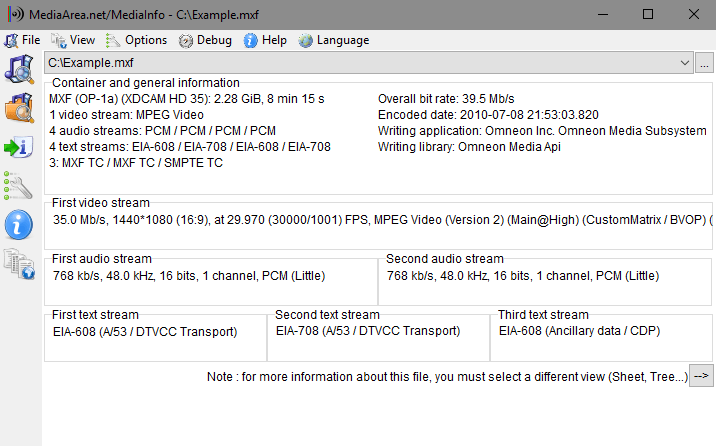
MediaInfo displays a variety of technical and metadata/tag information from audio/video files. It features many different available layouts to display the information, as well as the ability to create custom layouts. The program can be used to find missing codecs or get more information about a given media file.
| Category: | |
| Runs on: | WinXP / Vista / Win7 / Win8 / Win10 |
| Writes settings to: | Application folder |
| Stealth: ? | No |
| Unicode support: | Yes |
| License: | Freeware/Open Source |
| How to extract: |
|
| What's new? | See: https://mediaarea.net/MediaInfo/ChangeLog |
| Latest comments |
PapaiMark
on 2022-06-27 19:50
MediaInfo change log:
kiwichick888
on 2022-10-21 02:19
See all
30›
Is there any particular reason that there's no download link for 64-bit? |

InstalledCodec v1.30
Checker on 21 Mar 2014 Change history
- 66KB (uncompressed)
- Released on
- Suggested by Andrew Lee
InstalledCodec finds information on media types that can play on your system. This small utility displays the list of all Codec drivers and DirectShow filters currently installed on your system. Display Name, Type, Disabled Status, Installed/Modified Time, Description, Company Name, Filename, etc. are available for each codec. The program allows you to easily disable or enable any Codec/DirectShow component or export the list to a text/XML/HTML file.
64-bit users must select "x64 Mode" under Options.
| Category: | |
| Runs on: | Win2K / WinXP / Vista / Win7 / Win8 |
| Writes settings to: | Application folder |
| Stealth: ? | Yes |
| License: | Freeware |
| How to extract: | Download the ZIP package and extract to a folder of your choice. Launch InstalledCodec.exe. |
| What's new? |
|
| Latest comments |
Magibon
on 2011-05-21 00:36
Add comment
1›
thank you for this :) |

GSpot v2.70a
Checker on 15 Mar 2014 Change history
- 1MB (uncompressed)
- Released on
- Suggested by Andrew Lee
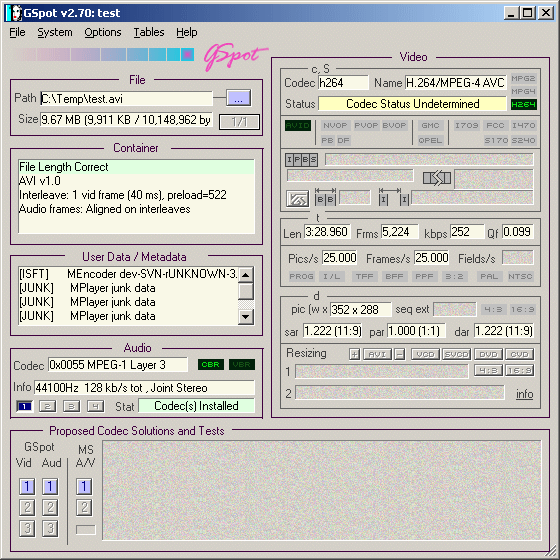
GSpot determines which audio and video codecs are required to play a file, as whether these codecs are installed on your system. Simply drag-and-drop any AVI file to the GSpot window.
Note: Has not been updated for several years, so newer codecs may not be recognized.
| Category: | |
| Runs on: | Win95 / Win98 / WinME / WinNT / Win2K / WinXP / Vista |
| Writes settings to: | Windows registry. I am accepting it as portable on the assumption that it will only be used occasionally to troubleshoot codec problems, so portable settings is that important. |
| Unicode support: | No |
| License: | Freeware |
| How to extract: | Download the ZIP package and extract to a folder of your choice. Launch the program by double-clicking on GSpot.exe. |
| Latest comments |
GBJ
on 2007-02-23 10:39
Add comment
2›
I have no idea how or why this app has the nerver to call itself portable. It writes a ton of settings to the registry. Enough said... |