
Search results (1)

[Login]

Portable Start Menu V3.1   
Suggested by USB_Kx - Updated by infimum on 11 Mar 2010
802KB (uncompressed) - Popularity score (7529)
Website - Screenshot - Download - Comments (30) - Post comment - Permalink

 
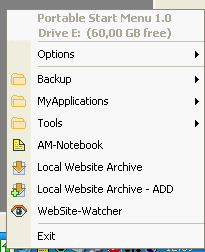
Synopsis: Portable Start Menu is a program launcher that allows you to organize your programs via a simple menu system and launch them through a tray icon. If you are running from an USB memory stick, Portable Start Menu can be configured to automatically close all launched applications when it terminates.
Writes settings to: Application folder
How to extract: Download the installer and extract to a folder of your choice. The application files are located in the {app} subfolder. Launch psmenu.exe.
Stealth [?]: Yes
Path portability: Automatic compensation for dynamic drive letter in removable storage devices
Unicode support: Yes
License: Freeware
System Requirements: Win2K / WinXP / Vista / Win7
What's new: >>
  • TrueCrypt: Mounting containers significantly improved, especially under Vista with UAC enabled
  • TrueCrypt: Custom command line parameters
  • Smaller fixes and improvements

Posted comments:

[Anonymous] WebforkA welcome addition but not quite there yet in comparison to the major program manager Pstart.

I love that it checks to see if applications have changed to help avoid viruses but the lack of drag-and-drop program addition makes adding all my portable files a tedious process. For this reason, Pstart still has a pretty strong pull, even if its submenu system requires tweaking.

Great progress, though. Wonderful to see a program of this quality to help unify the wealth of portable software out there.
 [2007-10-02 22:21]

[Anonymous] USB_Kxdrag and drop support would be nice. esp if the number of apps in your portable device increases.

lets all email the author about it.
 [2007-10-03 02:23]

[Anonymous] RobI saw that you can also enter absolute drive letters, they will automatically be changed if the drive letter changes. Look at the psmenu.xml file, all drive letters are stored as $ internally.

So for example "K:\docs\personal\work.doc" works, too.

The "Close all running apps functionality" is excellent!!!!!
 [2007-10-03 05:59]

[Anonymous] tryforsurebe careful when it asks to create an autorun file. This application deleted my old autorun.inf when i ran it. My entries, from my own autorun.inf, have not been imported to the new setup and no backup option was made available. [2007-11-13 08:23]

[Anonymous] brenden longits too tedious to add items to portable start menu. i have about 100 portable apps and there's no bulk import utility that i could find. until you can automatically add apps try open menu plus or pstart. [2007-11-13 23:41]

[Anonymous] Mosh Moshbrenden long Yea it can get tedious But I kinda enjoy setting it all up.Took me a few hours to do but I didnt think it was a Big deal.Unless your just Impatient Like alot of folks.Ha ha. [2007-12-31 15:56]

[Anonymous] USB_KxTo be fair, not everyone has as much free time as others. Not a "Ha.Ha" matter. [2008-01-07 00:44]

[Anonymous] Annieno dummy here, but I like this app!
I tried about 15 diff.usb launchers on the web and stumbled thru a few, this was effortless. Now just plug it in and go.

An exceptional program, I guess we all have our wants and desires and need to find it out there on the web. For me, this is perfect for my XP machines.
 [2008-01-16 11:11]

[Anonymous] NunoBWhat about a hotkey to show the panel? [2008-02-28 14:11]

[Anonymous] MidasFastLaucher coupled with PStart does it for me. But I'll check this one: one can't get too much easy access... [2008-02-29 03:23]

[Anonymous] HephaestusI love PSMenu it's fast and supports autorun which is very handy, it also has small icons, and supports as many folder deep as you want to go (usefull when you have 150 odd apps in your collection) v1.3 lets you set up "applications" that open folders in file explorer. Previously I had written an AutoIt script to do this for me. [2008-03-15 17:21]

[Anonymous] CrazyJohnnyThe only feature that was unique to PSM was the
"Closes running applications on USB-Sticks automatically"

It doesn't work on my applications at all... PStart and ASuite (maybe Geek.Menu) are still the best.
 [2008-04-17 09:37]

[Anonymous] MidasAignes has the obnoxious habit of encrypting their executables, which then get keys into your registry that the freewares won't really work without, and then passing annoying adds through their free stuff for the paid versions... I think I'll pass. [2008-06-05 03:55]

[Anonymous] miamIt eats about 9 Mb of RAM (for what?). The best solution I ever tried was just to create a folder with links to applications and put it in convinient place. [2008-06-24 08:39]

[Anonymous] surferI like the general appearance of PStart and the way shortcuts can be added by drag and drop. But the reason I'm not using it is because its xml configuration file gets corrupted. I know that a backup of xml configuration file should be kept but the program has proved itself to be unreliable.

For this reason I prefer Portable Start Menu, even though I don't like it's non-support of drag-n-drop or even it's appearance.
 [2008-08-13 00:20]

[Anonymous] Midas@surfer:

Fast Launcher (http://www.dvasoft.com/fast_launcher/) does Drag'n'Drop real easy and it really is portable -- altough it might not be stealth, I haven't checked...
 [2008-09-30 05:49]

[Anonymous] tonyinstaller requires admin rights.

silly, because most stuff I want to run from my USB stick because our IT department wont let me install it.
 [2008-10-08 01:15]

[Anonymous] SailorI discover a very similar program that has some of the required features (drag'n'drop, shortcut..). It only needs .NET framewor to work.
It's here http://www.ugmfree.it/SyMenuDownload.aspx
 [2009-03-02 03:35]

[Anonymous] TuanThis program is great, lots of nifty little things, such as drive letter in systray, it will attempt to close all application before eject the disk, the other good thing is it also allows you to start any windows program as well as storing bookmarks. It doesn't have the Drag-n-Drop function, but it will scan for all executables and put it in a particular folder so you can delete out the ones you don't want. As for the bookmark stuff, it is rudimentary, not a bookmark manager but it will do.
I reckon if it adds drag-n-drop and allows for import and organise of bookmarks, it will be close to perfect, at least for me anyway.
 [2009-05-25 06:33]

[Anonymous] LyndonI can't get this to run, perhaps it is not compatable with Windows 7 ?
I tried compatability mode (emulating winXP) but still no joy.
Anyone else had this issue?
 [2009-11-25 01:29]

[Anonymous] DougI'm running Windows 7 and am not having any issues. I love this launcher and am glad they came out with a new version. I can't find another launcher I like more! [2009-11-25 21:30]

[Anonymous] pippozzoI would love one single feature over any other: monitor my Portable folder for changes, so if I add/remove/modify programs, it reflect changes in the menu.
Do you know any??
 [2009-11-26 10:44]

[Anonymous] TGRWhy do portable aps need an installer, worse still WHY DO PORTABLE APS NEED ADMIN RIGHTS TO INSTALL [2009-11-26 21:28]

[Anonymous] Jbtingwhy are you guys complaining about the installer when you can just extract it? [2009-11-27 20:08]

[Anonymous] TGRtried extracting as you suggested
did not work, so I think I am reasonable is restating my original comment
Why do portable aps need an installer, worse still WHY DO PORTABLE APS NEED ADMIN RIGHTS TO INSTALL
 [2009-11-28 06:24]

[Anonymous] TedNo drag & drop? I've been dragging and dropping to this software for years. It's simple, works well, and is a better option for me than Pstart. By the way, I live on Planet Earth. [2009-11-30 08:59]

[Anonymous] MidasMy previous comments still apply. I reckon that Appetizer looks rather promising...
http://www.portablefreeware.com/?id=1488
 [2009-12-04 23:40]

[Anonymous] AiadiShame that the menu does not disappear when the mouse is moved away without clicking on any application (i.e. if you open the menu by clicking the tray icon and then deciding not to start any application due to change of mind and then moving the cursor away). It is otherwise a good one but I think that this handicap will stop me using it.... [2010-03-11 17:50]

[Anonymous] Ted TaylorWhat downloads is not a ZIP FILE but an application file. This will not allow me to install to a portable drive! Bit of a cock-up, you might think. [2010-03-12 07:32]

[Anonymous] snr-4-mewhilst i agree with the 'why do portable apps need an installer' sentiment, there's 2 issues you are mixing up.
1. portable means [supposedly] take this app. to whichever compatible computing device and
2. if that computing device is not managed, you'd probably be able to run that app too.
However, if the computing device is in a managed scenario [like a uni. network or similar], then your software doesn't itself spontaneously bypass nor override security settings put in place by the IT management.

just because you have portable apps. doesnt equate to you being omnipotent on any given managed computing device.

 [2010-06-03 02:42]


Post your comment:

All HTML tags will be removed from your comment. URLs (http, https, ftp) will be automatically detected and hyperlinked. I reserve the right to delete irrelevant, frivolous or offensive comments. For more general topics (eg. whether apps that write to the registry, leave traces on the host machine, rely on certain versions of IE etc. can be considered portable), please post to the Portable Freeware Discussion forum. If your virus scanner has detected a virus in the application, please email the author directly or post to the forum. Note that false positives (i.e. flagging a virus when there is actually none) are extremely common for virus scanners. When in doubt, try an online scanner like Online Malware Scanner or VirusTotal, which scans files using multiple anti-virus engines. It is very likely to be a false positive if only a few engines raise the red flag.

Your name: Remember me
Comment:

Turing test:


All rights reserved. Copyright © 2010 Andrew Lee (mailto: andrew at portablefreeware dot com)