It is currently Wed Jun 19, 2013 1:58 pm

All times are UTC - 8 hours


Post new topic Reply to topic  [ 234 posts ]  Go to page Previous  1, 2, 3, 4, 5, 6, 7 ... 16  Next
Author Message
 Post subject: Re: ProEject
PostPosted: Thu Jul 14, 2011 4:15 pm 
Offline
User avatar

Joined: Mon Aug 27, 2007 2:00 am
Posts: 3788
ProEject (Beta Release 3)

So I took on board your comments and added the following. I want to say a big thank you to all who have tested ProEject as its been very helpful. This is less buggy than Beta 2 (which was quite stable!)

Changelog:
Code:
- ADDED: "Thanks to Language Author" in the About GUI.
- ADDED: Exclusion ListView with a RightClick contextmenu & HotKeys to manipulate the ListView. DEL - to delete an entry, ENTER - to Edit the entry & Ctrl + N to create a new entry.
- ADDED: GUI is now shown by default by using ProEject.dat as standard instead of the user having to create the file.
- ADDED: Language ComboBox to select the Language of the GUI.
- ADDED: Multiple selection of Drives when wanting to ProEject, Clean, Close & Eject. (Thanks to spicydog)
- ADDED: Small Popup GUI to choose GUI or Eject. (Thanks to joby_toss)
- FIXED: Language file strings updated including %LANGUAGEAUTHOR%, %LANGUAGEUPDATED%, %LANGUAGEVERSION%, %COPYRIGHT%, %PROGRAMNAME% & %WEBSITE%.
- FIXED: Removed hiding of the USB drive that the GUI was running from. (Thanks to Lupo73 who confirmed users would probably want to Eject the USB drive too.)
- FIXED: Settings file check, changed to looking for a Key called "Run" instead of the Settings.ini file.
- FIXED: UI enhancments and eradicated potential bugs.
- IMPROVED: Language strings.

_________________
Added 177 Applications: Portable and an AutoIt MVP
SoftwareSpot - Portable Apps


Top
 Profile  
 
 Post subject: Re: ProEject
PostPosted: Thu Jul 14, 2011 11:31 pm 
Offline

Joined: Mon Mar 16, 2009 11:56 am
Posts: 252
My feedback after having tested ProEject (Beta Release 3)... You did an AMAZING job BTW :mrgreen:

I am running PE from G:\ (this is the USB drive) on XP Pro 32 SP3 for this test.

1) When ejecting (in GUI-mode) I get this error: "Error! Please Eject the USB drive manually." Followed by this one: "G:\ is not a USB drive so this can't be Ejected." BUT once deleted "ProEject.dat" if I choose "Eject" at the "Which option would you like to choose?" prompt G:\ gets duly ejected :shock:

2) When clicking on "Properties" (very useful BTW) the tooltip is too quick (it should either last longer OR it should stay if the mouse is kept over it OR it should just stay until closed via the X)

3) In "Settings/Additional" add a "Double-click Action" (dropdown menu) option with "Clean" "Close" "Eject" "Open" "Properties"

4) In "Settings/Additional" add a "GUI Layout" (dropdown menu) option with "Vertical" "Horizontal" "Auto" to better distribute the GUI panel... (For folks with lots of partitions/drives the standard GUI panel layout could be a hindrance)

5) Add a systray icon (when PE is run in either GUI-mode or Eject-mode) and make the GUI panel show (when PE is run in GUI-mode) only when the mouse hovers the systray icon, OR make the "Which option would you like to choose?" prompt show when PE is run in Eject-mode.

6) When PE is run in Eject-mode if I click the X at the "Which option would you like to choose?" prompt G:\ gets ejected, this should NOT happen. Eventually add a "Cancel" button next to "GUI" and "Eject"

7) Small typo in: (TIP_EJECT_1=Error! Please Eject the USB drive maNually.)

Keep up the good work :mrgreen:


Top
 Profile  
 
 Post subject: Re: ProEject
PostPosted: Thu Jul 14, 2011 11:45 pm 
Offline
User avatar

Joined: Sat Jul 31, 2010 1:19 am
Posts: 825
Location: Helsinki, Finland
ProEject requests elevation at startup. Unacceptable for me. :(

_________________
My YouTube channel | Release date of my fourth playlist: April 11, 2013


Top
 Profile  
 
 Post subject: Re: ProEject
PostPosted: Fri Jul 15, 2011 12:33 am 
Offline
User avatar

Joined: Mon Aug 27, 2007 2:00 am
Posts: 3788
Quote:
1) When ejecting (in GUI-mode) I get this error: "Error! Please Eject the USB drive manually." Followed by this one: "G:\ is not a USB drive so this can't be Ejected." BUT once deleted "ProEject.dat" if I choose "Eject" at the "Which option would you like to choose?" prompt G:\ gets duly ejected
FIXED! (Beta 3.5)

Quote:
2) When clicking on "Properties" (very useful BTW) the tooltip is too quick (it should either last longer OR it should stay if the mouse is kept over it OR it should just stay until closed via the X)
FIXED! (Beta 3.5)

Quote:
3) In "Settings/Additional" add a "Double-click Action" (dropdown menu) option with "Clean" "Close" "Eject" "Open" "Properties"
FIXED! (Beta 3.5)

Quote:
4) In "Settings/Additional" add a "GUI Layout" (dropdown menu) option with "Vertical" "Horizontal" "Auto" to better distribute the GUI panel... (For folks with lots of partitions/drives the standard GUI panel layout could be a hindrance)
FIXED! (Beta 3.5)

Quote:
5) Add a systray icon (when PE is run in either GUI-mode or Eject-mode) and make the GUI panel show (when PE is run in GUI-mode) only when the mouse hovers the systray icon, OR make the "Which option would you like to choose?" prompt show when PE is run in Eject-mode.
In GUI-Mode double-click on the titlebar, this will minimise to the TrayMenu with Options (included in the ReadMe section).
FIXED! (Beta 3.5)

Quote:
6) When PE is run in Eject-mode if I click the X at the "Which option would you like to choose?" prompt G:\ gets ejected, this should NOT happen. Eventually add a "Cancel" button next to "GUI" and "Eject"
FIXED! (Beta 3.5)

Quote:
7) Small typo in: (TIP_EJECT_1=Error! Please Eject the USB drive maNually.)
FIXED! (Beta 3.5)

_________________
Added 177 Applications: Portable and an AutoIt MVP
SoftwareSpot - Portable Apps


Last edited by guinness on Fri Jul 15, 2011 2:01 am, edited 2 times in total.

Top
 Profile  
 
 Post subject: Re: ProEject
PostPosted: Fri Jul 15, 2011 12:38 am 
Offline
User avatar

Joined: Mon Aug 27, 2007 2:00 am
Posts: 3788
Quote:
ProEject requests elevation at startup. Unacceptable for me.
Do you have UAC enabled?

_________________
Added 177 Applications: Portable and an AutoIt MVP
SoftwareSpot - Portable Apps


Top
 Profile  
 
 Post subject: Re: ProEject
PostPosted: Fri Jul 15, 2011 1:53 am 
Offline
User avatar

Joined: Mon Aug 27, 2007 2:00 am
Posts: 3788
ProEject (Beta Release 3.5)

I want to say a big thank you to spicydog & SYSTEM for this small update of ProEject, it should have fixed the UAC issue! :)

Changelog:
Code:
- ADDED: Click "X" in AutoConfirmation Mode now Exits ProEject. (Thanks to spicydog)
- ADDED: Option to choose what double-clicking on a drive will do. (Thanks to spicydog)
- ADDED: Option to show TrayIcon in ProEject Mode. (Thanks to spicydog)
- ADDED: Re-Sizing of GUI & saving the Position of the GUI. (Thanks to spicydog)
- FIXED: Eject from the same Drive in GUI Mode. (Thanks to spicydog)
- FIXED: If ShowGUI was 0 but ProEject.dat was present then the checkbox would be unchecked.
- FIXED: Time to display drive properties. (Thanks to spicydog)
- FIXED: Typo in TIP_EJECT_1 (Thanks to spicydog)

_________________
Added 177 Applications: Portable and an AutoIt MVP
SoftwareSpot - Portable Apps


Top
 Profile  
 
 Post subject: Re: ProEject
PostPosted: Fri Jul 15, 2011 4:17 am 
Offline
User avatar

Joined: Mon Mar 19, 2007 8:55 am
Posts: 908
Location: Italy
Great job guinness! :wink:

Here some notes for you:
1. in English.lng file you could sort strings..
2. why Translate.txt starts with "LANGUAGE_AUTHOR" string?
3. in GUI you could add a bottom bar with Settings and About buttons..
4. you could add the standard titlebar button to minimize the GUI, in addition to the double-click action support.. disabling the maximize button..
5. what is the purpose of Exclusions button in Additional tab?
6. you could add support to show drives as a list, eventually showing also device names in this mode (very useful in my opinion)
7. you could consider to show device properties with tooltip, to see them easily (if you prefer adding an option to disable it)
8. you could set a minimum for GUI size, with optimized ratio..
9. in Settings the About tab could be not needed given that it is already available with a own item in context menu (and maybe in future also directly in the GUI bottom bar)

_________________
Lupo PenSuite: all-in-one and completely free selection of portable programs and games.
DropIt: application to process your files with a drop.
ArcThemALL!: application to multi-archive your files and folders.


Top
 Profile  
 
 Post subject: Re: ProEject
PostPosted: Fri Jul 15, 2011 4:30 am 
Offline
User avatar

Joined: Mon Aug 27, 2007 2:00 am
Posts: 3788
Quote:
1. in English.lng file you could sort strings..
FIXED.

Quote:
2. why Translate.txt starts with "LANGUAGE_AUTHOR" string?
FIXED.
I forgot to add to the English file :oops:

Quote:
3. in GUI you could add a bottom bar with Settings and About buttons..
I don't really want to clutter the GUI, but if more suggest this then I can consider it. :)

Quote:
4. you could add the standard titlebar button to minimize the GUI, in addition to the double-click action support.. disabling the maximize button..
OK, but I will probably keep the maximum active, because I'm not a fan of GUI's that don't size and keep the maximum ghosted.

Quote:
5. what is the purpose of Exclusions button in Additional tab?
For ease really.

Quote:
6. you could add support to show drives as a list, eventually showing also device names in this mode (very useful in my opinion)
OK, nice idea I might make this an option too.

Quote:
7. you could consider to show device properties with tooltip, to see them easily (if you prefer adding an option to disable it)
OK, thanks.

Quote:
8. you could set a minimum for GUI size, with optimized ratio..
Oh you mean WM_GETMINMAXINFO! I didn't add this because of time but I will probably add it in Beta 4.

Quote:
9. in Settings the About tab could be not needed given that it is already available with a own item in context menu (and maybe in future also directly in the GUI bottom bar)
I added this for those that will never use the GUI :)

Thanks Lupo! Some new features to look at adding over the weekend for Beta 4 :mrgreen: (coming sometime next week.)

_________________
Added 177 Applications: Portable and an AutoIt MVP
SoftwareSpot - Portable Apps


Top
 Profile  
 
 Post subject: Re: ProEject
PostPosted: Fri Jul 15, 2011 4:40 am 
Offline
User avatar

Joined: Sat Jul 31, 2010 1:19 am
Posts: 825
Location: Helsinki, Finland
guinness wrote:
ProEject (Beta Release 3.5)

I want to say a big thank you to spicydog & SYSTEM for this small update of ProEject, it should have fixed the UAC issue! :)


It hasn't. :( (To be honest, I thought ProEject requests elevation by design.)

guinness wrote:
Do you have UAC enabled?


Yes. I have set it to the maximum setting ("Always notify me when...") and I use an admin account.

The reason I can't accept elevation requests is that I use school computers a lot and I very rarely have admin rights on them. On the other hand, on my own computer I don't need ProEject at all.

_________________
My YouTube channel | Release date of my fourth playlist: April 11, 2013


Top
 Profile  
 
 Post subject: Re: ProEject
PostPosted: Fri Jul 15, 2011 4:44 am 
Offline
User avatar

Joined: Mon Aug 27, 2007 2:00 am
Posts: 3788
Quote:
On the other hand, on my own computer I don't need ProEject at all.
OK!

Quote:
To be honest, I thought ProEject requests elevation by design
I didn't know what your settings were before, what happens if you use Beta 3.7 without accessing the registry?
Edit: Uploaded Beta 3.7

_________________
Added 177 Applications: Portable and an AutoIt MVP
SoftwareSpot - Portable Apps


Top
 Profile  
 
 Post subject: Re: ProEject
PostPosted: Fri Jul 15, 2011 4:59 am 
Offline
User avatar

Joined: Sat Jul 31, 2010 1:19 am
Posts: 825
Location: Helsinki, Finland
guinness wrote:
Quote:
On the other hand, on my own computer I don't need ProEject at all.
OK!

Quote:
To be honest, I thought ProEject requests elevation by design
I didn't know what your settings were before, what happens if you use Beta 3.7 without accessing the registry?
Edit: Uploaded Beta 3.7


Beta 3.7 with default settings does not request elevation! Thank you! :)

_________________
My YouTube channel | Release date of my fourth playlist: April 11, 2013


Top
 Profile  
 
 Post subject: Re: ProEject
PostPosted: Fri Jul 15, 2011 5:04 am 
Offline
User avatar

Joined: Mon Aug 27, 2007 2:00 am
Posts: 3788
It worked :shock: I mean it worked 8) All I did was removed the #RequireAdmin & used #AutoIt3Wrapper_res_requestedExecutionLevel=asInvoker in case AutoIt coders are interested.
_________________
Added 177 Applications: Portable and an AutoIt MVP
SoftwareSpot - Portable Apps


Top
 Profile  
 
 Post subject: Re: ProEject
PostPosted: Fri Jul 15, 2011 7:27 am 
Offline
User avatar

Joined: Mon Aug 27, 2007 2:00 am
Posts: 3788
ProEject (Beta Release 4)

Changelog:
Code:
- ADDED: C:\ drive to the GUI so the Open & Properties items can be shown. (Thanks to spicydog.)
- ADDED: Minimum GUI width & height. (Thanks to Lupo73)
- ADDED: Minimize using the traditional minimize button, therefore removed double-clicking due to conflict with maximize. (Thanks to Lupo73)
- FIXED: UAC elevation. (Thanks to SYSTEM.)

_________________
Added 177 Applications: Portable and an AutoIt MVP
SoftwareSpot - Portable Apps


Last edited by guinness on Tue Jul 19, 2011 2:56 pm, edited 1 time in total.

Top
 Profile  
 
 Post subject: Re: ProEject
PostPosted: Sat Jul 16, 2011 2:48 am 
Offline
User avatar

Joined: Mon Mar 19, 2007 8:55 am
Posts: 908
Location: Italy
Some other notes:
1. in "TIP_4" I think you have missed %PROEJECTDRIVE% at the beginning..
2. I think %PROEJECTDRIVE% may contains also :\ characters in it, to simplify translations (and eventually extract only drive letter if you need it in the code)
3. could you set a smaller minimum size? than you could use current one as default ratio, but allow to reduce the GUI to 3 columns and 2 rows of icons..
4. you could add support to Eject (physically open) CD/DVD drives..
5. is it correct that Clean and Close actions work also with CD/DVD drives?
6. why Exclusions is an empty tab? Edit: I saw it allows to add exclusions from right-click context menu.. you could add a text (at least if exclusions is empty) that reports to right-click to add exclusions..
7. could be interesting to add an option to show the list of keys that will be cleaned, to ask a confirmation.. in this way the user knows exactly what will be removed (I'm not a fan of cleaning apps that don't report me what they do)..
8. to avoid antivirus false positives, I think you may distribute your apps without UPX compression..

_________________
Lupo PenSuite: all-in-one and completely free selection of portable programs and games.
DropIt: application to process your files with a drop.
ArcThemALL!: application to multi-archive your files and folders.


Top
 Profile  
 
 Post subject: Re: ProEject
PostPosted: Sat Jul 16, 2011 5:50 am 
Offline
User avatar

Joined: Sat Jul 31, 2010 1:19 am
Posts: 825
Location: Helsinki, Finland
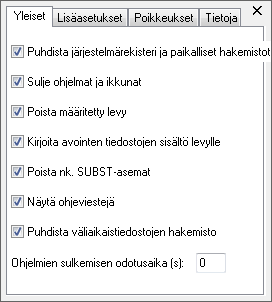
I found a visual glitch with too long translations.

Image

Here is my partial translation that triggers this problem.

guinness wrote:
Quote:
3. in GUI you could add a bottom bar with Settings and About buttons..
I don't really want to clutter the GUI, but if more suggest this then I can consider it. :)


I agree with Lupo here. Buttons would be easier to discover than a context menu.

Lupo73 wrote:
6. why Exclusions is an empty tab? Edit: I saw it allows to add exclusions from right-click context menu.. you could add a text (at least if exclusions is empty) that reports to right-click to add exclusions..


I suggest an Add button.

Lupo73 wrote:
7. could be interesting to add an option to show the list of keys that will be cleaned, to ask a confirmation.. in this way the user knows exactly what will be removed (I'm not a fan of cleaning apps that don't report me what they do)..


I find this important.

_________________
My YouTube channel | Release date of my fourth playlist: April 11, 2013


Top
 Profile  
 
Display posts from previous:  Sort by  
Post new topic Reply to topic  [ 234 posts ]  Go to page Previous  1, 2, 3, 4, 5, 6, 7 ... 16  Next

All times are UTC - 8 hours


Who is online

Users browsing this forum: No registered users and 0 guests


You cannot post new topics in this forum
You cannot reply to topics in this forum
You cannot edit your posts in this forum
You cannot delete your posts in this forum
You cannot post attachments in this forum

Search for:
Jump to:  

Protected by Anti-Spam ACP Powered by phpBB © 2000, 2002, 2005, 2007 phpBB Group