It is currently Sun May 19, 2013 2:17 am

All times are UTC - 8 hours


Post new topic Reply to topic  [ 14 posts ] 
Author Message
 Post subject: Opera 10 Turbo Preview (JPE launcher)
PostPosted: Sat Mar 28, 2009 5:10 pm 
Offline
User avatar

Joined: Sun Mar 01, 2009 5:48 pm
Posts: 440
Location: Charleston,SC.
Opera Labs
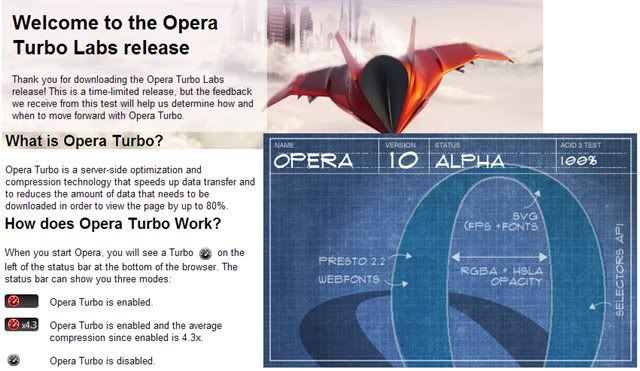
Image
Download Opera 10 Turbo preview installer
Download OperaTurbo Preview (JPE Launcher)

The whole app:files ,registry ,everything is sandboxed so any downloads will be in your .\JPE\User folders

The only problems I have had with any jpe browsers
is in trying to open a file thats on my system..say an html in my doc folder
..Without it being in the actual JPE user's folder
so in that sense you might have some trouble.


Top
 Profile  
 
 Post subject:
PostPosted: Sun Mar 29, 2009 3:24 pm 
Offline

Joined: Wed Sep 19, 2007 7:56 pm
Posts: 111
Big Thanks. I needed this.


Top
 Profile  
 
 Post subject:
PostPosted: Wed Apr 01, 2009 9:37 am 
Offline
User avatar

Joined: Sun Mar 01, 2009 5:48 pm
Posts: 440
Location: Charleston,SC.
Opera10 Turbo (JPE Launcher)-MODIFIED

I made some changes based on my own preferances
(meaning I sometimes get confused by virtual environments :) )
anyhoo,I thought I would share

Changes Made:

1) changed launcher's file structure
2) altered launch ini for easier use (but less secure)

CURRENTLY these directories WILL NOT be sandboxed

[FilesystemExclude]

1=5 user documents
2=16 user's desktop
3=%temp% user's local temp
4=C:\ Local Drive C
5=36 Windows


I suggest you Edit the "opera_jauntePE.ini"
to your own preferances. :P

These changes seemed to have cleared up the problems I mentioned in the first post.


Top
 Profile  
 
 Post subject:
PostPosted: Wed Apr 08, 2009 7:12 am 
Offline

Joined: Mon Oct 06, 2008 4:32 pm
Posts: 332
do you know if its possible to run plugins with this? I mean add a plugins folder to it somewhere and get it to use it


Top
 Profile  
 
 Post subject:
PostPosted: Wed Apr 08, 2009 1:23 pm 
Offline
User avatar

Joined: Sun Mar 01, 2009 5:48 pm
Posts: 440
Location: Charleston,SC.
It already has a folder for plugins in the app folder
(.\Program\Opera 10 Preview\program\plugins)
I thought I had included the adobe flash plugins..maybe not.

I copied the plugins folder from operaUSB into this one (flash for YouTube)
and it works.
Adobe flash plugins are the only ones I have actually used.

This is currently my favorite browser,but it does have a few minor issues
with image compression lowering image quality and some java issues/clashes.

_________________
"Defects are always more tolerable than the changes necessary to correct them"


Top
 Profile  
 
 Post subject:
PostPosted: Wed Apr 08, 2009 5:01 pm 
Offline

Joined: Mon Oct 06, 2008 4:32 pm
Posts: 332
ok thanks, didnt see the folder or didnt know where to look lol

yeah i like this now too :D especially the sandbox feature, i dont have to run firefox inside sandboxie now


Top
 Profile  
 
 Post subject:
PostPosted: Fri Apr 10, 2009 8:04 pm 
Offline

Joined: Wed Jul 18, 2007 5:45 pm
Posts: 597
Hey Napiophelios,

Much appreciated for the Opera 10 Turbo Preview JPE build (that's a mouthful!).

Just checked the Opera blog and Turbo is now included in the newest development builds:
http://my.opera.com/desktopteam/blog/20 ... urbo-in-10

Maybe update your JPE launcher to accomodate it?

Or do we simply just replace the Opera files in the "Program\Opera 10 Preview" folder?

_________________
is it stealth? ;)


Top
 Profile  
 
 Post subject:
PostPosted: Sun Apr 12, 2009 1:15 am 
Offline
User avatar

Joined: Sun Mar 01, 2009 5:48 pm
Posts: 440
Location: Charleston,SC.
I havent tried it but so long as its still called "opera.exe" the launcher should work fine,I would replace everything tho,not just the exe.

If you have to change the program folders' names o/r structure, make sure its reflected in the launcher's ini cofiguration

I read the change log and it seems they heard my complaints,I cant wait to try it out.Thanks for the heads up :)

_________________
"Defects are always more tolerable than the changes necessary to correct them"


Top
 Profile  
 
 Post subject:
PostPosted: Wed Apr 15, 2009 11:38 am 
Offline

Joined: Wed Jul 18, 2007 5:45 pm
Posts: 597
Okay I've tested this out with the newest Opera dev build and it works fine!

Tip: If you want to avoid a lot of directory redirection, download the Classic installer and use single profile configuration. This will save the app files in the Opera program directory, instead of the AppData / Local AppData folders.

I've found that the new dev build eats a lot of memory (around 200 MB) with only a few tabs open... hopefully they optimize this!

_________________
is it stealth? ;)


Top
 Profile  
 
 Post subject:
PostPosted: Wed Apr 15, 2009 2:51 pm 
Offline
User avatar

Joined: Sun Mar 01, 2009 5:48 pm
Posts: 440
Location: Charleston,SC.
Freakazoid if you have your profile in the same directory as the program files,
make sure you change the ini config to sandbox the exe directory,
otherwise I dont think you will have the security of the sandbox.
I may already have it like this,
I cant remember but I would check to make sure if you,re
relying on it for security reasons.
I know its not redirected in the modified version.

I never knew about the classic install/single profile option.
Seems like it would be practically portable on its own like that. :)

_________________
"Defects are always more tolerable than the changes necessary to correct them"


Top
 Profile  
 
 Post subject:
PostPosted: Wed Apr 15, 2009 10:46 pm 
Offline

Joined: Wed Jul 18, 2007 5:45 pm
Posts: 597
I am using the modified version, so I guess it isn't redirected and sandboxed.

I was wondering why the Opera profile was saving in the "Program" folder instead of in the "Sandbox" folder!

What do I have to add in the .ini to change this?

I'm not well versed with JauntePE yet.
But I hope to learn!

_________________
is it stealth? ;)


Top
 Profile  
 
 Post subject:
PostPosted: Thu Apr 16, 2009 6:11 pm 
Offline
User avatar

Joined: Sun Mar 01, 2009 5:48 pm
Posts: 440
Location: Charleston,SC.
freakazoid wrote:
I am using the modified version, so I guess it isn't redirected and sandboxed.

I was wondering why the Opera profile was saving in the "Program" folder instead of in the "Sandbox" folder!

What do I have to add in the .ini to change this?

I'm not well versed with JauntePE yet.
But I hope to learn!


you will have to modify the [filesystemInclude] list I believe

Let me tinker with it a bit I'll let you know.
The only thing the modified version should be sandboxing is appdata folders.

if your profile is in the program folder you will have to include it in redirection and make sure its not listed in the [FilesystemExcludes]

_________________
"Defects are always more tolerable than the changes necessary to correct them"


Top
 Profile  
 
 Post subject: Re: Opera 10 Turbo Preview (JPE launcher)
PostPosted: Tue Feb 09, 2010 8:47 pm 
Offline

Joined: Wed Jul 18, 2007 5:45 pm
Posts: 597
Bump for Napiophelios!
Can you check out your launcher for Opera profile installs in the same directory as program files?

Too lazy to look into JauntePE right now! :p

_________________
is it stealth? ;)


Top
 Profile  
 
 Post subject: Re: Opera 10 Turbo Preview (JPE launcher)
PostPosted: Tue Feb 09, 2010 10:52 pm 
Offline
User avatar

Joined: Sun Mar 01, 2009 5:48 pm
Posts: 440
Location: Charleston,SC.
The JPE launcher has nothing to do with where your profile is located.

Open Opera and paste this and go :)
Code:
opera:config#URL%20Filter%20File


check the "Show All" box and possible reload the page.

You can choose where to store your profile anywhere you want along with lots of other stuff!

the JPE launcher in the first post redirects all of the filesystem if I remember correctly
so it wont matter where you put it in the "virtual environment"
it will be redirected.

So long as Opera isnt your default browser only one little reg entry is made so its safe to open.
Make a copy of your profile where ever you want it to be and then select that place with the editor.

Check your messagebox Freakazoid :)

_________________
"Defects are always more tolerable than the changes necessary to correct them"


Top
 Profile  
 
Display posts from previous:  Sort by  
Post new topic Reply to topic  [ 14 posts ] 

All times are UTC - 8 hours


Who is online

Users browsing this forum: No registered users and 1 guest


You cannot post new topics in this forum
You cannot reply to topics in this forum
You cannot edit your posts in this forum
You cannot delete your posts in this forum
You cannot post attachments in this forum

Search for:
Jump to:  

Protected by Anti-Spam ACP Powered by phpBB © 2000, 2002, 2005, 2007 phpBB Group