Search results (12)
- Newer first
- Display 510 2550100entries
-

Portable Freeware Discussion
Portable Freeware Submission
Suggestions/Discussions

Winamp Lite v5.666 Build 3516
webfork on 29 Jul 2019 Change history
- 12MB (uncompressed)
- Released on 12 Dec 2013
- Suggested by Andrew Lee
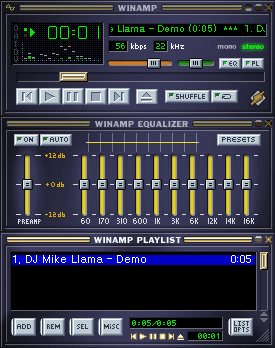
Winamp is an customizable media player considered the grand-daddy of MP3 players. The program plays most common formats, and includes an equalizer, replay gain, and hotkeys. Includes strong support for thousands of different skins and plug-ins.
| Category: | |
| Runs on: | Win2K / WinXP / Vista / Win7 / Win8 / Win10 |
| Writes settings to: | Application folder |
| Stealth: ? | No. Creates one folder and file to %APPDATA%\Microsoft\Crypto\RSA\. For full registry changes, read this. |
| Unicode support: | Yes |
| License: | Freeware |
| How to extract: |
|
| Similar/alternative apps: | AIMP, foobar2000, XMPlay |
| What's new? |
See: http://forums.winamp.com/showthread.php?t=373755 |
| Latest comments |
Midas
on 2013-11-21 14:30
The Ars Technica article posted by smaragdus above is great reading. Thanks. I was once an eager user of the free Winamp, so I have signed the petition...
Gregx
on 2018-10-28 14:48
See all
56›
For Winamp fans and folks I personally recommend - http://www.mywinamp.com |

Hoekey v1.22
webfork on 22 Dec 2015 Change history
- 51KB (uncompressed)
- Released on 9 Nov 2015
- Suggested by nevemark
HoeKey lets you assign most keys on your keyboard to various different actions. You can use it to run programs, control window actions, create and run aliases, hide/unhide windows, or even use it as a portable launcher.
Configuration is done in a text file access by Edit Config.
| Category: | |
| Runs on: | WinXP / Vista / Win7 / Win8 / Win10 |
| Writes settings to: | Application folder |
| Stealth: ? | Yes |
| Path portability: | Requires manual entry of relative path (eg. ..\..\personal\work.doc) |
| License: | Freeware |
| How to extract: |
|
| Similar/alternative apps: | Clavier+, X-HotkeyP, Slickrun, TyperTask, HotKeyz |
| What's new? |
|
| Latest comments |
BGM
on 2015-11-02 15:54
Oh - forgot - with HoeKey you also get a little panel that lists all of the hotkeys you assigned. That's really handy.
webb
on 2015-11-03 04:01
See all
4›
It's now at version 2.0 |

Qmmp v1.6.6 Updated
Andrew Lee on 22 Mar 2024 Change history
- 41MB (uncompressed)
- Released on 9 Mar 2024
- Suggested by I am Baas
Qmmp (Qt-based MultiMedia Player) is a feature-rich player with support for most popular audio formats, global hot-keys, and various included sound enhancements. The program uses the familiar 3-window structure with spectrum analyzer, a 10-band equalizer, and playlist similar to Winamp.
The program includes tremendous skin support, including thousands from Winamp and the XMMS project.
Supports format conversion, visualization, lyrics, cover art, CUE sheets, tray control, CDDB and ReplayGain support, removable device detection and more. Also supported is a variety of plugins for stereo correction, crossfade, stereo-to-mono, etc.
Cross-platform (FreeBSD, Linux) and available in 26 world languages. A PortableApps version is also available.
| Category: | |
| Runs on: | WinXP / Vista / Win7 / Win8 / Win10 |
| Writes settings to: | Application folder |
| Stealth: ? | Yes |
| Unicode support: | Yes |
| License: | GNU GPLv2 |
| How to extract: |
Optionally, you may delete unnecessary language files from translations sub-folder. |
| Similar/alternative apps: | 1by1, AIMP, foobar2000, Spider Player Pro, Xion |
| What's new? |
|
| Latest comments |
shnbwmn
on 2016-07-24 13:02
Nice little player. The website has a page with plugins, but it's slightly misleading. The "Qmmp Plugin Pack" download directs to the player itself, and the others require building from source/installed dependencies.
MIKLO
on 2017-01-15 17:15
Add comment
3›
@Realist, I believe the more we have the better they will all get or they go away, after all competition makes the world go round. I would agree if all are the exact same then it is a waste, but coders usually try and add something more useful that the last version doesn't have. Just my thoughts. :) |

1by1 v2.08 Updated
Ennovy on 10 Mar 2024 Change history
- 224KB (uncompressed)
- Released on 9 Mar 2024
- Suggested by Andrew Lee
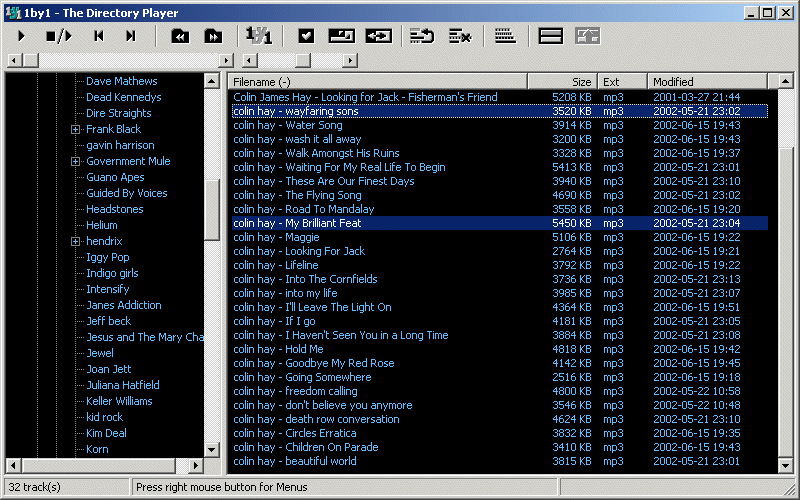
1by1 is a lightweight and low-resource usage audio player that plays directories or whole drives, with optional playlist/favorites support. The program remembers last track and position, supports gapless playback or crossfading between tracks, audio enhancer and Winamp 2.x input plugin support. Manage your collection from within the program including folder compare, delete, rename while playing, move and more.
Supports most popular formats including MP3, OGG, MP4, CDs and more.
| Category: | |
| Runs on: | Win2K / WinXP / Vista / Win7 / Win8 / Win10 / Win11 / Wine |
| Writes settings to: | Application folder |
| Stealth: ? | Yes |
| Unicode support: | Yes |
| Path portability: | Requires manual entry of relative path (eg. ..\..\personal\work.doc) |
| License: | Freeware |
| How to extract: | Download the self-extracting EXE and extract to a folder of your choice. Launch 1by1.exe. |
| Similar/alternative apps: | foobar2000 |
| What's new? | See: https://mpesch3.de/1by1.html#dwn |
| Latest comments |
freakazoid
on 2021-03-17 16:37
To reply to my previous comment, v1.98 just so happens to have a download size of 198kb :)
shuunen
on 2021-11-16 13:16
See all
42›
version 2 is out, 199kb setup file, unzip & enjoy a great portable minimal player <3 |

Audacious Portable v4.3.1
JohnTHaller on 5 Jun 2023 Change history
- 136MB (uncompressed)
- Released on 1 Jun 2023
- Suggested by JohnTHaller
Audacious is an open source audio player. A descendant of XMMS, Audacious plays your music how you want it, without stealing away your computer’s resources from other tasks. Drag and drop folders and individual song files, search for artists and albums in your entire music library, or create and edit your own custom playlists. Listen to CD’s or stream music from the Internet. Tweak the sound with the graphical equalizer or change the dynamic range with audio effects. Enjoy the modern Qt-themed interface or change things up with Winamp Classic skins. Use the plugins included with Audacious to fetch lyrics for your music, display a VU meter, and more.
| Category: | |
| Runs on: | Win7 / Win8 / Win10 / Win11 |
| Writes settings to: | Application folder |
| Stealth: ? | Yes |
| Unicode support: | Yes |
| Path portability: | Automatic relative path (eg. ..\..\personal\work.doc) |
| License: | MIT |
| How to extract: | Download the self-extracting EXE to a folder of your choice. Launch AudaciousPortable.exe. |

AIMP v5.03.2392
Andrew Lee on 25 Jun 2022 Change history
- 13MB (uncompressed)
- Released on 22 Jun 2022
- Suggested by eldad
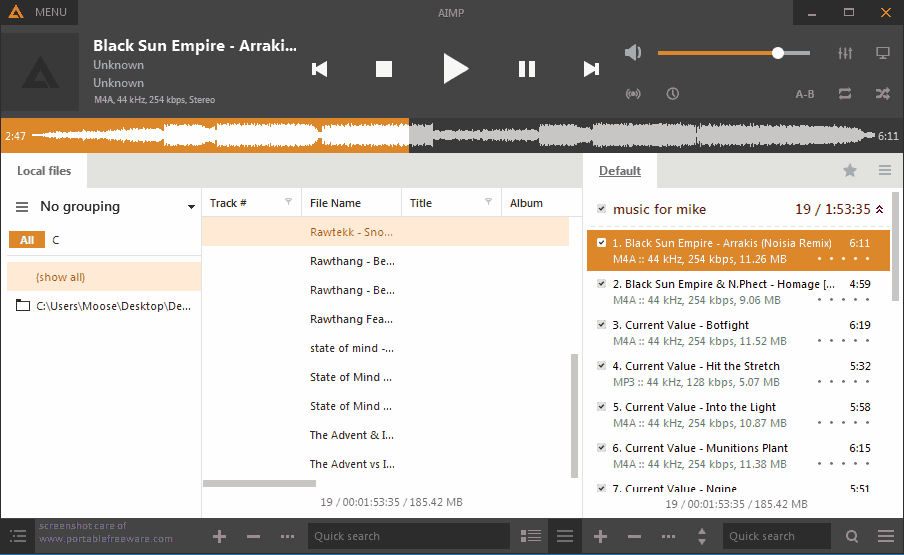
AIMP is a skinnable audio player similar to Winamp that supports most audio formats, as well as Internet radio. Features include a music library, mini-player, colorizing of individual skins, visualizations, smart playlists, global hotkeys, and plug-ins capability. Filters/effects include equalizer, reverb, normalization, voice remover, speed changes and more.
AIMP includes a built-in audio converter, APE image splitter, tag editor, alarm clock, and auto-shutdown.
Alternatively, AIMP Portable is stealth and automatically adjusts paths.
| Category: | |
| Runs on: | Vista / Win7 / Win8 / Win10 |
| Writes settings to: | Application folder |
| Stealth: ? | No. Writes to registry if run with admin rights. See this forum thread. |
| Unicode support: | Yes |
| Path portability: | Automatic relative path (eg. ..\..\personal\work.doc) |
| License: | Freeware |
| How to extract: |
|
| Similar/alternative apps: | Winyl, Xion |
| What's new? | See: https://www.aimp.ru/?do=changelog |
| Latest comments |
MIKLO
on 2016-06-03 11:47
smaragdus REALLY? wow I didn't realize that looks over substance was so important to sum people. Now I'm curious what others think about the "looks" of V4 or if most just don't care like me, please don't misunderstand I understand how you feel its just foreign 2me is all I'm saying. Of course if V3 suits your needs then by all means that's the correct version for you to use, no matter what I or others think. Enjoy.:)
Peter202
on 2016-11-06 10:52
See all
46›
Is it possible to disable the ID3v1 tagging? It's messing up the grouping of my mp3 files when i import them in the library. |

MPH v1.1.5
billon on 11 Jun 2018 Change history
- 2MB (uncompressed)
- Released on 8 Mar 2018
- Suggested by Checker
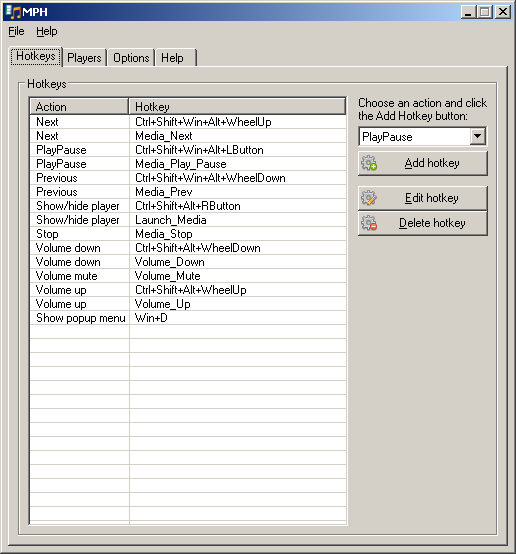
MPH (Media Player Hotkeys) allows you to control many popular media players from one set of global hotkeys. Since different players all have different shortcuts, MPH only requires you remember one set of controls. Includes support for lesser-used and "media" buttons on your keyboard and allows a variety of functions including Play, Pause, PlayPause, Stop, Next, Previous, Volume Up, Volume Down, Volume Mute and Show Popup Menu.
These applications are fully or partially supported: 1by1, AIMP, AIMP3, AIMP4, ALPlayer, ALSong, Billy, CoolPlayer, Foobar2000 WA, foobar2000, KMPlayer, Light Alloy, Media Player Classic, MPC-BE, MPC-HC, Pandora Desktop App, PotPlayer, Quintessential Media Player, Screamer Radio, STP, Spider Player, Spotify, Trout, VLC, Winamp and Windows Media Player.
| Category: | |
| Runs on: | WinXP / Vista / Win7 / Win8 / Win10 |
| Writes settings to: | Application folder |
| Stealth: ? | Yes |
| License: | Freeware |
| How to extract: | Download the ZIP package and extract to a folder of your choice. Launch MPH.exe. |
| What's new? |
|
| Latest comments |
Ganamyde
on 2013-06-07 11:27
skwire, you are too quick releasing your apps, its better you thoroughly test them first.
Napiophelios
on 2013-06-07 21:58
Seems to work fine on WinXPSP2
webfork
on 2013-12-26 21:09
See all
4›
Got a new keyboard for my system the other day and once again this program came through for me to make the pause/play button work with VLC and Foobar. Win. |

M3U Dropper v0.741
billon on 14 Oct 2016 Change history
- 532KB (uncompressed)
- Released on 6 Oct 2012
- Suggested by flector
M3U Dropper creates, imports, and organizes playlist files that take selections from an audio/video collection and put them in an order of your choice. This is useful for example in creating a mix of songs or videos with a specific mood or purpose. As the name suggests, the program creates M3U files which are used in most software players (Winamp, Foobar, Songbird, etc.) and many hardware players (including the iPod). Can also output to and import from other playlist formats including M3U8, PLS, and WPL.
Although other programs can generate playlist files, M3U Dropper uses a more portable method of relative pathways.
| Category: | |
| Runs on: | WinNT / Win2K / WinXP / Vista / Win7 / Win8 / Win10 |
| Writes settings to: | Application folder |
| Stealth: ? | Yes |
| Unicode support: | Yes |
| License: | LGPL v3 |
| How to extract: | Download the ZIP package and extract to a folder of your choice. Launch M3U Dropper.exe. |
| What's new? |
|
| Latest comments |
kadircanersahin
on 2016-04-27 08:37
See all
7›
not supported non-english characters in files ingilizcemi sikeyim |

HotKeyz Portable v2.8.3.0
webfork on 5 Sep 2016 Change history
- 3MB (uncompressed)
- Released on
- Suggested by Andrew Lee
HotKeyz allows you to define system hotkeys like "WIN+F" for a wide variety of actions from executing applications to a long list of system actions. By default, it features settings for minimizing, maximizing, restoring, or closing the active window. You can launch your e-mail window to compose a new email, control WinAmp-compatible players without opening the main window, or paste pre-defined text, special characters, or the current date and time.
System functions include opening and closing your CD or DVD ROM drive, power off, shutdown, logoff or rebooting. Start your screen saver, hide/unhide your desktop, taskbar, and more.
Note: Website offline, linking to archive.org and softpedia for download.
| Category: | |
| Runs on: | Win95 / Win98 / WinME / WinNT / Win2K / WinXP / Vista / Win7 |
| Writes settings to: | Application folder |
| Stealth: ? | Yes |
| Unicode support: | No |
| License: | Freeware |
| How to extract: | Download the ZIP package and extract to a folder of your choice. Launch HotKeyz.exe. |
| What's new? |
|
| Latest comments |
Silver
on 2010-01-26 15:04
Don't like mess with programming much then use HotKeyz as it's much easier than AutoHotKey but if you want more powerful ways of handling not only shortcuts, but also the Windows themselves and a bunch of other things, use AutoHotkey.
Jorge
on 2010-03-22 15:07
I tried downloading this and it claims that to be installed as administrator.
smaragdus
on 2015-11-08 19:34
See all
14›
It is a shame that HotKeyz has been discontinued without being made open-source. I still like it very much and still use it every day- it is very easy to configure. HotKeyz still works fine on Windows 8. |

College Alarm Clock v1.06
webfork on 28 Mar 2020 Change history
- 272KB (uncompressed)
- Released on
- Suggested by Onesimus Prime
College Alarm Clock is developed as a personal alarm clock for your PC. It features a 7-day format so that you can wake up earlier/later on different days of the week. Save/Load your weekly schedule to your hard drive. It will play any media file stored on your PC or LAN, though you must have some player installed for each media file you wish to play (for example, Winamp for mp3s or CDs, Real Player for .RMs).
| Category: | |
| Runs on: | Win95 / Win98 / WinME / WinNT / Win2K / WinXP / Vista / Win7 |
| Writes settings to: | None |
| Stealth: ? | Yes |
| License: | Freeware |
| How to extract: | Download the ZIP package and extract to a folder of your choice. Launch cac106.exe. |
| Latest comments |
RobZuc
on 2010-04-13 09:37
It's almost perfect to me, it just needs a snoozing option. Without it, I have to use Tarry91' alarm clock.
webfork
on 2010-04-16 16:02
Add comment
2›
Definitely like the simplicity but it should be easier to set to the time and paste times between days. Would rather just use Sunbird or Rainlendar with the "repeat" function set to weekly. |