

Eraser v5.8.8
webfork on 16 May 2015 Change history
- 2MB (uncompressed)
- Released on
- Suggested by MISIIM
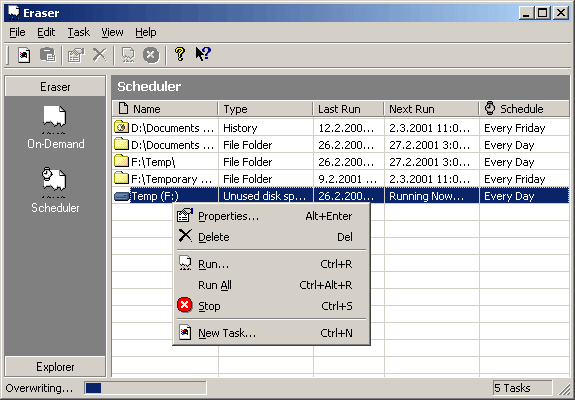
Eraser is a feature-rich tool to permanently delete sensitive data from your hard drive by overwriting it with random patterns. Includes a scheduler, free-space wipe, random number generation for better overwriting, page file wipe at shutdown, password-protected settings, and more. The program includes a wide variety of wiping mechanisms from very fast (only deleting the first and last 2kb) to extraordinarily slow (35-pass). Note that all but the most security-minded users should only need only the 1-pass "pseudo-random" wipe.
Alternatively, Eraser Portable is a PortableApps version.
Note: The 5.x branch is no longer supported. There is a 6.x branch available, but there is no official portable version for this branch and it requires the .NET framework.
| Category: | |
| Runs on: | Win95 / Win98 / WinME / WinNT / Win2K / WinXP / Vista / Win7 |
| Writes settings to: | Application folder |
| Stealth: ? | No |
| Unicode support: | No |
| License: | GPL |
| How to extract: | Download the ZIP package and extract to a folder of your choice. Launch Eraser.exe. |
| What's new? |
Do not erase sparse, compressed or encrypted files when FL2KB erasure is selected to prevent disk corruption. Fix Win32 Eraser builds to be truly Unicode builds. A few 64-bit fixes. Ensure that Eraser uses the latest runtimes packaged with the installer. This should fix hangs when using the Context menu. Fixed the About dialog after migrating to Unicode Sign all binaries packaged with the installer Allow erasing UNC paths Fixed memory exhaustion when doing a free space erase for FAT drives Migrate non-Unicode custom erasure methods to the Unicode methods so that old custom erasure methods are preserved upon upgrade Ensure that Eraser is not running when the Eraser setup is run |
16 comments on Eraser


JohnTHaller
2011-03-13 18:52
@Shyssiko - 61.5% of PCs connected to the net are running Windows XP. The vast majority of Windows XP machines do not have any version of .NET installed. Nearly all machines you encounter in public (net cafes, hotel business centers, libraries, even schools) are XP machines without .NET installed. .NET is only installed on XP when specifically selected by an administrator. It is not pushed out automatically by Windows update (unless it is already installed and it's a new version). Complete details are here: http://johnhaller.com/jh/useful_stuff/dotnet_portable_apps/ (I posted updated stats in this comment as the ones in the link are from October)
Once we have our new app directory online, we'll be adding .NET apps but only showing them for users who turn that option on with an appropriate warning about it not being fully portable and only working on XP machines with .NET manually installed on them.
V5.8.8
Shyssiko
2011-03-13 17:28
Is there a reason, in 2011 that applications requiring .NET framework are still blacklisted from being portable? The majority of computers have .Net installed and Vista/Windows 7 are prepackaged with .Net, so whats the f'ing deal?? (I'm looking at you John T. Haller).
V5.8.8
Billy Bob
2009-12-22 14:23
Shell integration works fine for me under Windows XP 32 bit with all service packs and patches.
I have never had any problems with Eraser, and yes, it deletes the files just fine and over-writes them with 'garbage', depending what over-write method you choose.
mantra
2009-12-07 10:54
DOES the shell integration work under xp sp3 32bit?

Eraser 5.8.8 Portable does not integrate to Windows shell on x64 systems (in my case- Windows 8 x64).
v5.8.8