

PDF-XChange Viewer v2.5.322.10
webfork on 19 Dec 2020 Change history
- 20MB (uncompressed)
- Released on 16 Dec 2018
- Suggested by Myles
NOTE: This program has mostly been replaced by PDF-XChange Editor (also portable), which is actively updated and contains additional features.
---
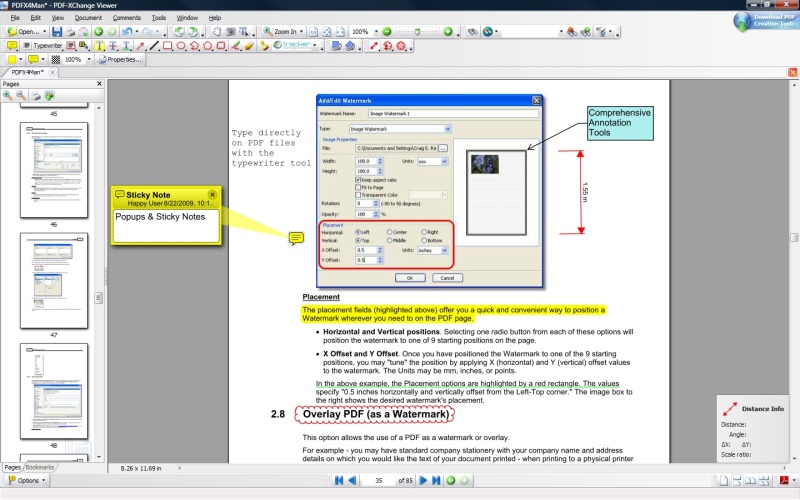
PDF-XChange Viewer is a feature-rich program that displays multiple PDF documents within a tabbed interface. Edit features include the ability to rotate documents, add comments/annotations to any PDF file, apply custom stamps from any image/PDF file/Windows clipboard, mark-up pages with text and objects, and type directly on any PDF page in "Typewriter" mode.
The program supports exporting to BMP/JPEG/TIFF/PNG etc., or extracting text from a PDF page/file. Additional features include capturing the document with the snapshot tool (copies an area to clipboard), measuring tools for distance, area and perimeter, and more. A recommended picture-to-text OCR plugin is available (thanks Bruce) as is a PDF help file.
Reported as functional on Mac/Linux under WINE. Alternatively, PDF-XChange Viewer Portable adjusts paths, with an OCR plugin and help file available from the website as separate downloads.
For 64-bit, see forum post
| Category: | |
| Runs on: | WinXP / Vista / Win7 / Win8 / Win10 / Wine |
| Writes settings to: | Application folder |
| Stealth: ? | Yes |
| Unicode support: | Yes |
| Path portability: | No |
| License: | Freeware |
| How to extract: |
|
| Similar/alternative apps: | SumatraPDF, PDF-XChange Editor, STDU Viewer |
| What's new? |
See: https://www.tracker-software.com/product/pdf-xchange-viewer/history |
113 comments on PDF-XChange Viewer


Mixture
2017-02-07 16:30
@zorro:
I updated my default PDF viewer (PDF-XChange Viewer 2.5.320) today. Tracker Software still updates the Viewer.
Why don't I use the PDF-XChange Editor? Simple, I need a PDF viewer, not an editor.
v2.5.319.0
Midas
2016-03-27 20:32
FYI, additional languages OCR downloads are available from http://www.tracker-software.com/pdf-xchange-viewer-ocr ...
v2.5.317.0
zorro
2016-03-27 19:59
Sadly, V 2.5.317 seems to be the last version of this Viewer: "The PDF-XChange Viewer has been discontinued and replaced by the PDF-XChange Editor which is now available including all the features of the Viewer and much, much more. . ."
v2.5.317.0
Checker
2016-01-13 04:08
Yes, it was my mistake. I saw the OS-icons at the left side of the programs main webside and I didn't see one for WinXP. That's why I deleted it from 'System Requirements'.
But support of WinXP is mentioned at the webside ... so I corrected the TPFC entry.
Sorry, for caused trouble ;)
v2.5.316.0
TP109
2016-01-12 21:48
OK. The PFWC entry is now updated to include XP. I was going by that info. The Tracker SW link indicates that they will continue to support XP for as long as possibe.
v2.5.316.0
Checker
2016-01-12 18:59
@TP109: PDF-XChange Viewer supports all Windows (32/64 bit) operating systems from Windows XP and later.
For limitations to product support for Windows XP see: http://www.tracker-software.com/knowledgebase/399-Limitations-to-Windows-XP-Home--Professional-Product-Support
v2.5.316.0
Ami
2015-09-21 20:41
There is an available Portable Mode of PDF-XChange Editor (Editor is a new product and it's a substitute for Viewer). It is Free too and includes fantastic FREE kit of features. Also it added support of SharePoint - this is great deal, isn't?
v2.5.315.0
Checker
2015-09-12 17:12
@Guido76: See: http://www.portablefreeware.com/index.php?id=1066
v2.5.315.0
Guido76
2015-09-12 13:17
Hi,
I make a precision about my previous post : the version of PDFtk I used, is here : www.angusj.com/pdftkb/
It's an .exe, but you can use Universal Extractor for "portabilizise".
v2.5.315.0
Guido76
2015-09-10 17:38
Hi,
i'm very sorry, webfork, but i have missed your message...
Since a long time, I use of PDKtk for insertion/deletion/extraction. It's a must, I think, but I use PDF-XChange Viewer as reader : it's a very good software also for that, in particular for editing or for adding comments on pdf.
v2.5.315.0
webfork
2015-06-10 23:42
Guido76: what freeware tools do you use for insertion/deletion/extraction?
v2.5.313.1
Guido76
2015-06-10 06:43
Unfortunately, most of the options to change the PDF document, such as inserting, deleting or page extraction are not available in the free version. Yet these functions are easy to find in a large number of free software.
v2.5.313.1
webfork
2015-02-13 00:14
Allen: They work fine but you need to have the text identified within the file. Some PDF files come WITH text but others are essentially just images. Fortunately this program has an option for a worthwhile OCR program to help pull out that text. After that, the highlight tool should work.
v2.5.312.1
Allen
2015-02-10 14:24
I can't get the "select tool" or the "Highlight tool" to work. Anyone else have this problem?
v2.5.312.0
Mixture
2014-11-22 19:37
My favorite part about the free version of PDF-XChange Viewer is the Security encryption options. Free 256-bit AES PDF protection! Otherwise, you'll have to use some awful PAID software for that security feature.
v2.5.311.0
br3
2014-10-30 23:04
Midas: thanks for the reply. A while back, I had posted this issue on the PDF-XChange Viewer forum and was told of their switching to the Editor. Of course, I tried to get the Editor to install (no Portable edition available), but that wouldn't work either.
The Editor page does say that XP is supported. I'm hoping someone using the recent version of either the Editor or the Viewer might have some suggestions.
v2.5.311.0
Midas
2014-10-30 12:19
@br3: we might have run out of luck, in view of the annoucement in the homepage:
"STOP PRESS: The PDF-XChange Editor is now available and supersedes the PDF-XChange Viewer!" :/
v2.5.311.0
br3
2014-10-29 23:10
I'm running XP Pro SP3 and I can't get this latest version to run. (The latest one that will work on my PC is 2.5.214.2.) When I double click on the exe file, there is noticeable processor activity, but nothing opens.
Anyone have any ideas what can be done to get this to work, or better yet their PDF-XChange Editor?
v2.5.311.0
Midas
2013-06-20 11:47
Tracker Software doesn't seem to provide an updated changelog -- but (as previously noted by Fred: http://www.portablefreeware.com/index.php?id=1436#comment19769) there's an history page @ http://www.tracker-software.com/PDFXV_history.html ...
v2.5.211
webfork
2013-05-28 01:38
Love how the search tool works with the current PDF, all files opened in tabs, or even an entire folder or drive, with results appearing in an easily accessible side window organized by files and instances. This is the best freeware search tool I've used so far (outside of DocFetcher as it searches more PDFs).
v2.5.210
danny rough
2013-05-15 07:30
that's great. you can also try this one, i think it's also good to use. http://www.rasteredge.com/how-to/csharp-imaging/pdf-reading/
v2.5.210
MIKLO
2013-03-05 22:09
I have used most of the free and pay4 PDF apps but I really like PDF-XChange, its not bloated like many others and it doesn't use a lot of MEM or slow down computer on all OS I have tried. The OCR in the newer version works great, and allows me to do some things with file that are badass.Of course 4me anytime I can have a great App that's also Portable I'm gonna use it. Thanks for all the hard work the owner did to makes this a very useful App for all of us.
Miklo
v2.5.210
Penz
2012-11-05 21:50
If you did OCR (using PDF-XChange Viewer) you can copy text (Ctrl+C) and then past it on the page in MS Word for ex. or Notepad...
v2.5.206
Midas
2012-06-16 20:08
Thanks for the tip, webfork. I always keep Sumatra around, just in case... ;)
V2.5.201
webfork
2012-06-16 19:29
Midas: that's correct -- that feature is disabled. Sumatra http://www.portablefreeware.com/index.php?id=1193 will save as text.
V2.5.201
Midas
2012-02-10 14:12
Love this, but can anyone confirm PDF-Xchange viewer doesn't allow saving pdf text to a file? Aduhbee would...
V2.5.201
TechSupport
2012-01-18 19:23
Thanks for the freeware!
Mark
Tech Support
V2.5.200
tikbalang
2011-12-25 12:35
.
@freakazoid
@Ruby
i deleted foxit portable the cleaned the registry with ccleaner. i then double-clicked a .PDF file, pointed to pdfxc, and checked "do this for all .pdf files" option.
thank you all.
.
V2.5.200
Bruce
2011-12-21 22:40
OCR has been added to the latest vesion for processing of scanned PDFs. Amazing! Simply download the optional "Potable ZIP (incl. OCR)" add-on. This is an outstanding PDF reader. Well done Tracker!
V2.5.200
Ruby
2011-12-21 20:30
@tikbalang: Copy/Paste the following (change drive letter and path) and name it pdfxcview.reg
Windows Registry Editor Version 5.00
[HKEY_CURRENT_USER\Software\Classes\.pdf]
@="pdffile"
[HKEY_CURRENT_USER\Software\Classes\pdffile\shell\open\command]
@="\"D:\\Portable\\Viewers\\PDFXCview.exe\" \"%1\""
V2.5.200
freakazoid
2011-12-21 20:05
@tikbalang - Just install the normal version instead of using the portable?
V2.5.200
Hydaral
2011-12-16 01:16
@ Magibon, The tip that Anonymous posted (not Chemz) was to remove the ad at the top right of the window, not remove the watermarks.
But I can't get the watermarks by adding bookmarks with v2.5.200 so it appears they have fixed it.
V2.5.200
outskirter
2011-12-15 20:36
Those of you who only want a simple PDF Viewer which is fully functional and doesn't bother you about a "full" version may want to try STDUViewer. It appeared on this site pretty recently. STDUViewer opens some other formats too, but you don't have to use them if you don't want to, and all the settings are stored in XML files in the application folder. File size is quite small, too, especially if you delete the DLLs for the formats you don't want.
V2.5.200
webfork
2011-09-19 00:23
CodeBanger: agreed. Adobe might make some amazing products, but their standard viewer is painfully large and slow.
V2.5.198
CodeBanger
2011-09-19 00:08
Wow, So sick of aduhbee and a million popups and updates and overboated slow as snot software....good job!
V2.5.198
Magibon
2011-07-19 04:12
@ 4srs
im using the latest version 2.5.197, and it still creates a watermark on the top of each page, on both the left and right side stating "Buy Pro".
Here's what the watermark looks like:
http://i54.tinypic.com/2w3dtfq.png
The trick mentioned by ChemZ no longer works. They now use a new watermark that is not seen in Resource Hacker.
a shame...
V2.5.197
ValeryP
2011-06-15 18:46
PDF-XChange is excellent and very fast! The option Search is multifunctional. I can find a word or its part even in Bookmark in many pdfs. PDF-XChange Viewer is now available in the cloud.
http://www.tracker-software.com/viewer_cloud_apps.
V2.5.195
4srs
2011-04-23 15:21
"version 2.5.0194.0 release - 25-03-2011 Starting from this build bookmarks' operations (creation, modification, deletion, etc.) are available in free mode and don't cause to add demo labels."
Sweet mercy of the spaghetti deity that is awesome news!
V2.5.195
Magibon
2011-04-16 01:04
@ Andre
I have been using this for a few weeks now, and i can promise you it's a false positive.
You should try an online scanner, they use multiple engines.
http://www.virustotal.com/file-scan/report.html?id=eb4a4ffea298bbb0cff2748fcad4e2c423c21f0b2de7c794cabbb8fbe7946ce6-1302878593
I use Kaspersky, and it scans clean:
http://i54.tinypic.com/34ypq2c.png
V2.5.195
SD
2011-04-14 07:00
can anyone guide me how to create bookmarks in foxit viewer? ive tried this with pdfxchange bt everytym it reports some internal error whenever i try saving the document. do guide me plz
V2.5.195
SJ
2011-04-08 05:22
Seems like a wonderful program, evaluating the mobile version. One small buggy thing, if someone has a solution: in fullscreen mode there is this nice "fullscreen mode toolbar" that appears on the lower right hand corner of the screen, to move forward/back and exit fullscreen that appears. I use this on my tablet PC, with touch to navigate. But the this mode toolbar then fades away after a few seconds...anyway to make it stay permanent in the full screen window? Many thanks in advance!
V2.5.194
epi4
2011-03-29 15:54
Redcom thank you so much, it works!!!. But I have a small problem, the document is more than 4000 pages, is there any way to remove them all at once
V2.5.194
redgum
2011-03-29 00:39
@epi4: To remove watermarks, load document in Acrobat (Pro only?), then View-->Navigation-->Content, then expand each page and nuke the last 2 objects on each.
V2.5.194
Marty
2011-03-22 21:14
Thanks Chemz I downloaded Xn Resource Editor from here did exactly what you said deleted the ukrainian file from png 255 and it worked perfectly and this was version 2.5 build 190. Now that little annoying ad is gone Thanks again.
V2.5.193
Sana
2011-03-04 20:16
to Abhishek Vaid:
if you choose Typewrite Tool, then write text, then you can right-click and choose Show/Hide Text Formatting Toolbar and you can see Font and Font Size.
Also after that you can pick out “Make Default” and next text will be the the same font and font size.
Who doesn't want see non-Free features and be afraid Watermarks - Edit->Preferences->Registration->Hide restricted, “PRO” functions... You will not see PRO-features.
V2.5.193
Magibon
2011-03-02 22:10
i love this PDF software, by far, the most beautiful viewing experience. I can't explain it, but the color scheme, viewing options, etc. are perfect. The options offered has everything i need. I was using Foxit and Sumatra for their light footprint and speedy launch, but PDF-XChange Viewer is just as fast/light but has more options and a pleasurable viewing experience. A no brainer, a def. keeper.
great addition :)
V2.5.193
Abhishek Vaid
2011-02-26 17:33
This is by far the best PDF viewing and reading experience I've had in years. Very smooth scrolling indeed, and quality of the pdf is rendered excellent. But I have small glitch - "how do I change the font type and font size of text I enter via Typewriter mode?". I searched for this, but couldn't find any option (in properties for typewriter tool) ... Anyways knows where it's hidden ???
AViD
V2.5.193
ChemZ
2011-02-23 23:35
Anonymous wrote: To remove the Download PDF Creation Tools ad, you can use something like XN Resource Editor (http://www.portablefreeware.com/index.php?id=407.
!! Backup PDFXCView.exe in case something goes wrong !!
Also, this is based on 2.0 Build 42.2 from the website, the program might change after updates. Use caution!
Then, open PDFXCView.exe. Go to the following "folders" in the program: PNG -> 255. There should be a little box with 1s and 0s in it labeled "Ukranian". Right click that, then choose "delete resource". Save your changes, and you should be good to go. As far as I can tell, it doesn't have any other effect on the program other than removing that particular ad from the upper right corner. (There's no invisible hyperlink where the picture was, either.)
V2.5.193
Marty
2011-02-23 15:41
Does anybody know how to remove the "Download PDF Creation Tools" advertisement from the right hand corner of the menu bar?
V2.5.193
Peng
2011-02-20 11:19
What do you think? Should I install the 64bit version of it or the portable?
V2.5.193
Rodny
2011-02-18 17:12
On the main page it says latest version is 2.5.193 - released on 15 Feb, 2011, but on the history page the last version is 2.5.192 which was released on 07 Feb, 2011.
So yeah the history is one version behind.
V2.5.193
Don
2011-02-17 15:20
@Fred Thanks I had seen that. but that always seems one version behind - or am I reading it wring.
V2.5.193
Don
2011-02-16 14:46
I can never find their version history that relates to the current version. Any ideas where it is please
Pinga
2011-02-08 17:56
Tiresome indeed. Explained here:
http://www.wilderssecurity.com/showpost.php?p=1825016&postcount=21
Weevil
2011-02-08 14:02
To save anyone else wasting time checking out whether it has changed:
@ Pinga is WRONG - The Free Version we are concerned with here does not do "add/remove pages"
perhaps he is using a crippled free trial of the Pro version which says it does so. Evil? no tiresome yes.
Pinga
2011-02-08 11:35
Anyone wanting to use PDF-XChange Viewer to edit PDFs should be cautious. The app creates ugly watermarks in the document when it is edited and saved, for example to add/remove pages. Evil!
FukenGruven
2011-02-08 01:17
Excellent Software!
I never knew or heard of this awesome application!
I was wasting a large amount of time to virtualize Adobe AcrobatXPro, which came out to over 1GB in size.
this does everything i needed in AcrobatXPro.
Superb sharing.
Thanks!
Mike
2011-02-07 15:12
Tried two different versions on XP pro SP3. Both crash back to desktop when clicking on bookmarks, same on various pdfs which work ok in Adobe. Have checked gdiplus.dll is latest version.
Olivi
2010-12-17 22:12
The best pdf viewer I've ever used. The free version is excellent and far easier to use (and faster) than Adobe Reader. In new version I looked some nice futures as changing colour, fonts or main background according to your style and mood, I can close even a single opened tab without closing the Viewer itself, ... I think about buying PRO.
Ivan
2010-12-17 22:01
Please update your description - PDF-XChange Viewer doesn't depend of GDIPLUS.DLL for ages.
letchworth
2010-12-07 17:12
Someone earlier in this thread [Tinte] mentioned the regret of not being able to create new bookmarks- True, but the free version of Foxit Reader allows the creation of Bookmarks-- I use Foxit & PDF XChange viewer as a "suite", utilizing the features of each that I need for a particular document.
rocknman
2010-10-27 06:16
This PDF software is absolutely the best!!! I upgraded to the Pro version for $34.50.
pyre_mohan
2010-09-29 02:30
TKS but download
http://c1236872.cdn.cloudfiles.rackspacecloud.com/PDFX_Vwr_Port.zip
does not work - it says server not found
gggirlgeek
2010-09-23 10:58
Love this program for viewing inside Firefox and replacing Adobe. Haven't tried creating a new document but I did an edit and it came out fine. Using it as a reader for over a year now.
Nina H
2010-09-21 18:49
If anyone is interested in a exelent German Tutorial of the PDF-XChange, you finde it here http://www.pdf-xchange.ch!
Fuck
2010-09-09 17:05
I am using this software as it allows me to add what I want on the pdf file over the Adobe Reader.
I used to use this without problems, I am not using pro features btw.
One day after clicking the save icon, I got watermarks on each doc, the top of the left and right corner.
ffs, it ruins all my notes.
I am using 2.054.
Ken H.
2010-09-03 00:46
This is exactly what I needed. It's small enough to put on a flash drive and leave plenty of room for pdf files that I need sometimes where a pdf reader isn't available on a computer I am using.
Lyn
2010-08-27 16:00
much better than Foxit without obnoxious Askbar tactics (or at least not as forecful)- running great even on an old p3 512ram (XP pro)
thanks so much anonymous for tip on getting rid of ad- worked great (deleting reg keys didn't help as they reinstalled on launch)
carbonize
2010-08-13 09:18
Loved this program so much I now use it on all my PCs instead of the Adobe reader.
maverickrohan
2010-07-15 20:44
Just found the solution ... you need to exit fullscreen mode, then Unlock Command Bars ... go back to full screen, right click on the search bar and then u get a list of command bars ... then u uncheck the one you want.
maverickrohan
2010-07-15 20:41
I love this program but I think I ran into a bug. It has a great full screen mode which you can activate by pressing the "F12" button. While in fullscreen mode I pressed "Ctrl + F" to get the search bar on top but now I'm stuck with the search bar in full screen mode on matter what I do. Does anyone know how to get rid of it?????
flector
2010-07-12 16:18
I bought the Pro version recently for $34, also because I needed to insert/delete pages (and frankly, very little else that the free version didn't have).
A great prog imho.
Harry
2010-07-12 15:40
You can hide the PRO-features in the Preferences (go to Registration).
csvdj
2010-05-28 20:44
Great app; I use it to convert .pdf books to images; then I load into an MP3 player with a suitably large screen--Instant book reader!
Carlie
2010-05-25 13:15
I have added text to a protected field (so easy to use!) however when I reopen the document via Adobe Acrobat the changes aren't visible. Any suggestions??
ehgadz
2010-04-20 00:08
oooooook.. it's right under page display settings: "forbid the change of current zoom factor..."
ehgadz
2010-04-20 00:03
anybody know how to make zoom 100% default when opening from bookmarks? it always resets to 70%...
ehgadz
2010-03-18 20:55
"Whats New: The current version is @ v.2.049 but list of changes not available yet"
Errrr Okay, lets all just update without knowing what has changed.
John
2010-02-16 02:17
>>but not the ability to delete individual pages or merge documents. I need to be able to do this and bought the Pro version.
While I certainly think the $30 they ask isn't that great if you need the advanced features, split and merge is free with PDFTK Builder: http://portableapps.com/news/2009-08-10_-_pdftk_builder_portable_3.6
PDF-X gives a warning that files merged with PDFTK contain an error, but you can save the file in PDF-X and the error goes away.
Per
2010-02-03 12:09
I tried Pdf XChange viewer and then bought the full program. The free viewer includes most necessary commenting and annotation tools - quite a lot, in fact - but not the ability to delete individual pages or merge documents. I need to be able to do this and bought the Pro version. The license key also works in the portable version, meaning I now have full control over pdf documents regardless of which PC I work on - a great advantage since my workplace PC does not have Acrobat and Pdf XChange works much better than Acrobat anyway. Its very, very well made.
alloandahoam
2010-01-05 13:47
>> Anonymous: re: hi
>> To remove the Download PDF Creation Tools ad, you can ....
Worked fine. Thanx
John
2009-12-04 16:32
Hand down best PDF viewer. Faster than Adobe, and unlike Foxit annotation tools are free to use. I've had PDF-X properly render (on screen) and print files that Adobe had problems with.
CodesAway
2009-10-28 10:57
I use this tool for all my PDF needs. It has great tools with extensive, easy to use customizations for each tool. The only feature it lacks (for my needs) is making bookmarks. For this (and only this), I use Foxit Reader ( http://www.portablefreeware.com/?id=1041 ).
The bookmarks made in Foxit Reader work great in PDF-XChange. However, in the free version (of PDF-XChange), you can't change them, but you can change them, reorder them, rename them, etc. in Foxit Reader.
a
2009-09-30 14:58
@anonymous, that works for me.
Anonymous
2009-08-07 21:56
re: hi
To remove the Download PDF Creation Tools ad, you can use something like XN Resource Editor (http://www.portablefreeware.com/index.php?id=407.
!! Backup PDFXCView.exe in case something goes wrong !!
Also, this is based on 2.0 Build 42.2 from the website, the program might change after updates. Use caution!
Then, open PDFXCView.exe. Go to the following "folders" in the program: PNG -> 255. There should be a little box with 1s and 0s in it labeled "Ukranian". Right click that, then choose "delete resource". Save your changes, and you should be good to go. As far as I can tell, it doesn't have any other effect on the program other than removing that particular ad from the upper right corner. (There's no invisible hyperlink where the picture was, either.)
lug
2009-07-18 00:12
Worked like a charm until i updated to the latest version 2.0.4.1; now whenever i run the application, it just fires up the splash screen then the main window closes immediately. Don't know what went wrong with it, though it may be a problem with some obscure parameters on my computer. I've downloaded the installer from the editor's site and tried it once more: no way! So, i switched to sumatra that hasn't all these bells and whistles but is a truely rock solid application.
that'it.
open source.
reliable.
free.
raj
2009-07-08 20:11
I love this viewer, very useful and user friendly.
bombuzal
2009-06-03 00:04
It's purpose is not to show pdf files. You can view pdf files in less complicated apps. It's for editing pdf files.
I use it when I read texts, to underline, add comments, draw something and to do everything else that I would do to a printed text when I learn from it and when I want to, for example, point out what's important and what's not. The next time I use the text, I need only a glance at it, to see what's in it.
hi
2009-05-04 00:11
Is there any way to get rid of the "Download PDF Creation Tools"-Ad in the upper right corner?
meter
2009-04-26 06:08
It's pretty easy to remove the annoying "PRO" items from menus, etc.:
1. Right click on a blank area in the toolbar area and select "Customize..."
2. Select the "Commands" tab
3. UNCHECK "Show restricted, 'PRO' commands in Commands list, Menus, and Toolbars"
dejan
2009-03-01 12:30
It is one of the best PDF-Viewer ever made.
lol
2009-02-24 19:31
Yup, using UPX on the EXEs/DLLs, you can reduce the size by a ton.
Good app.
Tinte
2009-01-03 04:53
And you can't really use a PRO-feature by accident. Since there's always a big "PRO"-marking right next to the feature. And if I'm not mistaken, you'll even get a message that'll tell you of the watermark and the PRO-feature.
Actually I even bought this tool for commercial use. We really needed a tool like that but didn't want a bloated (and expensive) Adobe Acrobat. Sure, it can't do _everything_ but it can do everything we need ;)
Neat, fast, pretty small, portable and can do almost everything you'll ever wanna do with PDFs. What more is there to hope for?
Stoufville
2008-11-06 19:27
The watermark you refer to 'Fritura:' is placed on your fiels only if you use any of the 'PRO' features' that are for licensed users only - otherwise you will not get these.
These means you can use around 70% of the features freely (such as annotations, stamps, commenting/typing in general, export to Image etc), but PRO features such as Scanning, merging etc require a license which currently costs $24.00
HTH
Jeffrey
2008-10-05 07:48
I think this is the best free portable pdf viewer. It has many mark up features and they work with Adobe Acrobat pro so I can use it for marking changes for work pdfs
Dave
2008-10-04 18:30
Out of all PDF viewers - sure its a bit large, but totally portable, lightening quick as well - best viewer on this site! Thanks!
chmaster
2008-10-03 03:42
What mark? I didn't notice any. Can anyone tell me, please?
Fritura
2008-09-17 10:20
It looks nie in the first place but when you use it leave a mark on every document.
Too bad.
phil
2008-09-12 23:36
How do you go about deleting unnecessary resources and compressing the exe file?
a
2008-09-02 12:20
I got the file size down to 4 megs by UPX compressing the executable and deleting unnecessary languages.
chmaster
2008-09-01 02:09
Now there is a portable version(4.59mb) on the site.
The other one(non-portable?) is 16.11mb.
I downloaded the portable one and executed, but it seemed to add 2 entries?
PJ
2008-08-31 16:29
One problem with this, is that it ignores the font size of windows (for menus and interface) and just uses a hardcoded tiny font.
PJ
2008-08-31 16:27
This one is faster than Foxit reader. At least for now, if they add a ton of stuff it may suffer.
Loner
2008-08-31 13:39
I like this program a lot. Have had it for a while, and surprised it says "NEW" on the description. If you download this, you'll be pleased with it.
Tinte
2008-08-31 09:57
Yes and No.
The free-version of PDF-XChange already got tons of neat features. Like adding comments, graphics, shapes and stuff. Typing in the PDF etc.
So for the most things you don't need the commercial versions. The only feature that I really miss in the free version is adding Bookmarks to a PDF-file.
a
2008-08-31 07:49
It's just like Foxit Reader it's much better than the official Adobe Reader, but typical of PDF readers, the authors are starting to add new features only to the commercial versions.
a
2008-08-31 07:47
It's a pretty darn good PDF viewer.
Post your comment
You have to login in order to post comments.
Recent Searches
Popular Titles
Recent Forum Posts
- AutoRun LWMenu
- Best of Gizmo's Freeware: The Portable Apps List
- DatePickerGO - Pop-up calendar app for quickly insert of dates
- Craft Basic [programming interpreter]
- FFmpeg on Windows
- OpenTTD - Transport Tycoon Deluxe game
- 64-bit Basic implementations
- Helping the Internet Archive
- AdwCleaner
- XP compatible software
- Media Downloader (media-downloader)
- Display Driver Uninstaller
- MKVToolNix
- HiBit Uninstaller
Recent Comments
- Pixieby freakazoid
- Pixieby Mixture
- Pixieby freakazoid
- Advanced Renamerby shiny
- Blank And Secureby OGRan
- Directory Listerby Midas
- Directory Listerby vmars316
- IrfanViewby Cornflower
- MKVcleaverby juverax
- MKVcleaverby juverax
- Apache OpenOffice Portableby DzejPy
- PrivaZerby kinki
- WinToFlash Liteby Midas
- WinToFlash Liteby juverax
- Mozilla Firefox, Portable Editionby AndTheWolf
Recent Updates
- FileZillav3.66.5 ➟ v3.67.0
- Text Editor Prov28.4.4 ➟ v29.0.0
- Opalv1.0.3 ➟ v1.3.1
- FileVoyagerv24.1.1 ➟ v24.4.13
- Subtitle Editv4.0.4 ➟ v4.0.5
- FontViewOKv8.38 ➟ v8.41
- CpuFrequenzv4.24 ➟ v4.31
- AutoHideDesktopIconsv6.11 ➟ v6.12
- OpenTTDv13.4 ➟ v14.0
- Mozilla Firefox, Portable Editionv124.0.1 ➟ v124.0.2
- foobar2000v2.1.3 ➟ v2.1.4
- QOwnNotesv24.3.5 ➟ v24.4.2
- Google Chrome Portablev123.0.6312.106 ➟ v123.0.6312.123
- ocenaudiov3.13.6 ➟ v3.13.8
- Unicodiav2.4.0 ➟ v2.4.2



Mixture is correct. Only need as viewer with able to add text comment (download utility bills and mark date paid, less paper stored).
v2.5.322.5